


Free AI Visibility Checker: See If ChatGPT and Google AI Overviews Mention Your Brand



Quick Answer: What Is a Free AI Visibility Checker?
- What it is: An AI checker usually means a tool that guesses whether a piece of text was written by AI. A free AI visibility checker does a different job. It tests whether AI assistants mention or cite your brand when people ask buyer questions.
- What the Spyro AI checker covers: The free report runs 5 buyer style prompts on ChatGPT and Google AI Overviews, then adds competitor gaps and an SEO health check of up to 20 pages. Claude, Gemini and Perplexity are paid plan engines, so they aren’t part of the free report.
- What it can’t do: A free AI visibility checker gives you a snapshot of 10 checks, not every answer an AI could give. Answers change between runs, so one miss doesn’t prove you’re invisible.
- What to do next: Read the mentions, the cited sources and the competitor gaps. Improve the pages that should answer those questions. Then run the AI checker again with the same method.
Searching for an AI checker can send you to a text detector or to a brand visibility tool, and the two have almost nothing in common. I wrote this guide for startups, SMBs, mid sized companies and agencies who want a quick baseline before paying for monitoring. If the GEO and AEO labels are new to you, the SEO vs GEO vs AEO guide sorts them out first.
What Is an AI Checker? Four Different Tools Share the Name
“AI checker” is one of those phrases that means whatever the searcher needs. Type it into Google and most results are tools that scan text and guess whether a person or a model wrote it. That’s not what this article is about, and I’d rather say so early than let you read three sections before finding out.
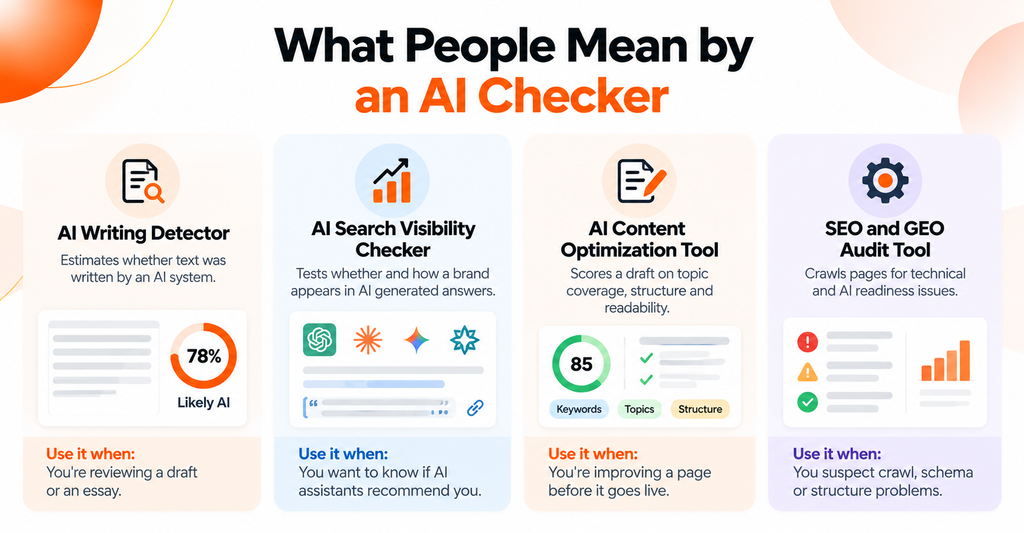
Here are the four tools people usually mean:
| Type of AI checker | What it does | Typical output | Use it when |
|---|---|---|---|
| AI writing detector | Estimates whether text was written by an AI system | A percentage or a label such as “likely AI” | You’re reviewing a draft or an essay |
| AI search visibility checker | Tests whether and how a brand appears in AI generated answers | Mentions, citations, competitor presence | You want to know if assistants recommend you |
| AI content optimization tool | Scores a draft on topic coverage, structure and readability | A content score and suggestions | You’re improving a page before it goes live |
| SEO and GEO audit tool | Crawls pages for technical and AI readiness issues | An issue list and readiness scores | You suspect crawl, schema or structure problems |
Is an AI Checker the Same as an AI Detector?
No. A detector looks at your words. A visibility checker looks at what AI assistants say about you. One reads text you wrote. The other reads answers a model wrote.
And I wouldn’t treat detector scores as proof of anything. OpenAI retired its own AI text classifier in 2023 because of its low rate of accuracy, according to TechCrunch. A separate research paper found that popular detectors flag writing by non native English speakers as AI generated. A detector can raise a question. It can’t settle authorship.
A visibility checker has its own limits, which I’ll cover below. But it answers a question you can act on: when someone asks an assistant about your category, does your brand show up?
Which AI Checker Should You Use?
Match the AI checker to the question you’re asking:
- “Does this text sound machine written?” Use an AI detector, and treat the score as a hint.
- “Does ChatGPT recommend my brand?” Use a free AI visibility checker.
- “Why isn’t my page getting picked up?” Use an SEO and GEO audit, or a content optimization tool.
Most confusion comes from picking the wrong AI checker for the job, not from the tools themselves.
What Is a Free AI Visibility Checker, and What Does It Check?
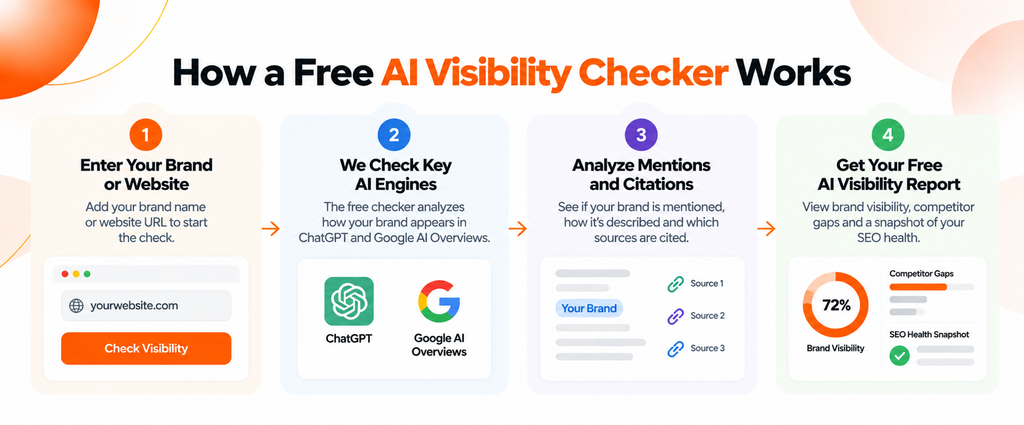
An AI search visibility tool sends questions to AI assistants and records what comes back. Does the answer name your brand? Does it link to your pages? Which competitors and sources appear instead? A free AI visibility checker does a small version of that job at no cost, usually as a one time snapshot. It’s the kind of AI checker that reads answers, not text.
A few terms get mixed up, so here’s how I’d keep them straight:
| Term | What it means |
|---|---|
| Brand mention | An AI answer names your brand in its text |
| Citation | An AI answer links to or lists one of your pages as a source |
| AI visibility audit | A broader review of mentions, citations, competitors, cited sources and the pages that could improve them |
| AI search share of voice | How often your brand appears compared with competitors across the same prompts |
| Ongoing monitoring | Repeating the same checks on a schedule so you can see trends |
A mention and a citation aren’t the same thing. Your name can appear with no link, and a link can appear with your name left out. A good AI visibility audit looks at both.
How Does the Spyro AI Free AI Visibility Checker Work?
Everything in this section comes from the live tool page for the free AI visibility checker, checked in 2026. Think of it as an AI checker for brand mentions, not for text. Tools change, so confirm the details on the page before you rely on them.
- Enter your details. The form asks for your name, email, website and target market. You can add up to 3 competitors or pick from suggested ones.
- Confirm your email. A one time code goes to your inbox. No account and no credit card are needed.
- The tool writes the prompts. It creates 5 buyer style prompts for your market and runs each one on two engines, ChatGPT and Google AI Overviews. That’s 10 checks.
- It crawls your site. The SEO health check covers up to 20 pages.
- You open the report. Results fill in as checks finish, usually within a few minutes. According to the tool page, the report is also sent to your email.
What Does the Free Report Include?
The tool page lists these parts:
- An AI visibility score based on the 10 checks, with each check worth 10 points
- Mentions versus citations, plus the sentiment of answers that mention you
- Which of your pages were cited, and which other sources the AI cited
- Competitor gaps and share of voice
- An SEO health check of up to 20 pages
What Are the Limits of the Free AI Visibility Checker?
Know these before you read any score:
- 5 prompts and 10 checks per report. That’s a sample. It isn’t a full map of how AI talks about your market.
- Two engines. ChatGPT and Google AI Overviews only.
- Up to 3 competitors and up to 20 crawled pages.
- One snapshot per website every 24 hours. Run it again inside that window and the existing report reopens.
- Failed checks aren’t scored as zero. If a check fails, the score uses the completed checks and says so.
The tool page doesn’t mention downloadable reports, and it doesn’t say how long reports are stored. So I won’t claim either.
Which AI Engines Does a Free AI Visibility Checker Cover?
Plenty of people assume a free checker covers every major assistant. This one doesn’t. It queries ChatGPT and Google AI Overviews, and it would be misleading to suggest otherwise. Here’s the honest split:
| Engine | Free AI visibility checker | Paid Spyro AI plans | How to check it yourself |
|---|---|---|---|
| ChatGPT | Yes | Yes | Included in the free report |
| Google AI Overviews | Yes | Yes | Included in the free report |
| Claude | No | Pro and Agency | Ask your prompts in a fresh chat and record the answer |
| Gemini | No | Pro and Agency | Same manual method |
| Perplexity | No | Pro and Agency | Same manual method, and note the sources it lists |
Paid plan details sit on the Spyro AI pricing page. Starter tracks ChatGPT and Google AI Overviews. Pro and Agency track all five.
There’s one more tool that causes confusion. The free SEO and GEO Audit is a separate page. It needs no email, crawls a page or up to roughly 20 pages of a site, and runs a 16 point GEO readiness check that includes whether crawlers such as GPTBot, ClaudeBot and PerplexityBot can reach your pages. That tells you whether those assistants can find you. It doesn’t ask them anything. For actual mentions, the visibility checker is the right tool.
How Do You Run an AI Visibility Audit Across ChatGPT, Claude, Gemini and Perplexity?
You can run a useful AI visibility audit with a free AI visibility checker plus about an hour of manual work. Here’s the sequence I’d follow.
- Pick one brand and one website. Agencies should audit one client at a time.
- Write 5 to 10 buyer questions. Use the words customers use, such as “best project management software for a 20 person agency”, not your product name.
- Run the free AI visibility checker. It covers ChatGPT and Google AI Overviews.
- Check Claude, Gemini and Perplexity by hand. Paste the same questions into each, in a fresh chat, and save the answers with the date.
- Record mentions and citations. For each answer, note whether your brand is named and whether your pages are linked.
- Note who shows up instead. Competitors and third party sources both matter. If a review site keeps getting cited, that’s a clue.
- List the questions where you’re absent. Those are your gaps.
- Match gaps to pages. Do you have a page that answers each question directly? If not, that’s your content backlog.
- Fix, then recheck. Use the same questions and the same method.
Why Do AI Answers Change Between Checks?
Because they’re generated, not looked up. Prompt wording, location, personalization, model version, retrieval and timing all play a part.
Researchers at SparkToro and Gumshoe ran 12 prompts nearly 3,000 times across ChatGPT, Claude and Google’s AI. The odds of getting the same list of brands twice were under 1 in 100. Some brands still appeared in 60% to 90% of responses for a given intent. (The study wasn’t peer reviewed, and the researchers sell tracking tools, so read it as a signal rather than a law.)
What I take from it: don’t obsess over exact position, and don’t trust a single run. Look at how often you appear across many prompts. That’s also why a free AI visibility checker works best as a baseline, not a verdict.
How Do You Read Your AI Visibility Audit Results?
Only use the metrics your free AI visibility checker report actually shows, whichever AI checker you pick. For the Spyro AI free report, these are the ones that matter.
| Metric | What it measures | What it doesn’t prove | What to do next |
|---|---|---|---|
| AI visibility score | Results across 10 checks (5 prompts on 2 engines) | That you’re visible on other engines or other prompts | Compare it with a later run, not with a different tool’s score |
| Mentions | Whether answers name your brand | That anyone clicked or trusted it | Find prompts with no mention and check for a matching page |
| Citations | Whether answers link to your pages | That the answer was accurate | See which pages are cited and why |
| Cited sources | Other sites the AI relied on | That those sites are rivals | Consider whether reviews or directories could list you |
| Competitor gaps and share of voice | How often rivals appear versus you on the same prompts | Real market share | Study the prompts where rivals win |
| Sentiment | The tone of answers that mention you | The full picture of your reputation | Fix facts that look wrong or outdated |
| SEO health check | Technical and on page issues across up to 20 pages | That fixing them guarantees a citation | Fix the critical items first |
What Does a Result Look Like? An Illustrative Example
This is a made up scenario, not a customer result.
A small accounting software company runs the checker. The report shows its brand mentioned in 2 of 10 checks, and cited once. Two competitors appear in most answers. Two prompts cite a comparison site that never mentions the company.
What would I do? First, check whether the company has a page that answers those two prompts plainly. Second, look at whether the comparison site lists it. Third, rerun the checker later with the same inputs. That’s a plan built from evidence, and it’s a lot more useful than a single number.
A missing mention doesn’t mean something is broken. It might just mean no page answers the question yet.
What Should You Do When AI Search Doesn’t Mention Your Brand?
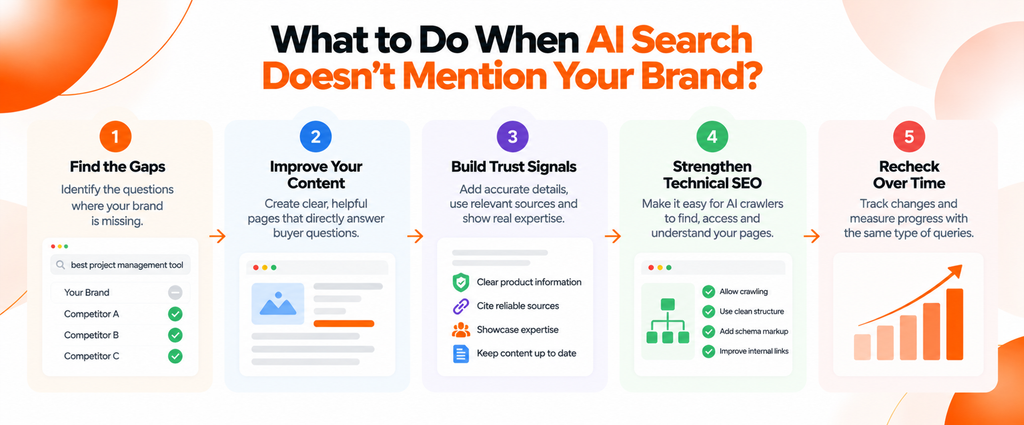
Start with the basics. Google says there are no additional requirements to appear in AI Overviews or AI Mode, only that a page must be indexed and eligible to show in Search with a snippet. It also says indexing and serving aren’t guaranteed. So the work looks a lot like good SEO.
- Make key pages easy to find and crawl. Check robots.txt, redirects and status codes. OpenAI says a site that opts out of OAI-SearchBot won’t be shown in ChatGPT search answers, and PerplexityBot works the same way for Perplexity. Both note that robots.txt changes can take about 24 hours. The AI crawler checker guide walks through this.
- Explain what you sell in plain words. Say who it’s for, what it costs where you can, and what problem it solves.
- Answer real buyer questions directly. Put the answer near the top of the page, then add detail. The AI content optimization guide covers how.
- Keep facts current. Pricing, features and product names should match everywhere.
- Use descriptive headings and sensible internal links. They help readers and crawlers.
- Earn mentions on pages other people trust. The guide to getting cited in ChatGPT and Perplexity explains how those engines pick sources.
- Measure over several checks. One report is a starting line.
No single step guarantees a citation. Anyone who promises one is guessing.
Free AI Visibility Checker vs Paid AI Visibility Tools: What’s the Difference?
A free AI visibility checker answers “where do I stand today?” Paid monitoring answers “is it getting better?” Here’s the comparison, using the Spyro AI free report and published Spyro AI plans.
| Dimension | Free AI visibility checker | Paid Spyro AI plans |
|---|---|---|
| Intended use | One time baseline | Ongoing tracking |
| Prompts | 5 per report | 15 per brand on Starter, 50 on Pro, 250 on Agency |
| Engines | ChatGPT and Google AI Overviews | 2 on Starter, 5 on Pro and Agency |
| Schedule | One snapshot per website every 24 hours | Daily or weekly checks, set by you |
| History and trends | Not described on the tool page | Scheduled tracking with history |
| Competitors | Up to 3 | Competitor tracking and gap analysis |
| Brands | One website per report | Up to 2, 10 or unlimited brands by plan |
| Cost | Free, no credit card | $29, $99 and $399 a month, with a 3 day free trial |
Prices come from the pricing page in 2026 and can change. If you’re comparing vendors on cost, the AI visibility tools pricing guide lays out what plans include.
Is a free AI visibility checker enough? For an SMB testing the waters, often yes. For an agency with several clients, probably not. You’ll want history, more prompts and more engines, which means paid tracking.
How Does a Semrush AI Search Visibility Checker Compare With a Free AI Visibility Checker?
Plenty of people search for a Semrush AI search visibility checker because they already use Semrush for SEO. It’s a fair place to start. But the two products answer different questions, so let’s separate them. One is a monitoring product inside a larger suite. The other is a quick AI checker for a single brand.
Semrush sells AI visibility as the AI Visibility Toolkit, which sits beside its keyword and backlink data. According to its help documentation, the toolkit includes a visibility overview, competitor research, prompt research, brand performance, prompt tracking and an AI search site audit. The standalone toolkit starts at $99 a month for one domain with 25 tracked prompts, and prompt tracking updates daily. Semrush AI visibility reporting is built for ongoing work inside a larger SEO suite.
A free AI visibility checker is built for a different moment. You have no data yet, and you want a fast, no commitment look at one brand.
A few cautions when you compare any Semrush AI visibility product with other tools, or with a free AI visibility checker:
- Check the engines. Semrush’s own pages don’t list the same engines in every place. The help article names ChatGPT and Google AI Mode, while the pricing page names more. Confirm the exact list for your plan.
- Count the prompts. 25 prompts and 5 prompts are very different samples.
- Ask about refresh rate. Daily, weekly and one time snapshots tell different stories.
- Look at report detail. Do you get cited URLs, competitor gaps and sentiment, or only a score?
Semrush also lists a free AI visibility checker in its site navigation. I couldn’t find documentation that describes what it returns, so I won’t compare it feature by feature. Try it yourself, and judge tools by prompts, engines, refresh and report detail rather than by the word “visibility” alone.
Who Gets the Most Out of a Free AI Visibility Checker?
- Startups and small businesses checking whether assistants recognize the brand at all.
- SEO specialists looking for citation gaps and sources that name rivals but not you.
- Content marketers finding buyer questions with no answer on their site.
- Agencies building a first baseline for a prospect or a new client before a proposal.
- Mid sized companies comparing visibility against the three competitors they worry about most.
- Marketing teams checking whether a round of new content changed anything.
Keep your expectations proportional. A free AI checker for brand visibility is a starting point for the first five uses. Anything that depends on trends needs repeated checks.
Key Takeaways
- An AI checker can be a text detector or a brand visibility tool. A free AI visibility checker tests whether AI answers mention or cite your brand, not who wrote your text.
- Pick the AI checker that matches your question. Detectors, content tools and audits each answer something different.
- The Spyro AI free checker runs 5 prompts on ChatGPT and Google AI Overviews. Claude, Gemini and Perplexity need a paid plan or a manual check.
- In any AI checker report, look at mentions and citations separately, then at cited sources and competitor gaps.
- AI answers change between runs. Treat a missing mention as a lead to investigate, not proof you’re invisible.
- A one time audit gives you a baseline. Ongoing monitoring shows whether your fixes work, and no AI checker can guarantee a citation.
Frequently Asked Questions
What is an AI checker?
An AI checker is a tool that analyzes something with AI or about AI. The phrase most often means an AI writing detector that estimates whether text was machine written. It can also mean an AI search visibility checker, which tests whether AI assistants mention your brand. Check which kind you’re opening before you trust the result.
What is a free AI visibility checker?
A free AI visibility checker is a tool that tests whether AI assistants mention or cite your brand, at no cost. Think of it as an AI checker for brand mentions. The Spyro AI version runs 5 buyer style prompts on ChatGPT and Google AI Overviews and returns a visibility score, competitor gaps and an SEO health check.
How is an AI visibility checker different from an AI detector?
An AI detector reads your text and guesses whether AI wrote it. An AI visibility checker reads AI answers and reports whether your brand appears in them. They solve different problems, and detector results shouldn’t be treated as proof of authorship.
Can an AI checker show whether ChatGPT, Claude, Gemini and Perplexity mention my brand?
Partly. The free Spyro AI checker covers ChatGPT and Google AI Overviews. Claude, Gemini and Perplexity are tracked on paid Spyro AI plans (Pro and Agency). You can also check all of them by hand with the same questions and a consistent record, though answers vary between runs.
What does an AI visibility audit include?
A good AI visibility audit covers brand mentions, citations and source URLs, competitor presence, the prompts where you’re missing, and the pages that could answer them. The free Spyro AI report includes a visibility score, mentions versus citations, cited sources, competitor gaps and an SEO health check.
Is a free AI search visibility tool enough for an agency?
Usually not for ongoing work. A free AI checker is handy for a first baseline on a prospect or client. Regular reporting needs more prompts, more engines, history and multi brand tracking, which paid plans provide.
How often should I check AI search visibility?
Run the free checker once to set a baseline, then recheck after you publish or change important pages. Paid tracking can run daily or weekly on a schedule you choose. Whatever you pick, keep the prompts and method the same so trends stay comparable.
Run Your Baseline, Then Fix What It Shows
A baseline beats a guess. The free AI visibility checker from Spyro AI is an AI checker for brand mentions, and it takes a few minutes and shows where ChatGPT and Google AI Overviews mention you, who they cite instead and which pages need work. It won’t guarantee a mention. It will tell you where to start.
If you’d like to look at technical readiness first, run the free SEO and GEO Audit. When you’re ready to track more prompts and all five engines over time, the pricing page lists the plans.