


Can AI Crawlers Read Your Site? How to Check GPTBot, ClaudeBot and PerplexityBot Access


Quick Answer: How Do You Know If AI Bots Can Read Your Site?
An AI crawler checker tells you whether bots like GPTBot, ClaudeBot and PerplexityBot are allowed to read your site, and where they might get stopped. Check five layers: robots.txt rules, the HTTP response each key page returns, CDN and firewall settings, server logs, and whether pages load without a login or heavy scripts.
No single check proves every bot can read every page. Access depends on the bot, the URL, your network rules, the server’s response and what that bot is for.
- Why it matters: if a search or retrieval bot can’t fetch a page, that service can’t quote it from a fresh visit.
- robots.txt is one layer: a bot your rules allow can still hit a 403 from a web application firewall or a CDN challenge.
- Access isn’t visibility: an open door doesn’t mean ChatGPT or Perplexity will cite you. Measure mentions separately.
- User agents can be faked: anyone can send a request that says “GPTBot”. Verify identity with the vendor’s published method.
- No guarantees: allowing a crawler makes a citation possible. Never certain.
Written for site owners, SEO teams, developers and agencies. For the bigger picture of how AI answers differ from Google rankings, see the SEO vs GEO vs AEO guide.
What Is an AI Crawler Checker?
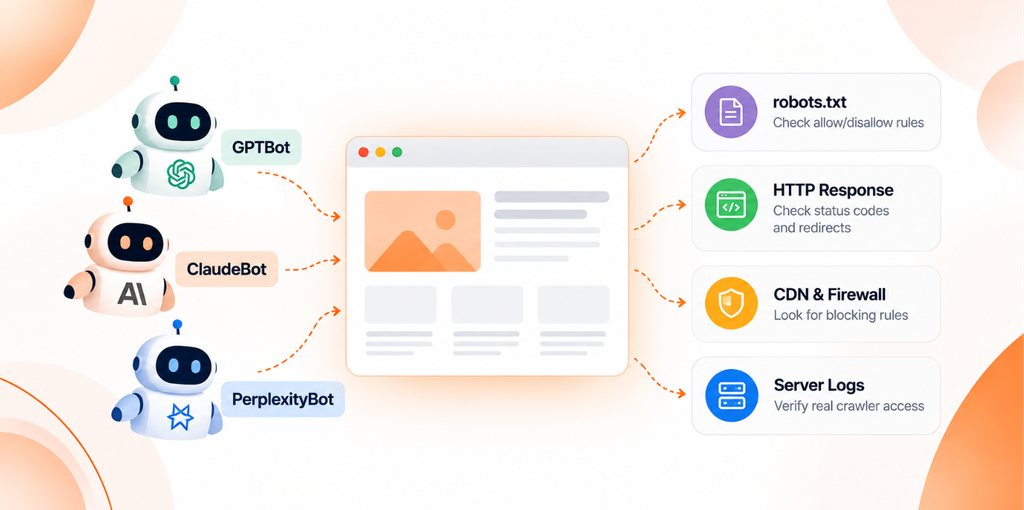
An AI crawler checker is a tool or process that tests whether named AI bots are allowed to fetch your pages, and whether anything on the way blocks them. A useful one looks at:
- whether robots.txt is reachable and which status code it returns
- the user agent groups that apply to each AI bot
- wildcard rules, and which rule wins when Allow and Disallow overlap
- sitemap declarations
- HTTP status codes and redirect chains for important URLs
- access denied responses such as 403 and 429
- signs of CDN or firewall blocking, when it can see enough evidence
Here’s the catch. A typical AI crawler checker works from the outside. It can read your rules and request your pages, but it can’t open your firewall dashboard or prove the real GPTBot visited.
What Can Each Type of Test Prove?
AI crawler testing comes in four forms, and each proves something different.
| Test type | What it does | What it can tell you | What it can’t tell you |
|---|---|---|---|
| robots.txt analysis | Parses your rules for each user agent | Whether a bot is allowed by policy | Whether your server actually lets it in |
| HTTP fetch test | Requests a URL, sometimes with a bot’s user agent string | Status code, redirects, headers and body | How your firewall treats the bot’s real IP addresses |
| Server log audit | Reads requests that reached your origin | Which URLs got which responses | Requests stopped earlier at the CDN |
| Verified crawler visit | A log entry confirmed against the vendor’s IP list or DNS | That the genuine bot fetched the page | Whether that page will ever be cited |
I’d treat a clean robots.txt result as step one. Not the finish line.
What Are GPTBot, ClaudeBot and PerplexityBot?
They’re the best known crawlers from OpenAI, Anthropic and Perplexity. They do different jobs, and each company runs several bots.
| Crawler | Documented purpose | User agent identifier | What website owners should verify | Important caveats |
|---|---|---|---|---|
| GPTBot (OpenAI) | Crawls content that may be used to train OpenAI’s generative AI foundation models | Token GPTBot; the full string contains GPTBot/ plus a version number | Your GPTBot group, and that requests come from OpenAI’s published IP list | Blocking GPTBot doesn’t block OAI-SearchBot, the crawler behind ChatGPT search |
| ClaudeBot (Anthropic) | Collects web content that could contribute to model training | Token ClaudeBot | Your ClaudeBot group, any Crawl-delay line, and source IPs against Anthropic’s list | Claude-SearchBot and Claude-User are separate bots with separate rules |
| PerplexityBot (Perplexity) | Surfaces and links websites in Perplexity search results; Perplexity says it isn’t used to crawl content for AI foundation models | Mozilla/5.0 AppleWebKit/537.36 (KHTML, like Gecko; compatible; PerplexityBot/1.0; +https://perplexity.ai/perplexitybot) | Your PerplexityBot group, and firewall rules against Perplexity’s published IP ranges | Perplexity-User, which fetches pages for user questions, generally ignores robots.txt according to Perplexity |
Sources: OpenAI’s crawler overview, Anthropic’s help article on its crawlers and Perplexity’s bot documentation. Version numbers change, so match on the token.
Training Crawlers, Search Crawlers and User Triggered Fetchers
Training crawlers collect content that may train models. Search crawlers handle AI search indexing, so a product can show and link pages. User triggered fetchers visit a page because a person asked a question. The other bots from these three companies:
| Bot | Job | robots.txt note from the vendor |
|---|---|---|
| OAI-SearchBot (OpenAI) | Surfaces websites in ChatGPT search | Sites that opt out won’t be shown in ChatGPT search answers, though they can still appear as navigational links |
| ChatGPT-User (OpenAI) | Visits pages when a user asks ChatGPT or a custom GPT | Because the action is user initiated, robots.txt rules may not apply |
| Claude-SearchBot (Anthropic) | Improves the quality of Claude’s search results | Blocking it may reduce visibility in search results |
| Claude-User (Anthropic) | Fetches pages when a Claude user asks a question | Blocking it may reduce visibility in user directed web search |
| Perplexity-User (Perplexity) | Supports user actions inside Perplexity | Generally ignores robots.txt, since a user requested the fetch |
So you can block training and still allow search. OpenAI says each setting is independent: a site can allow OAI-SearchBot and disallow GPTBot. A good AI crawler checker reports each bot separately for that reason.
Where Does Google-Extended Fit?
Google-Extended isn’t a crawler. It’s a robots.txt product token. Google’s crawler documentation says it controls whether content Google crawls may be used to train future Gemini models and for grounding in Gemini Apps and Vertex AI. It has no separate user agent string, and Google says it doesn’t affect inclusion in Google Search or act as a ranking signal. If an AI crawler checker lists Google-Extended, read it as a policy token, not a visiting bot.
For AI Overviews and AI Mode, Google’s page on AI features in Search points to robots.txt rules for Googlebot plus snippet controls like nosnippet and noindex. Not to Google-Extended.
How Do You Check Whether AI Crawlers Can Access Your Website?
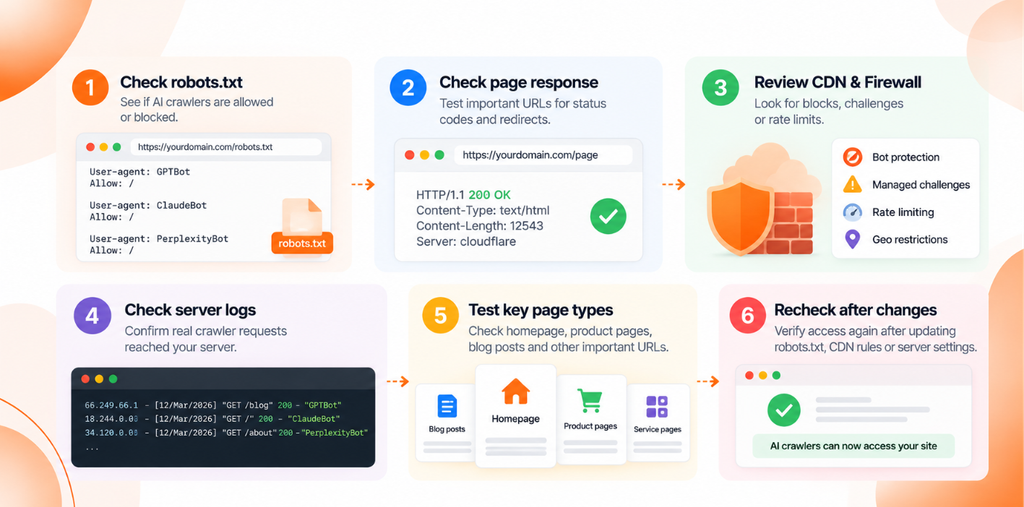
Six steps. Run them in order, because each one rules out a layer.
Step 1: Check robots.txt
Open https://example.com/robots.txt with your own domain. (example.com is a placeholder throughout.)
Check the status code first. Under RFC 9309, the robots.txt standard behind search engine crawlers, a 4xx response lets crawlers act as if no rules exist. A 5xx response tells them to assume everything is disallowed. So a broken robots.txt can quietly block your whole site.
Then read the User-agent, Allow, Disallow and Sitemap lines. RFC 9309 sets the matching logic:
- A crawler follows the group that names its product token (case doesn’t matter). It falls back to the
*group only when no group names it. - Several groups naming the same bot are combined.
- Inside the group, the longest matching path wins. If an Allow and a Disallow match equally, Allow should win.
File order doesn’t decide the outcome. Specificity does.
text
# Illustrative example only. Not a recommended policy.
User-agent: *
Disallow: /admin/
Disallow: /cart/

User-agent: GPTBot
Disallow: /

User-agent: OAI-SearchBot
User-agent: PerplexityBot
Allow: /
Disallow: /admin/

Sitemap: https://example.com/sitemap.xml
How to read it:
- GPTBot is explicitly disallowed across the whole site.
- OAI-SearchBot and PerplexityBot are explicitly allowed except
/admin/. Notice/cart/is open to them, because a named group doesn’t inherit wildcard rules. - ClaudeBot isn’t named, so the
*group applies and it can fetch everything except/admin/and/cart/.
Precedence inside one group:
text
# Illustrative example only
User-agent: ClaudeBot
Disallow: /blog/
Allow: /blog/guides/
Here /blog/guides/robots-basics/ is allowed, since the Allow path is longer. /blog/news/ stays blocked.
For each bot, note one verdict: explicitly allowed, explicitly disallowed, or covered by a broader rule. An AI crawler checker does this in seconds, but read the file once yourself.
Before you open everything up, pause. Allowing AI bots is a business, legal, privacy and content licensing decision. And robots.txt is a request, not a lock. RFC 9309 says the rules “are not a form of access authorization”, so private content belongs behind authentication.
Step 2: Check the Actual Page Response
Rules are policy. Responses are reality. This is where an AI crawler checker and a real crawler can disagree, so test important URLs directly:
bash
# Status code and final URL after redirects
curl -s -o /dev/null -L -w "%{http_code} %{url_effective}\n" https://example.com/pricing/

# Headers for every hop, sent with PerplexityBot's published user agent string
curl -s -L -D - -o /dev/null \
  -A "Mozilla/5.0 AppleWebKit/537.36 (KHTML, like Gecko; compatible; PerplexityBot/1.0; +https://perplexity.ai/perplexitybot)" \
  https://example.com/pricing/
Check the status code, redirect chain, headers such as X-Robots-Tag, and whether the body is your real page or a challenge screen.
| Code | Common meaning | What it suggests |
|---|---|---|
| 200 | Request succeeded | Good sign, but confirm the body is your content |
| 301 or 302 | Redirect | The final URL must also return 200 |
| 403 | Forbidden | The server or a security layer refused the request |
| 404 | Not found | Wrong URL or missing page |
| 429 | Too many requests | Rate limiting; check for a Retry-After header |
| 5xx | Server side failure | Origin, proxy or hosting problem |
MDN’s HTTP status reference explains each code in detail.
Treat these codes as clues. Your laptop sending a PerplexityBot user agent isn’t PerplexityBot, and firewalls often judge requests by IP address or behavior. A 200 in your browser doesn’t prove a crawler gets a 200.
Step 3: Inspect CDN and WAF Rules
Between a bot and your app there might be a CDN, a bot management product, a web application firewall, a reverse proxy or a hosting security plugin. Any of them can say no through managed challenges, CDN bot protection scores, IP reputation rules, rate limiting, geo restrictions, custom security rules or access control like password protected staging.
Nobody has to touch robots.txt for this kind of AI bot blocking to happen. In 2025, Cloudflare announced that new domains would be asked whether to allow AI bots, with blocking as the default. And Anthropic says its bots won’t try to bypass CAPTCHAs, so a challenge page works as a block.
If your AI crawler checker says a bot is allowed but your tests fail, open your security events. Filter by user agent and path, and note which rule fired.
Want that traffic? Confirm it’s genuine, then create the narrowest exception you can: the specific verified bot, public paths only, rate limits still on. Cloudflare’s verified bots documentation shows one approach, validating bots through IP lists, reverse DNS or cryptographic signatures. Don’t switch off bot protection site wide, and never allowlist by user agent string alone.
Step 4: Check Server Logs
Logs show what reached your server, which no outside AI crawler checker can see. For each request attributed to an AI bot, check the timestamp, requested URL, status code, user agent string, request frequency and response size. Watch for repeated failures. A tiny 403 response often means a block page.
bash
# Illustrative: count status codes for requests claiming to be AI bots.
# Field $9 is the status in the common "combined" log format; adjust for yours.
grep -E "GPTBot|OAI-SearchBot|ClaudeBot|Claude-SearchBot|PerplexityBot" access.log \
  | awk '{print $9}' | sort | uniq -c | sort -rn
text
# Illustrative log line. 203.0.113.0/24 is a documentation range, not a crawler IP.
203.0.113.24 [2026-01-10T08:14:02+00:00] "GET /blog/guides/ HTTP/1.1" 403 1520 "<user agent containing ClaudeBot>"
No entries at all? Either the bot hasn’t come by, or something upstream stopped it. Check CDN logs too.
Now the part people skip. A user agent string is a label, and labels can be faked. Before you treat a request as a real crawler visit, verify it the vendor’s way:
- OpenAI publishes IP lists for GPTBot, OAI-SearchBot and ChatGPT-User.
- Anthropic publishes its crawler IP addresses and says a source IP on that list indicates Anthropic.
- Perplexity publishes IP ranges for PerplexityBot and Perplexity-User as JSON files.
- Google recommends a reverse DNS lookup followed by a forward DNS lookup, or matching against its published ranges (Google’s verification guide).
Always pull current lists from the vendor, never from a blog post.
Why so strict? In 2025, Cloudflare alleged that undeclared crawlers it linked to Perplexity posed as ordinary browsers to get past blocks, and Perplexity disputed it (TechRepublic). Either way, a user agent alone doesn’t tell you who’s visiting.
Anthropic also advises against blocking its bots by IP, since that stops them reading robots.txt. Use robots.txt for opt outs.
Step 5: Check Important Page Types
Your homepage passing tells you about one URL. Treat this step as a small crawlability audit and sample main service pages, top blog articles, product pages, category pages, key landing pages and docs. Disallow rules often target directories, firewall rules often target paths, and templates render differently.
Feed that sample to your AI crawler checker and record each URL, page type, robots.txt verdict per bot, status code and notes.
Then view the raw HTML with curl. If the main text only appears after scripts run, some crawlers may never see it. Rendering support varies and isn’t always documented, so test the specific service, and server render key content where you can.
Step 6: Recheck After Changes
Changed robots.txt, a CDN rule or a server setting? Rerun the AI crawler checker and the same manual tests on the same URLs. Record the URL, crawler, response, date and change made.
Expect a lag. OpenAI and Perplexity both cite about 24 hours for robots.txt updates, and RFC 9309 lets crawlers cache the file that long. AI answers may take much longer to change. Or not change at all.
AI Crawler Access Checker Checklist
Use this alongside any AI crawler checker, once per site:
- robots.txt is reachable
- Relevant crawler specific directives are understood
- Important URLs return expected HTTP responses
- Redirects don’t lead to inaccessible destinations
- CDN and WAF rules have been reviewed
- Server logs have been checked
- Crawler identity has been verified where possible
- Important page types have been sampled
- Sitemap and canonical behavior are consistent where relevant
- Access has been rechecked after changes
- AI visibility is measured separately from technical accessibility
Why Can’t AI Bots Read a Site? 12 Common Causes
When an AI crawler checker flags a problem, it’s usually one of these.
| Cause | How to investigate | Safe next step |
|---|---|---|
| Explicit robots.txt Disallow | Read the bot’s group, then the * group | Change it only if your policy wants that bot in |
| Incorrect bot specific directives | Compare tokens with vendor docs (ChatGPT isn’t a crawler token; GPTBot is) | Fix the token and repeat any wildcard rules the group needs |
| Login required or private content | Test in a logged out browser | Keep it private; publish a public summary if you want it citable |
| HTTP 403 responses | Compare browser and bot user agent requests, then check security events | Add a narrow exception for verified bots |
| CDN managed challenges | The body shows a challenge page | Exempt verified bots on public paths |
| WAF rules and rate limits | Look for 429s and rate limit events | Adjust limits for verified crawlers |
| Server errors | Look for 5xx codes, especially on robots.txt | Fix the origin, then monitor |
| Redirect loops or inaccessible destinations | Follow the chain with curl -L | One redirect to a URL that returns 200 |
| Incorrect DNS or TLS configuration | Check records and certificates from outside your network | Fix records or renew certificates |
| Content only after client side rendering | Compare raw HTML with the rendered page | Server render key content |
| Regional or network restrictions | Review geo and network blocks | Narrow exceptions for verified crawler ranges |
| A crawler fetching a different URL | Logs show http vs https, www vs non www or old URLs | Align canonicals, redirects and sitemap URLs |
Does Allowing AI Crawlers Improve AI Search Visibility?
Sometimes it removes a barrier. Think of access as AI search accessibility: needed, but not enough on its own.
- Access can be a prerequisite. OpenAI says sites that opt out of OAI-SearchBot won’t be shown in ChatGPT search answers, apart from navigational links. Anthropic says blocking Claude-SearchBot may reduce visibility.
- Training isn’t search. Allowing or blocking GPTBot is a training decision. It doesn’t control OAI-SearchBot.
- Blocking one bot doesn’t block all AI access. User triggered fetchers may not follow robots.txt, and AI Overviews rely on Googlebot controls rather than Google-Extended.
- Content still decides. Once a page is reachable, relevance, quality, trust and each product’s own systems decide whether it’s used. See how AI search engines cite sources and the guide to getting cited in ChatGPT and Perplexity.
- Different policies are reasonable. A publisher might block training and allow search, while a software company allows everything public.
An AI crawler checker can’t measure citations. That takes prompt tracking over time, because AI answers change from run to run.
robots.txt vs llms.txt vs sitemap.xml: What’s the Difference?
These files get lumped together, but they do different jobs.
| File | Purpose | Status | What it can’t do |
|---|---|---|---|
| robots.txt | Crawler access directives | Standardized as RFC 9309 in 2022 | It isn’t access control, and user triggered fetchers may not follow it |
| sitemap.xml | URL discovery and site structure signals | Widely supported sitemaps protocol | It doesn’t grant or deny access |
| llms.txt | Proposed Markdown file giving language models context and links to key content | A proposal published at llmstxt.org in 2024 | It doesn’t override robots.txt, and not every AI bot reads it |
Google updated its guide to generative AI features in Search in 2026 to say Google Search doesn’t use llms.txt. Its changelog adds that these files won’t help or hurt Google rankings, and that keeping them for other services is fine. So treat llms.txt as optional. For access, robots.txt and server responses matter far more.
How Can Spyro AI’s AI Crawler Checker Help?
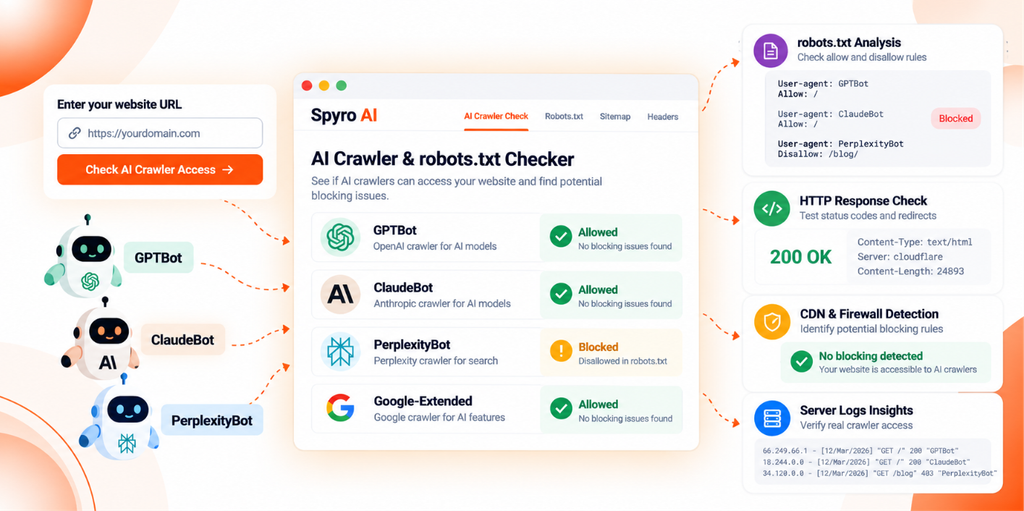
The free AI Crawler & robots.txt Checker from Spyro AI is a quick first pass. According to the tool page, you enter a domain and the AI crawler checker:
- fetches your robots.txt, sitemap and llms.txt
- resolves the exact rule that allows or blocks each AI user agent it tests, including GPTBot, ClaudeBot, PerplexityBot and Googlebot
- flags bots that seem to be turned away by your server or firewall even though robots.txt allows them
- suggests robots.txt rules you can review before pasting
Know its limits. It doesn’t crawl every page, the tool page doesn’t describe how it detects silent blocks, and it doesn’t claim to read server logs, verify crawler IPs or confirm a real bot visit. Steps 3 and 4 still happen on your side.
For a wider view, the free SEO and GEO Audit covers up to 20 pages, including AI crawler access, llms.txt presence and technical issues like robots rules, sitemaps and redirects. To measure visibility itself, the free AI Visibility Checker shows whether ChatGPT and Google AI Overviews mention your brand.
What Do AI Bot Access Problems Look Like? Three Examples
These are illustrative scenarios, not real customer cases.
Example 1: HTTP 200 in a Browser, 403 for Automated Requests
The guide page loads in a browser. An AI crawler checker run from outside gets a 403, and so does a plain curl request. The body is a short challenge page, and security events show a bot management rule matching automated traffic on that path.
text
# Illustrative output only
$ curl -s -o /dev/null -w "%{http_code}\n" https://example.com/guides/
403
Likely next step: decide whether you want that bot. If yes, confirm real crawler requests in your logs against the vendor’s IP list, then add a narrow exception for that verified bot on public paths.
Example 2: robots.txt Allows PerplexityBot, but a CDN Challenge Stops It
The AI crawler checker shows PerplexityBot allowed by robots.txt. Origin logs show no PerplexityBot requests at all. CDN logs show challenges issued to requests from Perplexity’s published ranges.
Likely next step: allow the verified bot category or the vendor’s current ranges for public paths, then recheck after 24 hours.
Example 3: The Homepage Works, but the Articles Directory Is Blocked
The homepage passes every AI crawler checker test. A sample of article URLs shows “disallowed” for every AI bot, because robots.txt still carries a rule left over from a migration:
text
# Illustrative example only
User-agent: *
Disallow: /resources/
Likely next step: narrow the rule to what really needs blocking, such as Disallow: /resources/drafts/, then retest the sample.
Key Takeaways
- An AI crawler checker is a starting point. It reads policy and sends test requests, but it can’t prove a real crawler visit.
- GPTBot and ClaudeBot are training crawlers. Search and user triggered bots have different names and rules.
- Google-Extended controls Gemini training and grounding, not Google Search or AI Overviews.
- CDN challenges, firewall rules and 5xx errors can block bots that robots.txt allows.
- Allowing a crawler never guarantees a citation, so measure AI visibility separately.
Frequently Asked Questions
What is an AI crawler checker?
An AI crawler checker is a tool or process that tests whether AI bots such as GPTBot, ClaudeBot and PerplexityBot are allowed to read your site. It usually reads robots.txt rules for each bot and requests key URLs to check status codes and redirects. It can’t prove a genuine crawler visit without server log evidence.
How do I check whether GPTBot or ClaudeBot can access my website?
Run an AI crawler checker or open robots.txt and find the groups for GPTBot and ClaudeBot, or the wildcard group if they aren’t named. Then request important URLs and confirm they return 200. Finally, search your server logs for those user agents and verify source IPs against the lists OpenAI and Anthropic publish.
How do I know whether PerplexityBot is blocked?
Check the PerplexityBot group in robots.txt, then test key URLs for 403, 429 or challenge pages. Review CDN and firewall events for requests from Perplexity’s published IP ranges. An AI crawler checker can flag rule level blocks, but firewall blocks often only show up in security logs.
Does robots.txt control all AI bots?
No. robots.txt only works for bots that choose to follow it. OpenAI says robots.txt rules may not apply to ChatGPT-User because its visits are user initiated, and Perplexity says Perplexity-User generally ignores robots.txt. It also isn’t access control, so private content needs authentication.
Can a website allow Googlebot but block GPTBot?
Yes. Each bot reads its own robots.txt group, so you can allow Googlebot and add a separate group that disallows GPTBot. Blocking GPTBot doesn’t affect Google Search. OpenAI also lets you allow OAI-SearchBot for ChatGPT search while disallowing GPTBot for training.
Does allowing AI crawlers guarantee citations in AI answers?
No. Allowing a crawler removes one barrier. Whether a page is indexed, cited or mentioned depends on relevance, quality, trust and each AI product’s own systems. Track citations and mentions across many prompts over time.
What should I do if an AI crawler receives a 403 response?
Find out which layer returned the 403 by checking CDN, firewall and server logs. Confirm the request came from the vendor by checking its IP against the published list. If you want that bot, add a narrow exception for the verified crawler on public paths, then rerun your AI crawler checker.
Start With an AI Crawler Checker, Then Verify What It Can’t See
The full process in one place:
- Inspect robots.txt.
- Test representative URLs.
- Review CDN and firewall controls.
- Examine server logs.
- Verify crawler identity where possible.
- Recheck access after changes.
- Measure AI visibility separately.
An AI crawler checker covers the first two steps fast. The rest needs your own logs.
For a quick baseline, run the AI Crawler & robots.txt Checker on your domain and fix anything it flags before moving on to logs. It won’t guarantee a single citation. It will tell you whether the door is open.