



40% off on first monthClaim Now →
User avatar
User avatar
User avatar
Built for Businesses adapting to AI search

Rank #1 on & get recommended by ChatGPT Perplexity Claude& Gemini

See why AI engines recommend your competitors instead of you, then fix it. Spyro tracks your AI citations and Google rankings in one place, and publishes the content that earns them back.

Start your 3-day free trial · Cancel anytime
Spyro GEO Dashboard
How it works

Your SEO team on autopilot.

From keyword to published article — Spyro does it all, so you can focus on running your business.

AUDIT PIPELINEActive
Domain Health98/100
Blueprint Index84%
✓ Technical Crawl ScanDone
✓ Keyword BlueprintDone
🗲 Competitor Gap IndexProcessing...
Audited Pages: 1,420Crawl Pace: 120/min
01. Audit & Setup

Concierge Setup & SEO Audit

Our team audits your website, maps competitive targets, and constructs your initial 30-day topical map based on direct search intent.

GAP SCANNERScan Complete
Competitor Share88.4%
Your Share (Gap)14.2%
↳ b2b startups outboundKD: 12
↳ best email warmupKD: 24
↳ automated cold outboundKD: 38
Gaps Identified: 42Est. Vol Loss: 18.4K/mo
02. Gap Discovery

Topical Gap & Competitor Scan

Input your competitor domains. Spyro automatically audits their active organic Google indexing to pinpoint high-value citation gaps you missed.

SEMANTIC MAPActive Silo
Topical Authority92.4%
Silo DepthTier 4
🖎 Parent: Outreach GuidePrimary
↳ Sub: Deliverability RotateLinked
↳ Sub: Active Warming loopsLinked
Keywords: 182 mappedLink Equity: High
03. Silo Mapping

Keyword Silo Builder

Keywords are grouped into tightly knit semantic topical silos. Spyro creates a logical structure designed to feed search engines brand authority.

GEO ENGINEOptimized
AI Citation Score96.8%
GEO Score94/100
Hook: Startups scale deliverability by routing rotations across sending accounts...
Readability: Grade AWords: 2,820
04. GEO Content

2,500+ Word GEO Article Engine

Utilizing advanced Generative Engine Optimization (GEO) mode, our engine structures posts with answer-first hooks, citable quotes, and schema.

ASSET ENGINEInject Complete
Alt Text Quality100/100
Media Resolution4K WebP
Outreach Tech Banner
Featured Images: 1Semantic Links: 3
05. Asset Optimization

Semantic Links & Media Injection

Spyro maps your architecture to insert natural internal links and pairs each piece of content with a customized, premium tech featured image.

CMS SYNC STATUS100% Active
Sync Success Rate100%
CMS Auto-PublishOn
🖳 WordPress & Shopify SyncLive
↳ 7 Warmup tools...✓ Published
↳ Scale startups cold...Scheduled
Queue Pace: 1 article/dayNext Sync: 4h 12m
06. Autopilot Sync

Autopilot Daily CMS Publishing

Once verified, Spyro publishes optimized posts directly onto WordPress, Shopify, or Webflow daily to boost index consistency hands-free.

RECOMMENDATION ENGINEAudit Complete
Avg Citations81.5%
Weekly Growth+12.4%
ChatGPT Citations89%
Perplexity Citations74%
Claude Index: +18.2%Gemini Index: +6.5%
07. Auditing & Verification

Weekly AI Visibility & Recommendation Growth

Every Monday, Spyro audits ChatGPT, Perplexity, Claude, and Gemini. We query your targeted blueprints, analyze citation rates, and map recommendation share growth to prove your autopilot ROI.

INDEX MONITORLive Audit Running
Google Index Rate94.8%
Avg Indexing Speed3.2 Hours
🗲 Instant Search Console SyncActive
🔍 AI Overview Ingestion Rate88.2%
🛡️ Citation Integrity ShieldVerified
Audit Health Score: 99.2%Index Checks: 450/day
08. Indexing Audits

Automated Indexing & Search Console Audits

We continuously scan active search console pipelines and generative engine recommendations to confirm immediate, permanent inclusion. Spyro monitors indexing latency, verifies citation structural integrity, and tracks real-time query visibility automatically.

The loop

One loop that compounds.

Measure where you stand. Fix what's missing. Publish on autopilot. Watch it move. Repeat.

  1. 1

    Measure

    Track citations and rankings across ChatGPT, Claude, Gemini, Perplexity, and Google in one dashboard.

  2. 2

    Audit

    Find the content gaps and GEO-readiness issues holding you back.

  3. 3

    Create

    Generate answer-first, GEO-optimized articles built the way AI engines reward.

  4. 4

    Publish

    Auto-link and publish straight to WordPress, Shopify, or Wix. Zero effort.

  5. 5

    Re-measure

    Every Monday, one email shows exactly what moved.

Unique Features

Make Your Platform Work Harder For You

Streamline your business with unified metrics and AI-powered analytics—all in one place.

Dashboard showing MRR of $69,897 and 1206 active users with an upward trend graph.

Unified Metrics

See your MRR and active users in one clean, unified view — no more switching tabs.

AI suggesting actions like "Optimize onboarding flow" and "Raise pricing tier" based on user data.

AI Growth Insights

Actionable suggestions from your data, without digging into spreadsheets or dashboards.

Integration performance stats for Nuvio, Klyra, and Veltix with percentage changes.

Product Usage Tracking

Track how users engage with your app live to uncover patterns and optimize features.

Retention graph with user return notifications for analyzing feature effectiveness.

Feature Impact Analysis

Know exactly which features drive long-term retention—and which ones don't contribute.

Why Choose Spyro

Stop Wasting Thousands on Slow SEO Agencies

Traditional search channels are shifting to AI responses. Spyro combines standard organic ranking audits with automated citation growth.

Content GenerationAutomated article & draft pipeline
Traditional SEO$200+/mo
Generic AI Writers$40+/mo
Spyro SEO/GEOFrom $99/mo
Keyword Research & Gap AuditsCompetitor analysis & opportunity tracking
Traditional SEO$200+/mo
Generic AI Writers$40+/mo
Spyro SEO/GEOFrom $99/mo
AI Citation MonitoringChatGPT, Perplexity & AI engine presence
Traditional SEO$200+/mo
Generic AI Writers$40+/mo
Spyro SEO/GEOFrom $99/mo
Auto-Publish to CMSDaily content moat, zero manual steps
Traditional SEO$200+/mo
Generic AI Writers$40+/mo
Spyro SEO/GEOFrom $99/mo
GEO OptimizationGenerative Engine Optimization mode
Traditional SEO$200+/mo
Generic AI Writers$40+/mo
Spyro SEO/GEOFrom $99/mo
Zero Technical Expertise RequiredBuilt for founders, not SEO specialists
Traditional SEO$200+/mo
Generic AI Writers$40+/mo
Spyro SEO/GEOFrom $99/mo
See which plan fits your growth stageGet Started
Included
Partial / Limited
Not Available
Why spyro is different

Six Enterprise Modules In One Founder Plan

Spyro replaces complex keyword trackers, crawlers, draft outlines, publishing systems, and manual citations with one continuous growth machine.

Deep SEO Audit

Scan your whole site in minutes and find the broken redirects, duplicate meta tags, weak heading structures, and crawl blockers holding you back.

Competitor Gap Analysis

Add a competitor URL to see the high-value search queries they win, then get a clear action plan to take those rankings for yourself.

Keyword Position Tracker

Monitor search positions accurately over time across specific regions. Get single-email weekly updates displaying rank fluctuations.

AI Citation Tracker

Track real-time citations and recommendations inside ChatGPT, Perplexity, Gemini, and Claude. See if models recommend your domain.

Generative Engine (GEO) Mode

Structure posts for AI model criteria. Injects answer-first snippets, quotable summaries, Q&A blocks, and JSON schema optimized for citations.

Autopilot Publishing Moat

Connect WordPress, Shopify, or Wix once. Spyro queues, writes, links, and publishes optimized articles for you, every day.

Writing Examples

Real Articles. Generated in Minutes.

Browse examples of SEO-ready, long-form content that Spyro generates — complete with inline images, structured headings, and trust signals built for AI-first search engines.

Top 10 AI Customer Support Chatbots in 2026×
GEO-Optimized
Intercom Fin AI customer support product homepage
Spyro Tech Review

Top 10 AI Customer Support Chatbots in 2026

Spyro Editorial Team

AI & SaaS Research Desk, Spyro Tech Review

16 min read
Updated May 31, 2026

TL;DR.If you want the short version: Intercom Fin is the one most teams should look at first, mostly because it's fast to set up and bills per resolved conversation. Ada is the pick if you're drowning in volume. Zendesk and HubSpot make sense when you already pay for their help desk or CRM. Gorgias owns Shopify support, and Tidio, Chatbase, Botpress and YourGPT cover the cheaper, build-it-yourself end. Everything below is the long version, with a screenshot and real pricing for each.

A couple of years ago, most support “AI” was glorified FAQ search wearing a chat skin. That has changed. The current tools actually resolve tickets — they'll look up the order, issue the refund, change the subscription — and they do it well enough that a lot of conversations never reach a person.

How many? It depends who you ask. The figure that gets quoted is somewhere north of 70% for mature setups, up from roughly a fifth a few years back. Treat the exact percentage with some suspicion; the direction is what matters. Customers now expect an answer in seconds, at 2am, on whatever app they happen to be in, and slow support quietly costs you revenue.

We went through the ten platforms below — the docs, the pricing pages, and a fair amount of marketing — and ranked them by how well they close tickets rather than how confident the homepage sounds. Here's what we found and who each one actually suits.

What makes one worth paying for

The decks all blur together, so it helps to have a checklist. The tools worth shortlisting can do most of this:

  • It closes tickets on its ownthis is the number that matters most. The better tools land somewhere between 60% and 80% once they've been tuned for a few weeks.
  • It answers from your contentand cites where the answer came from, instead of inventing something plausible.
  • It hands off cleanlywhen it isn't sure, a person picks up with the full conversation already attached.
  • It covers the channels you usechat and email at a minimum, ideally voice, WhatsApp and the rest in one place.
  • It knows when to say “I don’t know”a measurable hallucination rate tells you more than a polished demo on cherry-picked questions.
  • It can take actionrefunds, order edits, plan changes. Answering questions is table stakes; doing the work is where the savings are.
  • It writes back to your systemsso the CRM or help desk stays current and nothing slips through.
  • It shows you the numberswhat it resolved, what it escalated, and where it's getting things wrong.

The field at a glance

Six things to scan before you read the detail. On a phone, the table scrolls sideways.

PlatformBest ForEase of SetupAI CapabilitiesEnterprise ReadyPricing Level
Intercom Fin AI AgentDigital-first and product-led SaaSEasyAI Agent, Grounded RAG, Tool actionsYes$$$$
Zendesk AI AgentsTeams already on ZendeskModerateAI Agents, Intent detection, Agent CopilotYes$$$$
AdaHigh-volume enterprise supportAdvancedAI Agent, Reasoning engine, 50+ languagesYes$$$$
Freshworks Freddy AIValue-focused mid-marketEasyFreddy Agent, Copilot, InsightsPartial$$$$
Tidio Lyro AIE-commerce and small businessEasyLyro AI, Visual Flows, Shopify actionsNo$$$$
ChatbaseSaaS and teams building their own botEasyCustom AI agent, RAG training, AI ActionsPartial$$$$
HubSpot Service Hub AITeams already on HubSpotEasyBreeze Agent, CRM grounding, CopilotYes$$$$
GorgiasDTC and Shopify brandsModerateAI Agent, Order actions, MacrosPartial$$$$
BotpressTechnical teams building custom agentsAdvancedVisual Studio, LLM-agnostic, Knowledge basesYes$$$$
YourGPTSmall, non-technical teamsEasyNo-code builder, 100+ languages, Workflow automationNo$$$$

The ten, reviewed

Each one gets a screenshot of its current homepage, what we liked, what we didn't, and roughly what it costs. They are numbered, but read the “best for” line before the rank — a pick further down the list can easily be the right call for your situation.

1. Intercom Fin AI Agent
4.6 / 5

Conversational AI agent

intercom.com
Intercom Fin AI Agent AI customer support — product homepage screenshot
Intercom Fin AI Agent — official product homepage (intercom.com)

Fin is the one most teams end up shortlisting, and for good reason. It lives inside Intercom's messenger and ticketing tools, so you can have it running in days rather than months. It answers from your help center, docs and past tickets, and it shows the source it used instead of guessing. If you're not on Intercom, it can also sit on top of Zendesk or Salesforce.

  • Resolves end to end: handles chat, email, WhatsApp, SMS and phone, and actually closes the ticket rather than deflecting it.
  • Cites its sources: every answer links back to where it came from, and it declines rather than inventing one.
  • Takes action: issues refunds, updates subscriptions and triggers workflows in your own systems.
  • Helps your agents: drafts replies and pulls up context on the cases it escalates.

What it does well: resolution quality is among the best we looked at; you only pay when it actually resolves a ticket; live in days, not months; clean interface for both customers and agents.

Where it falls short: per-resolution cost climbs at high volume; it's strongest when you're already on Intercom; usage-based billing is harder to budget for.

Best for: Digital-first and product-led SaaS. Pricing: $0.99 per resolution — you're billed only when Fin fully answers. It sits on top of Intercom Suite seats, which start around $39/seat/mo.

Bottom line: The fastest way to a high resolution rate without a big IT project. Start here unless you have a reason not to.

2. Zendesk AI Agents
4.3 / 5

AI on a ticketing backbone

zendesk.com
Zendesk AI Agents AI customer support — product homepage screenshot
Zendesk AI Agents — official product homepage (zendesk.com)

If you already run Zendesk, this is the path of least resistance. The AI inherits your macros, triggers, fields and SLAs, so there's nothing new to wire up. It caught up with Intercom on accuracy over the last year, and the built-in QA grades every conversation instead of a small sample.

  • AI Agents: resolve chat and email using the Zendesk setup you already have.
  • Intent and sentiment: hundreds of pre-trained intents route and prioritize tickets for you.
  • Agent Copilot: suggests replies and step-by-step procedures inside the Agent Workspace.
  • Full-coverage QA: Zendesk QA reviews every ticket for quality and risk, not a 2% sample.

What it does well: hard to beat on value if you're already a Zendesk shop; mature reporting and a big app marketplace; QA reviews 100% of tickets; lots of pre-built intents out of the box.

Where it falls short: the AI is a paid add-on on top of seats; advanced automation takes some setup; resolution billing is less transparent than Fin's.

Best for: Teams already on Zendesk. Pricing: Suite from about $55/agent/mo, plus an Advanced AI add-on around $50/agent/mo; AI Agents are metered by resolution.

Bottom line: The obvious upgrade if you're on Zendesk already. Less compelling as a reason to switch.

3. Ada
4.4 / 5

Enterprise AI agent platform

ada.cx
Ada AI customer support — product homepage screenshot
Ada — official product homepage (ada.cx)

Ada is built for companies handling huge volumes — it openly targets businesses with 300,000 or more support conversations a year. Its reasoning engine works across chat, email, voice and social in 50-odd languages, grounds answers on your content, and calls your APIs to get things done. On mature setups it reports automated resolution above 70%.

  • AI Agent: resolves conversations across channels, grounded on your knowledge sources.
  • Reasoning engine: plans multi-step resolutions and calls your APIs to finish the job.
  • Multilingual and voice: 50+ languages plus voice for global, round-the-clock support.
  • Coaching and analytics: tools to measure, test and push the automated-resolution rate higher.

What it does well: built for serious scale; strong multilingual and voice coverage; works the same across every channel; good tooling to measure and improve resolution.

Where it falls short: pricing is quote-only and enterprise-sized; usage-based cost is hard to forecast; more than most SMBs need; real implementation effort.

Best for: High-volume enterprise support. Pricing: Quote-based and usage-driven — reported around $1–$3.50 per resolved conversation, with contracts that often run into six figures a year. It only really adds up above roughly 300k conversations annually.

Bottom line: The enterprise option. Choose it when volume is the problem and automation rate is the number you're judged on.

4. Freshworks Freddy AI
4.5 / 5

Agentic AI for service

freshworks.com
Freshworks Freddy AI AI customer support — product homepage screenshot
Freshworks Freddy AI — official product homepage (freshworks.com)

Freddy is the sensible middle ground for teams that have outgrown the cheap tools but don't want enterprise pricing. It handles up to around 80% of routine tickets, helps agents with replies and summaries, and flags trends for managers. There's a real free tier, so it's easy to try before you spend anything.

  • Freddy AI Agent: a no-code bot that handles up to 80% of routine, repetitive tickets.
  • Freddy Copilot: smart replies, summaries and tone control for your agents in real time.
  • Freddy Insights: trend analysis and anomaly detection for managers.
  • One inbox: email, chat, phone and social together, with 1,000+ integrations.

What it does well: free tier and quick setup; solid response-time and productivity gains; predictable per-seat pricing; decent omnichannel coverage.

Where it falls short: it tops out below Fin on the hard, long-tail tickets; lighter on enterprise controls than Ada or Zendesk.

Best for: Value-focused mid-market. Pricing: Freshdesk is free for up to two agents; paid plans start around $15/agent/mo, and the Freddy AI Agent is billed per resolved session.

Bottom line: The best balance of capability and cost for SMB and mid-market teams.

5. Tidio Lyro AI
4.7 / 5

SMB and e-commerce chatbot

tidio.com
Tidio Lyro AI AI customer support — product homepage screenshot
Tidio Lyro AI — official product homepage (tidio.com)

Tidio's Lyro handles the usual e-commerce questions — orders, returns, shipping — and you can have it live on a Shopify store in an afternoon. The free plan includes 50 Lyro conversations so you can test it, after which the AI becomes a paid add-on. You also get visual no-code flows and live chat alongside it.

  • Lyro AI: trained on your content to answer routine e-commerce questions automatically.
  • Visual Flows: a no-code builder for the journeys you want handled the same way every time.
  • Shopify built in: reads orders and starts returns and tracking right in the chat.
  • Multichannel: live chat, Messenger, Instagram, WhatsApp and email in one place.

What it does well: easy and cheap to get going; free Lyro conversations to prove it works; fits Shopify well; quick payback for small teams.

Where it falls short: Lyro is a paid add-on that grows the bill; resolution isn't at the level of the enterprise tools; limited deeper automation and controls.

Best for: E-commerce and small business. Pricing: Base plans from around $29/mo; the Lyro add-on starts near $39/mo for 50 conversations and scales with volume.

Bottom line: A good first step into AI support for a small store.

6. Chatbase
4.4 / 5

Custom AI agent builder

chatbase.co
Chatbase AI customer support — product homepage screenshot
Chatbase — official product homepage (chatbase.co)

Chatbase is for building your own support bot rather than buying a help desk. You train it on your docs, sites and files, pick the model underneath (GPT, Claude or Gemini), connect actions that call your APIs, and drop it onto any page. It's a popular, self-serve way to get a branded agent without a contract or a long rollout.

  • Trains on your data: upload docs, sites and files and it answers from them.
  • Your choice of model: run GPT, Claude or Gemini under a credit-based system.
  • AI Actions: call APIs, capture leads and trigger workflows from the chat.
  • Embed anywhere: a copy-paste widget, plus integrations and a developer API.

What it does well: quick to launch a branded bot; you choose the model; fair self-serve pricing; good API and developer story.

Where it falls short: the credit system means cost depends on the model you pick; removing branding and adding agents costs extra; it isn't a full ticketing system.

Best for: SaaS and teams building their own bot. Pricing: Free plan with limited credits; Hobby around $40/mo, Standard around $150/mo, Pro $500/mo, and custom enterprise. Credit use varies a lot by model.

Bottom line: The easiest way to ship a custom, on-brand agent — handy for SaaS and developer teams.

7. HubSpot Service Hub AI
4.4 / 5

CRM-native AI agent

hubspot.com
HubSpot Service Hub AI AI customer support — product homepage screenshot
HubSpot Service Hub AI — official product homepage (hubspot.com)

If you're on HubSpot, Breeze answers from your knowledge base and CRM and logs everything back to the contact automatically. It moved to outcome pricing in 2026 at $0.50 per resolved conversation, which is about as cheap as outcome billing gets, and it already closes roughly two-thirds of conversations across thousands of accounts.

  • Breeze Customer Agent: answers grounded in your HubSpot knowledge base and CRM.
  • CRM context built in: reads tickets, deals and contacts and writes activity back to the record.
  • Breeze Copilot: drafts replies and summarizes threads for human agents.
  • Pay on outcome: the $0.50 fee only applies when a conversation is resolved.

What it does well: no friction if you're already on HubSpot; very cheap at $0.50 per resolution; full CRM context with no setup; 28-day trial.

Where it falls short: needs Service Hub Pro or Enterprise, from about $50/seat/mo; only really worth it if you're HubSpot-native; newer than Intercom or Zendesk.

Best for: Teams already on HubSpot. Pricing: $0.50 per resolved conversation, on top of a HubSpot Service Hub Professional or Enterprise subscription.

Bottom line: The natural pick for HubSpot users who don't want to leave the CRM.

8. Gorgias
4.3 / 5

Ecommerce help desk with AI

gorgias.com
Gorgias AI customer support — product homepage screenshot
Gorgias — official product homepage (gorgias.com)

Gorgias is a help desk built for online stores, with deep Shopify, BigCommerce and Magento hooks. Its AI handles the order, return and “where's my order” questions that make up most e-commerce tickets, and it can edit or cancel orders right in the chat. It also ties support back to sales with conversion tracking.

  • Built for ecommerce: resolves order, return and shipping questions on its own.
  • Order actions: edit, cancel and refund orders inside the conversation.
  • Revenue tracking: shows the sales that came out of support chats.
  • One inbox: email, chat, SMS, social and voice together.

What it does well: built specifically for ecommerce; can take real order actions; connects support to revenue; quick to set up for a DTC brand.

Where it falls short: each AI resolution can also count as a billable ticket; overages run about $1.50; not a great fit outside ecommerce.

Best for: DTC and Shopify brands. Pricing: Around $0.90 per AI resolution on annual billing ($1.00 monthly), with overages near $1.50. A resolution often also counts as a help desk ticket, so do the math on total cost.

Bottom line: If you're on Shopify and most of your tickets are order-related, this is the one.

9. Botpress
4.4 / 5

Developer AI agent platform

botpress.com
Botpress AI customer support — product homepage screenshot
Botpress — official product homepage (botpress.com)

Botpress is for teams that would rather build the agent than buy one. It gives you a visual studio, a big integration hub and full API access, it's model-agnostic, and it grounds answers on vector knowledge bases. You can build genuinely agentic flows with it — but you're building, not configuring.

  • Visual studio: build complex logic mixing autonomous and rule-based nodes.
  • Bring your own model: swap models freely; you pay AI usage on top of the plan.
  • Knowledge and RAG: vector-database grounding on your own content.
  • Integrations and API: a large hub plus full platform API access.

What it does well: a lot of control and flexibility; bring your own model; free pay-as-you-go to start; strong integrations and API.

Where it falls short: you need developers to do it well; AI usage is billed on top of the plan; it isn't a ready-made support suite.

Best for: Technical teams building custom agents. Pricing: Free pay-as-you-go (500 messages plus a $5 AI credit a month); Plus is $89/mo plus AI usage, Team $495/mo plus usage, and enterprise is custom.

Bottom line: The most flexible option, for technical teams happy to assemble their own agent.

10. YourGPT
4.6 / 5

No-code AI chatbot builder

yourgpt.ai
YourGPT AI customer support — product homepage screenshot
YourGPT — official product homepage (yourgpt.ai)

YourGPT is a no-code builder aimed at small businesses without engineers. Point it at your site or upload a few documents and you've got an agent in minutes. It speaks 100+ languages, does structured workflow automation, and works across web, WhatsApp, Instagram, Slack, Telegram and voice. For the price, it does a lot.

  • No-code setup: train it on a URL, documents or videos and launch fast.
  • Multilingual: 100+ languages out of the box.
  • Workflow automation: structured flows plus AI for FAQs, order lookups and troubleshooting.
  • Lots of channels: web, mobile, WhatsApp, Instagram, Messenger, Slack, Telegram and voice.

What it does well: genuinely no-code and quick; excellent language coverage; lots of channels, including voice; cheap.

Where it falls short: credit limits cap how far it scales; lighter analytics and controls; not meant for complex enterprise support.

Best for: Small, non-technical teams. Pricing: Credit-based monthly plans with a free trial; one of the more affordable no-code options, with each tier including an AI-credit allowance that scales with use.

Bottom line: A low-cost, multilingual starting point for a small team.

Which one is right for you

Most of the decision comes down to your size and what you already run. Roughly:

StartupsTidio, YourGPT, or the free Freshworks tier. You want something live this week, not this quarter. All three are no-code and have a real free plan, so you can see whether the AI actually deflects your tickets before you pay anyone.

SaaS companiesIntercom Fin or Chatbase. Fin slots straight into a modern support stack and bills per resolution. If you'd rather build a bot trained on your own docs and wire it into your app, Chatbase gets you there faster.

Ecommerce brandsGorgias, or Tidio for smaller stores. Gorgias was built around Shopify and can actually edit and cancel orders inside the conversation. For a small store that doesn't need all of that, Tidio is cheaper and good enough.

Mid-marketFreshworks Freddy, Zendesk, or HubSpot. Freddy is the value play. If you already run Zendesk or HubSpot, though, turning on their AI is far less work than switching tools, and it inherits everything you've already set up.

EnterprisesAda, Zendesk, or Intercom. Here the questions are volume, security and reporting. Ada is built for the hundreds-of-thousands-of-conversations end of the market; Zendesk and Intercom bring mature platforms the rest of the org already trusts.

Engineering-led teamsBotpress or Chatbase. If you'd rather own the logic than buy a packaged help desk, Botpress is as flexible as it gets and lets you bring your own model. Chatbase is the lighter version of the same idea.

What it's actually worth

The savings are real, but they aren't magic. Teams that get this right see first-response times drop from hours to seconds and cost per ticket fall by a third or more, while agents spend their day on fewer, harder cases. A reasonable expectation is 35–45% of tickets handled automatically in the first few months, climbing toward 65–75% by the end of the first year — provided someone keeps the knowledge base current. That last part is the whole game. The model matters far less than the quality of what you feed it.

Where this is heading

The interesting shift over the next year or two is from answering to doing. A few things to watch:

  • Agents that take multi-step action — not just answer, but go and do the refund or the plan change.
  • Voice that's good enough for routine phone support, which closes the last channel most bots ignore.
  • More of the queue closing itself, with people reviewing only the low-confidence or high-stakes cases.
  • Copilots that draft and summarize for human agents instead of replacing them.
  • Proactive support — catching the problem before the customer files a ticket.

A few things worth remembering

  1. The good tools resolve most routine tickets without a human. That's the whole pitch, and in 2026 it mostly holds up.
  2. There's no single winner. The right answer is usually decided by what you already run — Zendesk shops pick Zendesk, Shopify stores pick Gorgias, and so on.
  3. Pay attention to how you're billed. Per-resolution pricing (Intercom, HubSpot, Gorgias) is cleaner than per-seat, but it's also harder to forecast.
  4. A clean, current knowledge base does more for your resolution rate than picking the fanciest model.
  5. Run a 30-day trial against a real number before you commit. The deflection rate you actually get is the only benchmark worth trusting.

Where this leaves you

AI support has gone from experiment to something most teams will run by default. The question isn't whether to use it anymore, it's which one fits. Intercom Fin is the safe first look for most; Ada if you're at real scale; Gorgias or Tidio for ecommerce; and the lighter tools if you're small or want to build it yourself. Whatever you shortlist, the process is the same: tidy up your help content, run a 30-day trial against a number you care about, and let the data pick the winner.

Spyro helps support and content teams publish help articles that AI assistants like ChatGPT and Perplexity actually cite. If that's on your list, start free.

Frequently asked questions

What is the best AI customer support chatbot in 2026?

For most teams, Intercom Fin. It resolves a high share of conversations, cites its sources, and you only pay when it actually answers ($0.99 per resolution). That said, the honest answer is “it depends on your stack” — Ada is stronger at enterprise scale, Zendesk and HubSpot win if you already use them, and Gorgias is the one for ecommerce.

Which AI customer support chatbot is best for ecommerce?

Gorgias. It's built around Shopify, BigCommerce and Magento, handles the order and return questions that make up most ecommerce volume, and can edit or cancel orders right in the chat. Tidio is the cheaper option if your store is small.

Which platform is best for startups?

Tidio, YourGPT, or the free tier of Freshworks Freddy. They're no-code, inexpensive, and you can get one running in an afternoon and judge it on real tickets before paying.

Are AI chatbots replacing human agents?

Not really. They take the repetitive 60–80% of tickets that were always lookups — password resets, order status, refunds — and leave the harder, messier conversations to people. The teams doing this well supervise the AI and step in on the edge cases.

How much do AI customer support platforms cost?

It varies a lot. Some charge per resolved conversation (HubSpot $0.50, Intercom $0.99, Gorgias around $0.90); others add an AI fee on top of per-seat plans (Zendesk, Freshworks); Chatbase and Botpress sell credit-based and pay-as-you-go tiers from roughly $40–$89 a month; and Ada is enterprise-only, usually a six-figure annual contract. Add up the real total before you sign — the sticker price rarely tells the whole story.

Can AI chatbots integrate with CRMs and help desks?

Yes, all of these do. Some are native to a CRM or help desk (HubSpot, Zendesk); others connect through APIs and integration hubs (Intercom, Ada, Botpress, Chatbase). It's worth checking the depth of that integration, because grounding and write-back depend on it.

FAQ Schema Integrated
Direct Intent Ingestion
Citable Trust Indicators
Internal/External Backlinks
A Detailed Beginner's Guide to the Ketogenic Diet×
GEO-Optimized
Wellness Lab · Vol. 12

A Detailed Beginner's Guide to the Ketogenic Diet

A Detailed Beginner's Guide to the Ketogenic Diet

Dr. Lena Whitfield, RD

Registered Dietitian, Wellness Lab

14 min read
Updated May 24, 2026
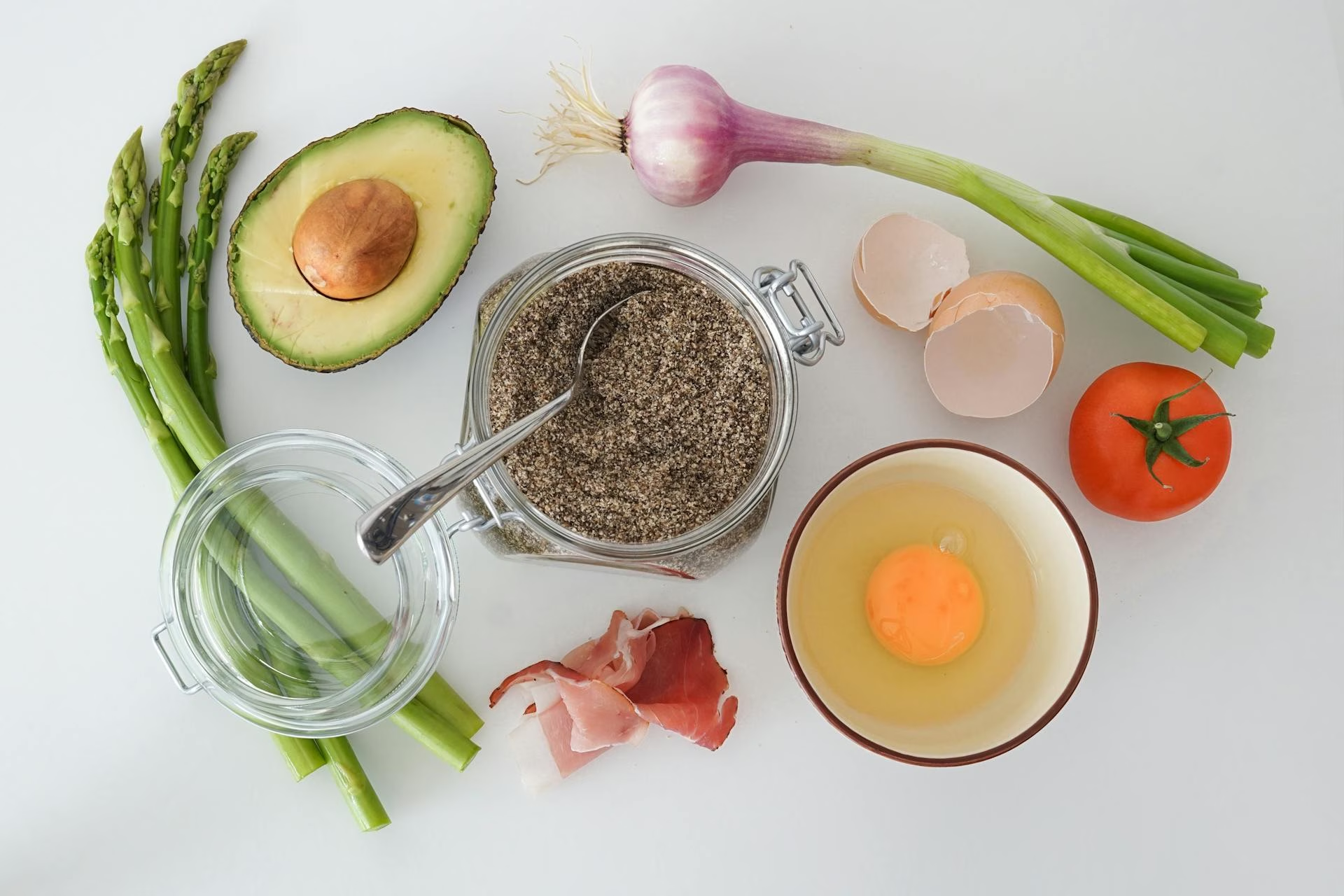
A flat-lay of keto-friendly whole foods including avocado, eggs, tomatoes, herbs and oils
A typical keto haul: avocado, eggs, fresh herbs, tomatoes and good oils. Whole food, very few carbs.

The short version

Keto is a very low-carb, high-fat way of eating that pushes your body to burn fat for fuel instead of sugar. Done well, it tends to quiet the appetite, even out your energy, and help with weight and blood sugar. The trade-off is a strict carb limit and a rough first week or two while your body adjusts. It suits people who like clear rules and do better without constant snacking, and it is not the right call for everyone, which we will come back to.

Why everyone suddenly seems to be doing keto

Walk into any gym or scroll through any feed and someone is talking about keto. In my clinic it is usually the first diet people ask about, often before they have asked whether it is right for them in the first place.

Some of that buzz is earned. When keto clicks, you feel it. The constant hunger eases, the afternoon slump softens, the weight starts to move. But the popularity has a downside too. Beginners get buried under conflicting rules and influencer meal plans that look nothing like how real people eat. Most of the people who give up in the first month do not quit because the diet failed them. They quit because no one told them what those first two weeks would feel like.

So consider this the plain version: what keto is, what actually happens inside your body, what to eat and what to drop, a realistic week of meals, the side effects people rarely warn you about, and the mistakes nearly everyone makes. I have tried to keep the fear-mongering and the miracle promises out of it.

What is the ketogenic diet?

At its simplest, keto means eating very few carbohydrates and a lot of fat. You drop the bread, pasta, rice, sugar and starchy foods that make up most of a normal diet, and you replace those calories mostly with fat, plus a moderate amount of protein. That really is the whole idea.

It is not a recent invention, either. Doctors at the Mayo Clinic developed the ketogenic diet back in the 1920s to treat children with epilepsy, and it is still used for that today. The weight-loss and blood-sugar uses came later, once researchers noticed what very low-carb eating did to appetite and insulin. So there is a century of clinical history behind it, even if the bacon-and-butter version on social media is new.

At its best, keto is not sticks of butter. It is ordinary food with the bread, sugar and starch left off the plate.

How does ketosis actually work?

Normally your body runs on glucose, the sugar it pulls from the carbs you eat. Carbs are easy fuel, so given the choice your cells reach for them first. Keep carbs low enough for long enough and that easy fuel runs out. Your liver answers by breaking fat down into molecules called ketones, which your brain and muscles can burn instead. That switch, from running on sugar to running on fat, is ketosis.

It helps to picture your metabolism as a fire. Carbohydrate is kindling. It catches fast, burns bright, and is gone just as quickly, which is why a high-carb breakfast leaves you hungry by mid-morning. Fat is a slow log. It takes longer to get going, but once it is burning the heat stays steady for hours. For most people the switch takes two to four days of strict low-carb eating, and the early ketone supply can be patchy. That is exactly why the first week tends to feel rough before it feels good.

Typical keto macronutrient ratios

“High fat, low carb” is vague, so here is the shape most beginners aim for. Treat these numbers as a target to drift toward, not a test you can fail.

NutrientShare of caloriesWhy it matters
Fat70–80%Your main fuel once carbs are low. Fat is what keeps you full and your energy steady through the afternoon.
Protein15–25%Enough to protect muscle and keep you satisfied, but not so much that your body turns the surplus into glucose.
Carbohydrate5–10%Usually 20 to 50g of net carbs a day, and almost all of it from vegetables rather than grains or sugar.

The ratios matter because the margins are thin. Too many carbs and you never reach ketosis. Too much protein, which is easier than it sounds, and your body quietly turns the surplus into glucose and keeps you out of ketosis even after you have dropped the bread. Fat fills the gap and keeps you full. That is the balancing act.

The benefits, and the honest caveats

People start keto for different reasons, so here is what the evidence actually supports, with the caveats left in.

Weight loss

For the first six months to a year, trials fairly consistently show keto matching or beating low-fat diets for weight loss. Some of the early drop is water, which is why the scale moves so fast in week one. The lasting part comes from eating less without really trying to.

Less hunger

Protein and fat keep you full, and steadier blood sugar means fewer crashes that send you hunting for a snack. Plenty of people drift naturally into two meals a day. This, more than any metabolic trick, is what makes the diet work.

Steadier energy

Once you are fat-adapted, the post-lunch coma tends to fade. You are off the spike-and-crash of a carb-heavy diet, so your energy sits at a more even level across the day.

Better blood sugar

Fewer carbs means less glucose and less insulin. For people with type 2 diabetes or insulin resistance, that can mean noticeably better numbers, sometimes enough to revisit medication. That part needs a doctor, not a blog, because doses often have to come down quickly once the carbs go.

Mental clarity

This one is more personal than proven. A lot of people report sharper focus on keto, most likely from stable blood sugar rather than anything mystical about ketones. It also tends to show up after the foggy adjustment week, not during it.

On the bigger claims

You will see keto credited with everything from reversing disease to slowing ageing. The solid evidence sits around weight, appetite, blood sugar and epilepsy. The rest runs from promising to wishful. A fair rule of thumb: the bigger the claim, the more proof you should want before you buy it.

Foods you can eat on keto

The thing that surprises most beginners is how ordinary keto food is. You are not hunting for special products. You are building plates around protein, fat and low-carb vegetables, most of which are already in your kitchen.

A carton of fresh brown eggs
Eggs are about as close as keto gets to a perfect food. Cheap, filling and endlessly versatile.
Healthy fats

Fat is the fuel, so make it good fat. Avocados, extra-virgin olive oil, coconut oil and butter are the staples. Cook in them, dress your salads with them, melt a little over your vegetables. This is the habit beginners resist hardest and benefit from most.

A ripe avocado cut in half
Half an avocado adds fat, fibre and potassium, the mineral most beginners run short on.
Protein

Eggs, chicken, beef and salmon do most of the work. Buy the fattier cuts: chicken thighs over breast, ribeye over sirloin. They are more satisfying and fit the diet better. Keep portions sensible, though, because protein is essential, not unlimited.

Dairy

Full-fat is the rule. Hard cheeses, heavy cream and plain full-fat Greek yogurt all earn their place. Skip the flavoured yogurts and the low-fat versions, which is usually where the sugar hides.

Low-carb vegetables

This is where most of your fibre and micronutrients come from, so do not skimp. Spinach, kale, broccoli, cauliflower and asparagus are all excellent. A simple guide: vegetables that grow above ground tend to be fine, while the starchy ones below ground, like potatoes and carrots, are not.

Bowls of colourful low-carb vegetables, nuts and seeds
Leafy greens, crucifers, nuts and seeds do the heavy lifting for fibre and micronutrients.
Nuts and seeds

Almonds, walnuts and pumpkin seeds make easy snacks and good salad toppers. One warning from experience: they are easy to overeat, and a few handfuls of cashews, which run higher in carbs, can quietly push you over your limit. Portion them out instead of eating from the bag.

Foods to avoid on keto

The avoid list is short to say and harder to live with. Anything built on sugar or starch has to go.

Loaves of dark bread with wheat stalks
Bread is the hardest habit to break. A single slice can use up most of a day's carb budget.
  • Bread. Wheat is almost pure starch. One sandwich can blow your entire daily carb allowance.
  • Pasta and rice. Same problem, bigger portions. Cauliflower rice and courgette noodles are the usual stand-ins.
  • Sugar. Table sugar, honey, syrup, most desserts. This is the one that ends ketosis fastest.
  • Soft drinks. A single can holds more carbs than you are allowed all day. Diet versions are debated, but at least carb-free.
  • Most processed snacks. Crisps, crackers, granola bars and “healthy” cereals are nearly all carb bombs.
  • High-sugar fruit. Bananas, grapes, mangoes and apples are too sweet for regular eating. Berries are the exception.
Rows of pastries and sweet baked goods in a bakery case
Bakery sugar, from pastries to sweetened coffees, is where most hidden carbs hide.

What can you actually eat in a day?

Beginners often look at that list and panic, convinced there is nothing left. There is plenty. A normal, unglamorous day might look like this.

A cooked steak in a pan with asparagus and rosemary
A simple keto dinner: a good steak, green vegetables and butter. No weighing, no fuss.
  • Breakfast. Three eggs scrambled in butter with half an avocado, and coffee with cream.
  • Lunch. A big salad with grilled chicken, olive oil, cheese and a handful of seeds.
  • Dinner. Salmon or steak with asparagus or broccoli, finished with butter.
  • Snacks. A few olives, some cheese, a small handful of nuts, only if you are actually hungry.
  • Drinks. Water, black coffee, unsweetened tea. Sparkling water with lemon if you miss the fizz.

A 7-day keto meal plan for beginners

Use this as a starting point, not a rulebook. Repeat the meals you like, swap the ones you do not, and lean on leftovers. Cooking once and eating twice is the quiet secret to sticking with any diet.

Two fresh salmon fillets on parchment paper
Fatty fish like salmon turns up often on keto: protein and omega-3s from a single pan.
DayBreakfastLunchDinnerSnack
MonScrambled eggs in butter, half an avocadoChicken Caesar, hold the croutonsBaked salmon, roasted asparagusCheese and a few olives
TueFull-fat Greek yogurt, walnuts, chiaTuna salad in lettuce cupsRibeye, sautéed spinachTwo boiled eggs
WedCheese-and-spinach omeletteLeftover ribeye over greensChicken thighs, roasted broccoliA small handful of almonds
ThuAvocado and baconCobb salad, ranchPork chops, cauliflower mashPepperoni and cheese
FriCoconut-milk chia puddingSalmon over mixed leavesBeef and pepper stir-fry, no riceMacadamia nuts
SatSausages and fried eggsBunless burger, side saladRoast chicken, green beans in butterOlives
SunFeta and veg frittataPrawn and avocado saladSteak, asparagus, garlic butterBerries with cream

Common keto side effects, and what to do

The keto flu

Somewhere around day three or four, a lot of beginners feel awful: headachy, tired, foggy, short-tempered. This is the famous keto flu, and the good news is that it is almost never the diet itself. It is your body flushing water and minerals as insulin falls. Put back the salt, potassium and magnesium you are losing and most of it lifts within a day or two.

Headaches and fatigue

Same cause, same fix. More water, more salt. A mug of broth or a pinch of salt in your water works faster than you would expect.

Constipation

Usually a sign you cut the carbs but forgot the vegetables. Pile on the leafy greens, add some chia or flax, and keep the water coming.

Cravings

These peak in the first week and ease as your appetite resets. Do not white-knuckle it on an empty stomach. Eat enough fat and protein and the cravings lose most of their grip.

One piece of advice

If I could give a beginner a single tip, it would be this: salt your food and drink more water. The most common reason people feel terrible in week one is not the carbs. It is low sodium and dehydration, and both are easy to fix.

Beginner mistakes to avoid

Spilled oats, seeds and cinnamon sticks on a surface
“Healthy” oats and granola are carb-dense. Read the labels, because the carbs add up fast.

After watching plenty of people start keto, the same handful of mistakes keep coming up.

  • Eating too much protein. The classic error. Someone cuts carbs, piles the plate with chicken breast, and wonders why ketosis never arrives. Excess protein becomes glucose. Add fat, ease up on the lean meat.
  • Ignoring electrolytes. This causes most of the keto flu and most of the quitting. Salt, potassium and magnesium, every day, especially early on.
  • Being afraid of fat. Decades of low-fat messaging are hard to unlearn, but a low-fat, low-carb diet just leaves you hungry and miserable. On keto, fat is the point.
  • Hidden carbs. Sauces, dressings, “keto” bars, that second handful of cashews. They add up. For the first couple of weeks it is worth tracking what you eat until your eye is trained.
  • Expecting magic. Keto is a useful tool, not a miracle. The people who succeed treat it as a way of eating they can keep up, not a two-week crash plan.

A simple keto grocery list

Shop the edges of the store, the fridge, the meat counter and the produce section, and you will sidestep most of the carbs sitting in the middle aisles. Here is a starter list to fill your first cart.

ProteinsEggs, chicken thighs, beef, pork, salmon, tuna, prawns, bacon, sausages
VegetablesSpinach, kale, broccoli, cauliflower, asparagus, courgette, peppers, salad leaves
Healthy fatsAvocados, extra-virgin olive oil, coconut oil, butter, ghee
DairyCheddar and other hard cheeses, heavy cream, full-fat Greek yogurt, cream cheese
PantryAlmond flour, chia and flax seeds, canned fish, broth, sea salt, spices, sugar-free condiments
SnacksAlmonds, walnuts, macadamias, pork rinds, olives, dark chocolate (85% or higher)

Is the keto diet safe?

For most healthy adults, yes. A sensible keto diet built on whole foods is a long way from the all-bacon caricature people picture. The ones who tend to benefit most are those carrying extra weight, fighting their blood sugar, or simply worn out by being hungry on every other diet.

Keto is not for everyone, though, and it would be dishonest to pretend otherwise. If you have kidney or liver disease, a history of disordered eating, or you are pregnant or breastfeeding, talk to a doctor before you start. And if you take medication for blood pressure or diabetes, that conversation is not optional, because doses often need lowering, sometimes within days.

Be honest with yourself about the long game, too. The research on many years of keto is still thin, and plenty of people get what they want from a focused few months and then settle into a gentler low-carb pattern. There is no prize for sticking out a diet you quietly hate.

Frequently asked questions

What is ketosis?

Ketosis is the state where your body runs mainly on fat instead of carbohydrate. When you keep carbs very low, your liver starts turning fat into molecules called ketones, which your brain and muscles can burn for fuel. It is a normal, well-studied process, and not the same thing as the dangerous ketoacidosis seen in unmanaged type 1 diabetes.

How long does it take to enter ketosis?

For most people, two to four days of eating under about 50g of net carbs. A few things speed it up: a longer overnight fast, a walk after meals, or simply cutting carbs harder. A blood ketone meter is the only way to know for certain.

Can I eat fruit on keto?

Some, in small amounts. Berries are the standout, and a handful of raspberries or blackberries fits most days. Bananas, grapes, mangoes and apples are too sugary to be regular keto foods, though a few bites will not undo anything.

Is keto good for weight loss?

It can be, and the research backs that up for the first six to twelve months. Most of the effect comes down to appetite, since protein and fat are filling and people tend to eat less without counting. The honest caveat is that keto is not magic. Total calories still matter, and it only works if you can actually stick with it.

Can vegetarians follow keto?

Yes, though it takes more planning. Eggs, cheese, Greek yogurt, tofu, tempeh, nuts, seeds, avocado and olive oil carry most of the load. Strict vegans have a harder time hitting protein without creeping over on carbs, but it can be done with care.

What happens if I eat too many carbs?

You drop out of ketosis, usually within hours. That is not a disaster. You simply start burning glucose again until your carbs come back down. The bigger problem is a run of high-carb days, which stalls progress and tends to bring the cravings back.

How much water should I drink on keto?

More than you think, especially early on. Low insulin makes your kidneys shed water and sodium quickly, which is why beginners feel parched and lightheaded. Drink to thirst, salt your food, and do not be shy about electrolytes.

Is keto safe long term?

For most healthy adults a well-planned keto diet looks safe over extended periods, but the long-term research is still thin. If you have kidney disease, liver problems, a history of disordered eating, or you are pregnant, check with a doctor first. Many people also do well treating keto as a several-month reset rather than a forever plan.

Key takeaways

  • Keto is a very low-carb, high-fat way of eating that shifts your body from burning sugar to burning fat.
  • Aim for roughly 70 to 80% fat, 15 to 25% protein, and 20 to 50g of net carbs a day, mostly from vegetables.
  • The first two weeks are the hardest. Most of the misery, the so-called keto flu, is just low electrolytes and is preventable.
  • Eat real food: meat, fish, eggs, leafy greens, avocado, olive oil, nuts and full-fat dairy. Skip bread, pasta, rice, sugar and most processed snacks.
  • Do not fear fat, and do not overdo protein. Those are the two mistakes I see most often.
  • Salt your food and stay hydrated. It solves more keto problems than any supplement.
  • Keto is not for everyone. If you have a medical condition or take medication, check with a clinician first.

Final thoughts

A composed keto plate with eggs, avocado, cured meats and low-sugar extras
A real keto plate: eggs, avocado, cured meats and a few low-sugar extras. Satisfying, not punishing.

If you take one thing from all this, let it be that keto is more forgiving than it looks from the outside. You do not have to be perfect. You have to be consistent, set the first fortnight up for success with enough fat, salt and water, and give your body the time it needs to change fuels.

Start simple. Clear the obvious carbs out of the kitchen, build your plates around protein, fat and vegetables, and judge it by how you feel rather than by a number on a meter. For a lot of people that is enough to make keto feel less like a diet and more like a way of eating they can keep up. Whatever you decide, go in with realistic expectations, loop in your doctor if you have any reason to, and give it an honest month before you make up your mind.

FAQ Schema Integrated
Direct Intent Ingestion
Citable Trust Indicators
Internal/External Backlinks
The Complete Guide to Earwax & What You Need to Know×
GEO-Optimized
An audiologist helping an older adult with a hearing device
Med Reference · Patient Education

The Complete Guide to Earwax & What You Need to Know

Dr. Marcus Reed, MD

ENT Specialist, Med Reference

12 min read
Updated May 20, 2026

I have spent a lot of years looking inside ears, and I can tell you the single most common thing I remove is not wax that the body left there. It is wax that someone pushed in trying to clean it out.

Earwax has a bad reputation it does not deserve. We treat it like grime to be scrubbed away, when it is actually one of the ear's cleverer defences. This guide walks through what earwax really is, why your body bothers to make it, when it genuinely needs dealing with, and the safe ways to do that. Just as important, it covers what to never do, because that is where most of the trouble starts.

What is earwax?

Earwax, or cerumen if we are being formal, is made by tiny glands in the outer part of your ear canal. It is a mix of those glandular secretions, dead skin cells and a little of whatever has drifted in from the outside world. That blend is exactly what makes it useful.

Your body produces it on purpose, around the clock, the same way it produces tears or saliva. The amount and texture vary a lot from person to person, and most of that comes down to genetics rather than anything you are doing right or wrong.

The big misconception is that wax equals dirt. It does not. A clean ear is not a wax-free ear. In fact, an ear scrubbed completely clean is more prone to itching, dryness and infection, because you have stripped away its protective layer.

Labelled anatomical diagram of the human ear showing the outer ear, ear canal and eardrum
The outer ear, the canal and the eardrum. Wax is made in the outer third of the canal and travels outward on its own.

A quick tour of the ear

You do not need a medical degree to follow this, but a little anatomy makes everything else click into place.

The outer ear is the part you can see, plus the opening into the canal. The ear canal is a roughly inch-long tunnel that leads inward. Wax is produced only in the outer third of that canal, near the entrance, not deep inside. At the far end sits the eardrum, a delicate membrane that vibrates with sound and separates the outer ear from the middle ear.

Here is the part most people never learn. The skin lining your canal slowly migrates outward, like a conveyor belt moving from the eardrum toward the opening. As it travels it carries old wax, dead skin and trapped debris along with it. Every time you chew or talk, your jaw helps nudge that process along. Left alone, the ear genuinely cleans itself.

Worth knowing

That outward conveyor belt is exactly why poking around with a swab backfires. You are working against the direction your ear is already moving wax, and shoving some of it back toward the eardrum where it gets stuck.

Why earwax is actually good for you

Once you see what wax is doing, it gets a lot harder to think of it as gross. It is a small, hardworking protective system, and it pulls several jobs at once:

  • Protection. It forms a barrier that stops dust, water and stray particles from reaching the eardrum.
  • Trapping debris. Its stickiness catches dirt, dead skin and even the occasional small insect before they get deep.
  • Lubrication. It keeps the thin skin of the canal from drying out, cracking and itching.
  • Fighting germs. Earwax is slightly acidic and mildly antibacterial and antifungal, which helps keep infections at bay.
An ear scrubbed perfectly clean is not a healthy ear. It is an unprotected one.

The different types of earwax

Not all earwax is the same, and the difference is written into your genes. There are two main types, and which one you have is decided by a single gene that, oddly enough, also has a say in body odour.

TypeWhat it looks likeCommon in
Wet (sticky)Soft, sticky, honey-coloured to dark brownMost people of African and European descent
Dry (flaky)Grey, crumbly and flakyMost people of East Asian and Native American descent

Colour varies on top of that, and it is mostly nothing to worry about. Fresh wax is usually lighter and softer. Older wax darkens to brown or almost black as it dries and collects debris on its way out. The colours that should get your attention are not really wax at all: anything green, foul-smelling, or streaked with blood points to a possible infection or injury rather than ordinary cerumen.

A person wincing while pushing a cotton swab into their ear
The classic mistake. A swab in the canal pushes more wax in than it ever takes out.

What actually causes earwax to build up

If the ear cleans itself, why does wax ever become a problem? Usually because something interrupts that natural outward flow. A few of the usual suspects:

  • Cotton swabs. The big one. For every bit of wax a swab removes, it tends to pack more of it deeper into the canal.
  • Earbuds. Wear them for hours a day and they act like a plug, holding wax in and trapping moisture behind it.
  • Hearing aids. Same idea. Anything that sits in the canal blocks the exit and encourages wax to collect.
  • Narrow or hairy canals. Some people are simply built with canals that wax struggles to travel out of.
  • Naturally heavy producers. A few people just make more wax than average, and it can outpace the ear's ability to clear it.

I see this play out constantly. A patient comes in convinced their ears are filthy, when really they are a daily-earbud user with a narrow canal, doing everything right except the swabbing that started the blockage in the first place.

Signs you might have too much earwax

A blockage rarely happens overnight. It tends to creep up, and the symptoms usually show up on one side. Watch for:

  • Muffled or reduced hearing, often in just one ear
  • A feeling of fullness or pressure, like the ear is plugged
  • Ringing or buzzing (tinnitus) on the affected side
  • Mild dizziness or a sense of being off balance
  • An ache or general discomfort in the ear
  • Itching deep in the canal
A clinician examining a patient's ear with an otoscope
A clinician can see the canal and eardrum directly, which takes the guesswork out of a blockage.

When earwax becomes a problem

Most of the time, wax is a non-issue. It becomes one when it builds up faster than it clears and packs into a plug, which clinicians call impacted cerumen. That is when the muffled hearing and full feeling set in.

Trapped wax and moisture can also set the stage for an ear infection, especially if the skin of the canal has been scratched by a swab or fingernail. And while wax-related hearing loss is almost always temporary, ignoring a blockage that keeps getting worse, or pain and discharge that come with it, is how a small problem turns into a longer appointment.

Safe ways to deal with earwax at home

If your ear feels a little full but there is no pain, no discharge and no history of a perforated eardrum, a gentle at-home approach is reasonable before you book a visit.

The simplest method is to soften the wax and let your ear finish the job. A few drops of mineral oil, baby oil or plain olive oil, once or twice a day for several days, makes hardened wax loosen and migrate out on its own. Over-the-counter ear drops work the same way, a little faster. A warm shower, letting water run into the ear and then tilting it out, can help rinse softened wax free.

Do

  • Soften wax with a few drops of mineral, baby or olive oil
  • Use over-the-counter drops exactly as directed
  • Let warm shower water rinse the outer ear
  • Give it several days; wax usually clears on its own
  • See a clinician if symptoms last beyond a week

Don't

  • Push cotton swabs into the ear canal
  • Use ear candles, ever
  • Dig with hairpins, keys or anything sharp
  • Irrigate if you might have a perforated eardrum
  • Over-clean an ear that has no symptoms

What not to do

This is the half of the article I wish more people read first. Most ear injuries I treat are self-inflicted, and they come from a short list of tools:

  • Cotton swabs. Fine for the outer ear, never inside the canal.
  • Hairpins and keys. They scratch the canal and can puncture the eardrum in an instant.
  • Ear candles. No benefit, real risk of burns and dripped wax.
  • Anything sharp. If it is rigid and pointed, it does not belong in your ear.

A real warning

It only takes one slip. A startled flinch, a bump from a child, a moment of overconfidence, and a swab or pin can tear the eardrum. Those injuries can mean weeks of healing and, in some cases, lasting damage to your hearing. No blockage is worth that gamble.

How the professionals remove it

When home care is not enough, getting wax removed by a clinician is quick, routine and usually painless. There are three common methods, and the right one depends on your ears and your history.

  • Irrigation. A gentle stream of warm water flushes the wax out. Simple and effective, though not for anyone with a perforated eardrum or past ear surgery.
  • Microsuction. A tiny suction device clears the wax while the clinician watches through a microscope. It is precise, dry, and generally the safest option.
  • Manual removal. A small curette or hook lifts the wax out under direct view. Fast and well tolerated in skilled hands.

From your side of the chair, the whole thing usually takes five to fifteen minutes. You might feel a little pressure or a cool rush of water, hear some odd sounds, and then notice the world is suddenly louder on that side. Most people are surprised by how anticlimactic it is.

Earwax and hearing aids

Close-up of a hearing aid being fitted to an older adult's ear
Hearing aids sit right where wax exits, so a little extra maintenance goes a long way.

Hearing-aid users deal with more wax buildup than most, and the reason is mechanical, not hygienic. The device sits in or over the canal, right in the path the wax uses to leave, so it collects instead of clearing. Wax is also the leading cause of hearing aids breaking down, since it clogs the tiny speakers and microphones.

The fix is a small daily habit. Wipe the device down each night with a dry cloth or tissue, use the cleaning brush and wax guards that come with it, and store it somewhere dry. Beyond that, a wax check every six months keeps both the ear and the hardware working the way they should.

What about children?

Parents worry about this one a lot, and the honest answer is reassuring: children's ears clean themselves just like adults' do, and most of the wax you can see does not need touching at all.

The safe approach is the boring one. Wipe the outer ear with a damp cloth and leave the canal alone. Resist the urge to go in with a swab, which is even riskier in a wriggly child. If your little one is tugging at an ear, complaining of pain, or seems to be missing things you say, that is a reason to see a pediatrician rather than to start digging. They can check the ear safely and clear a true blockage if there is one.

Earwax myths vs facts

A lot of ear-care advice gets passed around and repeated until it sounds true. Here is what holds up and what does not.

MythFact
Earwax is a sign of poor hygiene.Everyone makes it. It is a sign of a healthy, self-cleaning ear.
Cotton swabs clean your ears.They usually push wax deeper and can pack it against the eardrum.
You should clean inside your ears daily.The canal cleans itself. Daily poking does more harm than good.
Ear candling pulls wax out.It does not, and it can burn you or drip candle wax into the canal.
More wax means dirtier ears.How much you make is mostly genetic, not a hygiene score.
Earwax has no real purpose.It lubricates the canal, traps debris and fights bacteria.
All earwax should be removed.Only remove it if it is actually causing symptoms.
Dark or yellow wax is unhealthy.That is the normal colour range. Only a few signs warrant concern.

When should you see a doctor?

Home softening handles most mild cases. Some signs, though, mean you should skip the self-care and get the ear looked at. Book an appointment if you have any of these:

See a clinician if you have

  • Ear pain, rather than just fullness
  • Discharge that looks like pus or blood
  • Sudden or one-sided hearing loss
  • Dizziness or a spinning sensation
  • A blockage that has not cleared after a week of drops
  • A known perforated eardrum, ear surgery or recurring infections

Frequently asked questions

Is earwax normal?

Completely. Everyone produces it, and a certain amount sitting in the ear canal is exactly what you want to see. It only becomes a problem when it builds up enough to block the canal or when it is pushed in and packed down. Visible wax at the opening of the ear is not dirt. It is your ear doing its job.

How often should I clean my ears?

For most people, almost never, at least not the inside. The ear canal is self-cleaning: jaw movement from talking and chewing slowly carries old wax outward, where it dries and falls away. Wiping the outer ear with a damp cloth in the shower is all the cleaning a healthy ear needs.

Can earwax cause hearing loss?

Yes, but it is almost always temporary. When wax fully blocks the canal it muffles sound, and people often describe it as having a finger in one ear. Once the blockage clears, hearing returns to normal. If your hearing does not come back after the wax is removed, that is worth having checked.

Are ear candles safe?

No. Ear candling has no proven benefit, and regulators have warned against it for years. The supposed wax it pulls out is just melted candle wax. The real risks are burns to the face and ear, and hot wax dripping into the canal or onto the eardrum. Skip it.

Can hearing aids increase wax buildup?

They can. A hearing aid or earbud sits in the canal and blocks the natural outward flow of wax, so it tends to collect and pack down. It is not that the device makes more wax, it just gets in the way of the wax leaving. Regular cleaning and the odd check-up keep it manageable.

What colour should earwax be?

Anywhere from pale yellow to dark brown is normal. Fresh wax tends to be lighter and softer; older wax darkens as it dries and picks up debris. Colour on its own rarely means much. Pain, a bad smell, or discharge that looks like pus or blood is what should prompt a visit.

Why do some people produce more earwax than others?

Mostly genetics. The same gene that decides whether your wax is wet or dry also influences how much you make. Narrow or hairy canals, frequent earbud or hearing-aid use, and a tendency to poke at the ears can all make wax build up faster, too.

Is it ever okay to use a cotton swab?

On the outer ear, sure. Wiping the bowl of the ear and behind it is fine. The rule is simple: nothing smaller than your elbow goes into the canal. The moment a swab enters the canal it is more likely to compact wax than remove it.

How do I know if my earwax is impacted?

Impacted wax usually announces itself with a blocked or full feeling, muffled hearing, sometimes an ache, ringing, or an itch deep in the ear. If a few days of softening drops do not help, or symptoms are getting worse, it is time to let a professional take a look.

The bottom line

If there is one thing to take away, it is to do less. Earwax is not the enemy. For the vast majority of people, the ear is perfectly capable of managing its own wax, and the best thing you can do is stay out of its way. Wipe the outside, leave the inside alone.

When wax does build up enough to cause trouble, reach for softening drops and a little patience before anything else. Keep swabs, pins and candles out of the picture entirely. And if you have pain, discharge, sudden hearing changes or a blockage that will not budge, let a professional sort it out. It is faster, safer and far less dramatic than anything you can attempt at the bathroom sink.

Medical disclaimer

This article is for general education only and is not a substitute for professional medical advice, diagnosis or treatment. Always speak with a qualified healthcare provider about any concerns regarding your ears or hearing, and never put anything in your ear canal against your clinician's guidance.
FAQ Schema Integrated
Direct Intent Ingestion
Citable Trust Indicators
Internal/External Backlinks
Integrations

Auto-Publish In One Click

Sync Spyro directly with your CMS, portfolio blog, or custom endpoints. Queue articles to write, link, optimize, and auto-publish daily.

Get Started Now

WordPress.org

WordPress.org

Self-hosted blogging engine integration

WordPress.com

WordPress.com

Managed WordPress cloud hosting sync

Shopify

Shopify Store

E-commerce blog auto-publishing sync

Wix

Wix Site

Headless & portfolio continuous blog queue

Google Search Console

Google Search Console

SEO performance & search indexing insights

APIs & Webhooks

Custom headless setups & triggered publishing

WordPress.org

WordPress.org

Self-hosted blogging engine integration

WordPress.com

WordPress.com

Managed WordPress cloud hosting sync

Shopify

Shopify Store

E-commerce blog auto-publishing sync

Wix

Wix Site

Headless & portfolio continuous blog queue

Google Search Console

Google Search Console

SEO performance & search indexing insights

APIs & Webhooks

Custom headless setups & triggered publishing

pricing

Grow Organic Traffic on Auto-Pilot

Spyro grows your SEO rankings and organic traffic while you focus on growing your business.

2 months off

Pro Plan + Done For You

Everything you need to automate your organic growth. Optimized content, automated distribution, citable GEO triggers, and backlink syndication.

$149/mo regularly
$99per month
$1,788/yr
$990/ yr

Annual Plan — 2 Months Free

Start Your Free Trial
Cancel anytime. No questions asked!

What's included:

  • Setup: Done For YouWe'll help set up your account, audit your website, identify issues and suggest improvements, and research and plan your entire month of blog topics
  • Up to 2 Workspaces IncludedEach Workspace is one website. Pro covers up to 2 — the 2nd is +$89/mo. Need 3 or more? You'll move to our Agency plan.
  • Personalized Keyword StrategySpyro checks all your competitors' rankings and targets long-tail keywords for you to rank on Google
  • 30 SEO/GEO-Optimized Articles (1 Daily)
  • 2,500–3,000 Word Long-Form Articles That Rank
  • Auto Internal & External Linking
  • AI Mentions TrackingEvery Monday, Spyro checks Google AI Overviews, ChatGPT, Claude, and Perplexity to see where your site ranks and whether it's cited as a source
  • Auto AI Images (20+ image styles to choose from)
  • Auto-Publishing to Your Website
  • Unlimited Team Members
  • Priority Support
  • Custom Feature Requests
%
More sites, less per site!Volume discounts apply automatically
3–5 sites 10% off6–10 sites 15% off11–20 sites 20% off
FAQ's

Everything you need to know about spyro

Here are answers to the most common things people ask before getting started.

What is Spyro?

Spyro is an AI visibility platform that tracks how often your brand, product, or website gets cited and recommended by AI tools like ChatGPT, Claude, Gemini, and Perplexity — giving you real data on your presence in the AI-driven search landscape.

How does Spyro track AI citations?

Spyro runs thousands of relevant prompts across major AI models and logs every time your brand or URL appears in a response. We then surface trends, competitors, and gaps in a clear dashboard so you can act on the data.

Which AI models does Spyro monitor?

We currently monitor ChatGPT (GPT-4o), Claude, Gemini, Perplexity, and Copilot. We add new models as they gain mainstream adoption.

How is Spyro different from traditional SEO tools?

Traditional SEO tools track Google rankings. Spyro tracks AI rankings — how often an AI recommends your brand when someone asks a question in a chat interface. These are two very different distribution channels, and Spyro is purpose-built for the AI one.

Do I need technical skills to use Spyro?

No. Spyro is designed for founders, marketers, and product teams. Setup takes minutes and the dashboard is built to be understood at a glance — no data engineering required.

How long does it take to see results?

Most users see their first citation data within 24 hours of connecting their brand. Trend data builds meaningfully over the first 2–4 weeks as we accumulate enough query history to show movement.

My site is new — is Spyro still useful for me?

Yes. In fact, starting early gives you a baseline to measure growth against. You'll know exactly which content investments and PR efforts start moving your AI visibility needle.

Can I monitor my competitors?

Absolutely. Add any competitor domain and Spyro will track their AI citation rate alongside yours, so you can benchmark your share of voice and spot where they are winning.

How do I improve my AI visibility score?

Spyro surfaces the exact topics, queries, and formats where competitors are getting cited but you are not. Use that gap analysis to create authoritative content, earn quality backlinks, and get mentioned on sources AI models trust.

Can agencies manage multiple clients on Spyro?

Yes. Agency plans let you manage multiple brand workspaces from a single account, with separate dashboards and white-label reporting for each client.

How often is the citation data updated?

Citation data refreshes daily. Trend charts update in real time as new query runs complete, so your dashboard always reflects the latest AI landscape.

What happens to my data after the free trial?

All data collected during your trial is preserved when you upgrade to a paid plan. Nothing is lost — your historical baseline carries forward.

Is my data private and secure?

Yes. Your brand data, competitor configurations, and query results are stored with encryption at rest and in transit. We never share your data with third parties.

Does Spyro integrate with tools I already use?

Spyro connects with Slack for daily digest alerts, and exports clean CSV or JSON reports you can pull into your existing BI tools, Notion docs, or agency reporting workflows.

What does Spyro cost after the trial?

We offer a Pro plan and an Agency plan (with a Custom tier for high-volume teams), billed monthly or annually. Annual plans include two months free. Pricing details are on our pricing page and you can upgrade directly from your dashboard.

Can I cancel at any time?

Yes. There are no long-term contracts on monthly plans. You can cancel from your account settings at any time and you will not be charged again after your current billing period ends.

Blogs

Helpful insights to help you grow

Explore our latest articles to help your SaaS product succeed and scale smarter.

Top 10 AI Chatbots in 2026
AI Tools

Top 10 AI Chatbots in 2026

A comprehensive breakdown of the best AI chatbots available in 2026 — covering ChatGPT-5, Claude 4, Gemini Ultra 2, Grok 3, Perplexity AI, and more. Find out which model fits your workflow, budget, and use case.

12 min read
Best AI Video Makers for TikTok in 2026Video Tools

Best AI Video Makers for TikTok in 2026

The top AI-powered video creation tools for TikTok creators and marketers — reviewed for speed, caption quality, viral clip generation, and value.

10 min read
Supabase vs Firebase: Choose Your Backend in 2026Backend Dev

Supabase vs Firebase: Choose Your Backend in 2026

A complete side-by-side comparison of Supabase and Firebase across database model, authentication, pricing, real-time capabilities, and developer experience.

11 min read

Your website should never leave a visitor without an answer.

Spyro writes citation-friendly pages, links them, and publishes to your CMS daily, so your brand is the answer AI engines and Google hand to your customers.