


WordPress AI SEO Automation: Publish GEO Ready Posts on Autopilot



Quick Answer: What Is WordPress AI SEO Automation?
WordPress AI SEO automation is the use of AI and scheduled workflows to handle the repeatable parts of SEO and publishing on a WordPress site, such as briefs, drafts, metadata, link suggestions and scheduled posting, while people keep control of facts, approvals and strategy.
- What you can automate: research prompts, briefs, first drafts, title and meta description drafts, schema fields, image alt text drafts, scheduling and monitoring.
- What you shouldn’t: fact checking, statistics, final approval and edits to live pages that already rank.
- What GEO ready means: a page that answers the question early, backs claims with named sources and is easy to crawl. It improves your chances of being quoted. It doesn’t guarantee a ranking or a citation.
- The safest setup: drafts or scheduled posts first, a limited WordPress account, backups, and one human sign off before anything goes live.
Here’s the thing most “autopilot” pitches skip. In WordPress AI SEO automation, publishing automatically and optimizing automatically are two separate jobs, and only one of them is safe to leave alone. I wrote this guide for site owners, in house marketing teams, SEO consultants and agencies that run WordPress sites. If you want the writing side first, the AI content optimization guide explains how AI engines pick passages to quote.
What Does WordPress AI SEO Automation Actually Cover?
Three different things get lumped under this label, and mixing them up is how sites end up with unreviewed posts.
- AI assisted writing. A model drafts or edits text. A chatbot tab counts.
- SEO tooling inside WordPress. A plugin manages titles, meta descriptions, sitemaps, redirects and schema fields. Most of that is settings and rules, not AI.
- Workflow automation. Something moves work along by itself: a calendar that queues topics, a service that sends a finished post to your site, a schedule that publishes on Tuesday morning.
WordPress AI SEO automation joins all three, with checks between the steps. A writing assistant on its own gives you a draft in a chat window. A traditional SEO plugin grades what you typed after you typed it. Automation connects them, so a brief becomes a reviewed draft, the draft becomes a scheduled post, and the published page gets measured.
Which tasks are safe to hand over? This is the split I’d use.
| Task | Automate it? | Why |
|---|---|---|
| Topic ideas, keyword groups, briefs and outlines | Yes, then review | Suggestions are cheap to reject |
| First draft | Yes, if a person edits it | AI drafts can contain invented details |
| Title and meta description drafts | Yes, with review | Google says metadata needs the same fact check as body text |
| Internal link and alt text suggestions | Suggest, then review | Wrong links confuse readers, and alt text should describe the image |
| Schema fields | Automate, then validate | Markup has to match what’s visible on the page |
| Scheduling and sitemaps | Yes | Native WordPress features |
| Statistics, claims and final approval | No | A person opens every source and signs off |
| Changes to live, ranking pages | Only with review and a backup | One bad bulk edit can undo years of work |
Google doesn’t ban AI content. Its guidance on generative AI content says it can help with research and structure, and also says to manually fact check and review AI output, including titles, meta descriptions, structured data and image alt text. Its spam policies list generating many pages with AI tools without adding value for users as scaled content abuse. That one sentence is why every workflow below has a human checkpoint.
How Does WordPress AI SEO Automation Work From Brief to Published Post?
WordPress AI SEO automation runs as a chain. Each link produces something the next one can check.
| Stage | Automation task | Human checkpoint | Output |
|---|---|---|---|
| 1. Research | Group keywords, pull questions and gaps | Confirm the topic fits your business | Approved topic |
| 2. Brief | Draft search intent, outline, sources to cite | Edit the angle and the outline | Brief with headings |
| 3. Draft | Write the first version | Add original examples, remove filler | Edited draft |
| 4. On page SEO | Draft title, meta description, headings, image alt text | Check accuracy and tone | Metadata that matches the page |
| 5. Links and schema | Suggest internal links and sources, generate structured data | Open every link, validate markup against the visible content | Verified links, valid markup |
| 6. GEO pass | Check answer first openings, headings, passages that stand alone | Read each key passage on its own | Quotable sections |
| 7. Fact check | Flag claims without a source | Verify every statistic and product claim | Cleared draft |
| 8. Send to WordPress | Create a draft, pending or scheduled post | Approve the schedule | Draft or scheduled post |
| 9. Publish and index | Release on the chosen date, update the sitemap | Spot check the live page, inspect the URL if it isn’t indexed | Live, indexed page |
| 10. Monitor and refresh | Track performance, flag stale posts | Decide what to update | Refresh list |
Stage 9 deserves a note. Publishing doesn’t mean indexing. WordPress core has produced an XML sitemap at /wp-sitemap.xml since version 5.5, and Google says a sitemap doesn’t guarantee that everything in it gets crawled and indexed. So you check, you don’t assume.
Which Parts Come From WordPress, a Plugin, an AI Tool or Custom Code?
Knowing where each feature lives tells you what to configure and what to trust. Here’s how I’d sort it.
| Layer | What it handles | Watch out for |
|---|---|---|
| WordPress core | Post statuses (draft, pending, scheduled, published, private), user roles, the REST API, application passwords, XML sitemaps | Core doesn’t write or optimize content for you |
| SEO plugin | Title and meta fields, schema, redirects, breadcrumbs, sometimes AI suggestions | Plugin settings aren’t a content strategy |
| AI writing tool | Briefs, drafts, rewrites, metadata drafts | Invented facts, generic phrasing |
| Workflow service | Moving content between tools on a trigger or schedule | Broad permissions and API keys |
| Custom code | Anything specific to your site, built on the REST API | You own the security and maintenance |
WordPress itself is moving closer to AI. According to InfoQ’s coverage of WordPress 7.0, core now includes an AI Client, an Abilities API and a connectors hub for AI providers. Content generation isn’t part of core. It comes from an optional official AI plugin. The SEO and publishing judgment still sits with you.
The REST API is the other piece to understand. Its posts reference lists the statuses a created post can have: publish, future, draft, pending and private. Any tool that publishes through the API picks one of those. Draft or pending is the safe default. Future schedules it. Publish sends it live right now.
What Makes a Post GEO Ready in WordPress AI SEO Automation?
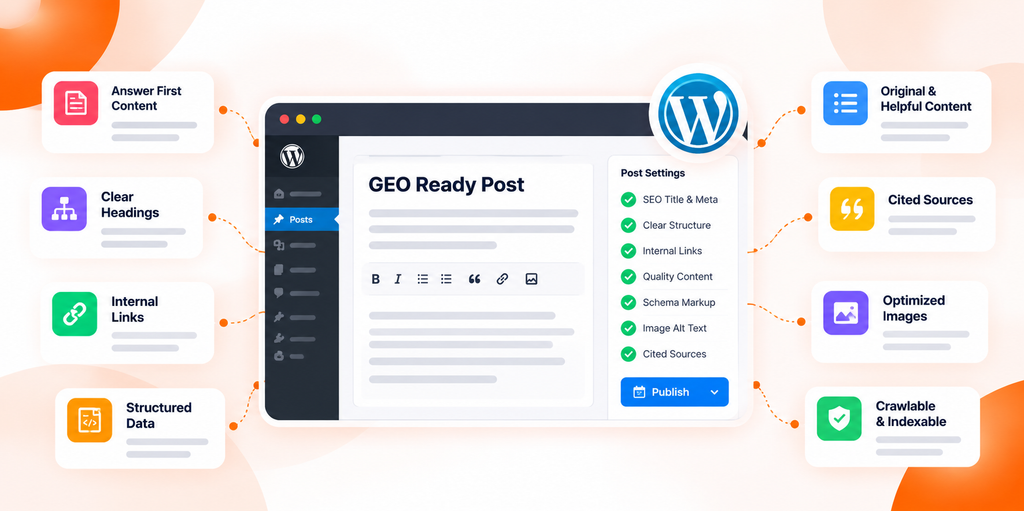
GEO ready means a page is easy for AI search features to find, understand and quote. Nothing more mystical than that. Google says there are no additional requirements to appear in AI Overviews or AI Mode, only that a page is indexed and eligible to show with a snippet. So GEO readiness is mostly good SEO plus clear writing.
What I’d check on every post, automated or not:
- A direct answer in the first one or two sentences, then the detail.
- Headings that state a point or ask a real question. “How much does it cost?” beats “Pricing.”
- Named, linked sources that a person has opened.
- Something original. Your numbers, your process, your screenshots.
- Passages that make sense alone, because an engine may quote one paragraph.
- Consistent names for your brand, products and people.
- A visible author and a real update date.
- Crawlable text, not content hidden in scripts or images.
- Structured data that matches the page. Schema describes what’s visible. It doesn’t add rankings.
No file, markup type or formatting trick guarantees a citation. If you want the full picture of what Google documents and what’s still unknown, the guide on how to rank in Google AI Overviews goes through it.
How Do You Build a WordPress AI SEO Automation Workflow in Seven Steps?
Start small. One site, one content type, one approval path. Here’s the order I’d follow for WordPress AI SEO automation.
Step 1. Set the guardrails. Objective: decide what AI may touch. Automate nothing yet. Write down your style guide, banned claims, approved sources and who signs off. The failure case is every draft sounding different.
Step 2. Turn search intent into a brief. Objective: know the reader’s question before drafting. Automate keyword grouping, question collection and outline drafts with an AI SEO platform or assistant. Check that the outline matches what a searcher wants. The failure case is a fluent article that answers a question nobody asked.
Step 3. Draft inside your style guide. Objective: a usable first version, fast. Automate the draft in an AI writer that has the brief and your rules. Check for invented statistics and generic phrasing, then add original examples. The failure case is a draft that reads like everyone else’s.
Step 4. Optimize the page. Objective: headings, metadata, links, images and schema that fit the content. Automate drafts of the title, meta description and alt text, plus link suggestions and schema fields, usually through an SEO plugin. Check by opening the links and validating the markup. Google’s image guidance asks for alt text that is useful, not stuffed with keywords. The failure case is irrelevant internal links.
Step 5. Review and fact check. Objective: every claim true and current. Automate a checklist that flags numbers and product claims without a source. A person then opens each source. No exceptions. The failure case is a confident wrong number published under your name.
Step 6. Send it to WordPress as a draft or a schedule. Objective: get the post into the CMS without publishing by accident. Automate the transfer through a plugin, workflow service, the REST API or a connected platform. Check the status is draft, pending or scheduled. The failure case is a post that goes live instantly with a placeholder image.
Step 7. Monitor and refresh. Objective: know whether the page is indexed, read and still accurate. Automate Search Console reports, rank and AI mention checks, and a quarterly list of stale posts. A person decides what to update. The failure case is a post that quietly goes out of date.
What Does This Look Like for a Real Team? (Illustrative Example)
This is a made up scenario, not a customer result.
Picture a six person marketing team publishing eight posts a month. Before automation, one editor spends most of a week on briefs, metadata and uploading. With a WordPress AI SEO automation workflow, briefs and first drafts come from a tool, the editor spends that time on facts and original examples, and approved posts are queued as scheduled posts for Tuesday and Thursday mornings. Will that raise rankings? Nobody can promise it. It should shorten the path from brief to approved post, and you can measure that.
Which Tools Does WordPress AI SEO Automation Need?
Rarely just one. No single plugin handles WordPress AI SEO automation end to end, because a plugin almost never handles research, drafting, optimization, publishing and measurement equally well. Most setups mix a few of these.
| Tool category | What it does | What it can’t do |
|---|---|---|
| Traditional WordPress SEO plugin | Meta fields, sitemaps, redirects, schema, readability checks | Decide your topics or verify your facts |
| AI content generation plugin | Drafts and rewrites inside the editor | Judge accuracy or originality |
| AI content optimization tool | Scores coverage, structure and headings | Predict rankings or citations |
| Workflow automation service | Triggers and moves content between apps | Replace editorial review |
| Internal linking and image tools | Suggest related posts, compress images, draft alt text | Judge which link or image helps the reader |
| Analytics and reporting | Shows clicks, impressions, conversions | Prove that automation caused a change |
I haven’t ranked specific plugins here. Features, pricing and compatibility change often, and a ranking that ignores your site’s needs is just an opinion. For AI writing tools, see the guide to the best AI blog writers for SEO and GEO.
How Do You Choose the Best AI SEO Plugin for WordPress?
The best AI SEO plugin for WordPress is the one that fits your publishing workflow, budget and technical setup. There’s no universal winner. Whether you’re weighing a WordPress AI SEO plugin that only handles metadata or a broader platform, ask these questions:
| Question | What to look for |
|---|---|
| Does it work with your WordPress version, PHP version, theme and editor? | Stated compatibility, recent updates |
| Which SEO tasks does it cover, and does it generate content or only optimize it? | Metadata, schema, links, audits, drafts |
| How does it connect, and what triggers an automation? | REST API, webhooks, schedules, manual buttons |
| Can you require approval? | Draft or pending status, a review step |
| What does it cost at your volume? | Usage limits, credits, seats |
| Where does your content go? | Privacy policy, model providers |
| What permissions does it need? | Least access possible, easy to revoke |
| Is it maintained, and can you leave? | Update history, support, export options |
| How does it report results? | Search data, not just a score |
If a tool can’t answer the approval and permissions questions, I’d skip it. Those two matter more than any feature list.
How Do You Keep WordPress AI SEO Automation Secure?
WordPress AI SEO automation means a tool can write to your site while you’re asleep. Treat that like handing someone a key.
- Use a dedicated account. WordPress application passwords belong to one user and, per that guide, had no scoping of their own, so requests run with that user’s full access. Never connect an automation with your own administrator login.
- Match the role to the job. The WordPress roles documentation shows that a Contributor can write posts but can’t publish them or upload files, while an Author can publish and upload. A Contributor can’t publish by accident, which is a useful safety net. An Author can add images, so make sure the integration saves drafts.
- Use HTTPS. Application passwords are available by default only on sites served over HTTPS, because otherwise the password could be intercepted.
- Revoke what you don’t use. WordPress shows when each application password was last used. Delete stale ones.
- Store keys safely. Use a password manager or the tool’s secure settings, never a shared document.
- Back up before bulk changes, test a restore once, and review any generated HTML for scripts or iframes you didn’t expect.
- Keep plugins updated and permissions minimal. Never disable a security setting to make an integration work. If a tool needs that, it’s the wrong tool.
The way content reaches WordPress changes the risk:
| Method | How it works | Best for | Main risk |
|---|---|---|---|
| Plugin | Runs inside WordPress | Editor based workflows | Plugin quality and updates |
| Automation service | Calls WordPress from outside | Connecting several apps | Broad permissions, stored credentials |
| REST API | Your own code or a connected platform sends posts | Custom control | You maintain the security |
| Custom code | Built for your site | Unusual needs | Bugs and ongoing upkeep |
Where Does Spyro AI Fit in WordPress AI SEO Automation?
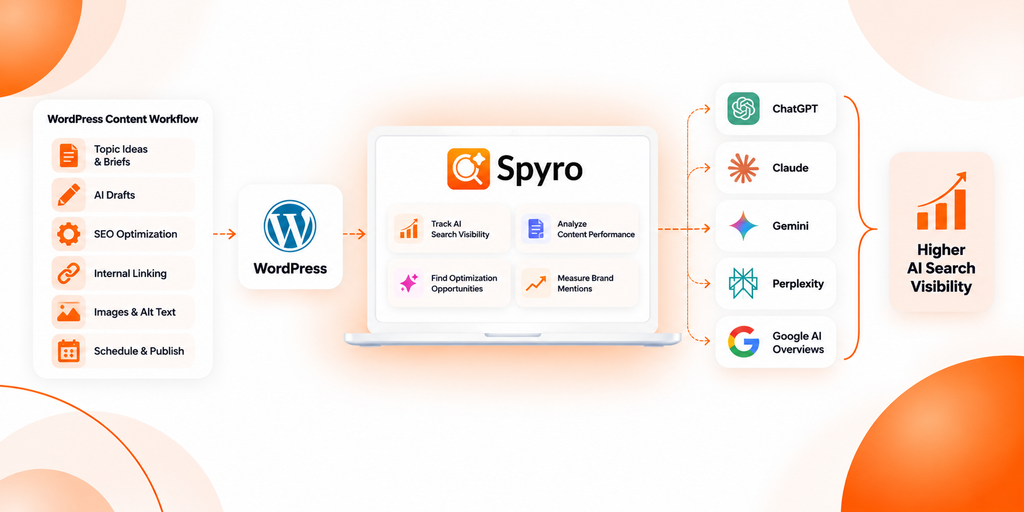
Spyro AI covers part of the chain, not all of it. Everything here comes from its documentation and product pages, checked in 2026.
- Topics and drafts. A content calendar lays out AI researched topic ideas by day. Spyro AI’s writer researches a topic, drafts the article with images, and gives you an editor where you can change wording, headings, title and description.
- SEO and GEO checks. An SEO score panel sits beside the target keyword. A GEO mode structures articles with answer first hooks, quotable summaries, Q&A blocks and schema.
- Publishing to self hosted WordPress. You connect your site once with a WordPress application password, then publish a finished article with one click or schedule it. The integrations documentation walks through the setup. (The Spyro AI homepage also lists WordPress.com, but I found setup instructions only for self hosted WordPress.)
- Auto publish. There’s a setting that publishes finished articles to your connected site automatically. The docs advise turning it on only once you’re happy with how your articles look. Until then, you review and push each article yourself.
- Measurement. A Search Console integration shows clicks and impressions, a site audit flags technical issues, and AI visibility tracking checks whether ChatGPT, Gemini, Claude, Perplexity and Google AI Overviews mention your brand, on a daily or weekly schedule you set.
Now the limits. The documentation doesn’t say whether auto published posts arrive on WordPress as drafts or go live immediately, so test with one article on a staging site first. I didn’t find documentation of Spyro AI editing existing WordPress posts, installing plugins or managing your SEO plugin’s settings, so don’t assume it does. And like every tool used for WordPress AI SEO automation, it can’t promise a ranking or an AI citation.
My view? Keep auto publish off for the first few articles, read each one, and turn it on only for content types where you’ve stopped finding problems. The free SEO and GEO Audit checks technical readiness, and the Schema Markup Validator checks markup.
Which Mistakes and Risks Break WordPress AI SEO Automation?
Most WordPress AI SEO automation failures are boring. Here are the ones I’d guard against, with the fix for each.
| Mistake or risk | What goes wrong | Prevention |
|---|---|---|
| Publishing AI drafts unchecked, or using unsupported statistics | Wrong facts under your name | A person opens every source before approval |
| Automating volume instead of quality | Thin pages that Google’s spam policy calls scaled content abuse | Cap output at what your editors can review |
| Treating an SEO plugin as a strategy, or ignoring search intent | Green scores on pages nobody needs | Start from real questions and review the brief |
| Repeating keywords unnaturally, or duplicate topics | Awkward text, near copies competing | Say it once, plainly, and search your site before approving a topic |
| Irrelevant internal links or broken external links | Confused readers, dead sources | Open every link before publishing and each quarter |
| Invalid or mismatched schema | Markup that contradicts the page | Validate it and compare with visible content |
| Missing metadata, poor alt text or accidental publication | Weak snippets, a half finished post goes live | A pre publish checklist and draft status by default |
| Unintended edits to live pages | Rankings drop after a bulk change | Backups, rollback and a staging test |
| Excess permissions and weak key storage | A leaked key writes to your site | Dedicated account, least access, revoke old keys |
| Assuming schema or GEO formatting guarantees citations | Wasted effort | Treat them as hygiene, then measure |
| No monitoring | Outdated or unindexed posts nobody notices | A monthly review and quarterly refresh list |
Google’s FAQPage documentation also notes that the FAQ rich result is no longer shown in Search, which is a good reminder that schema features come and go. For anything sensitive, regulated or high risk, such as health, legal or financial content, use draft first or approval based publishing every time.
How Do You Measure WordPress AI SEO Automation?
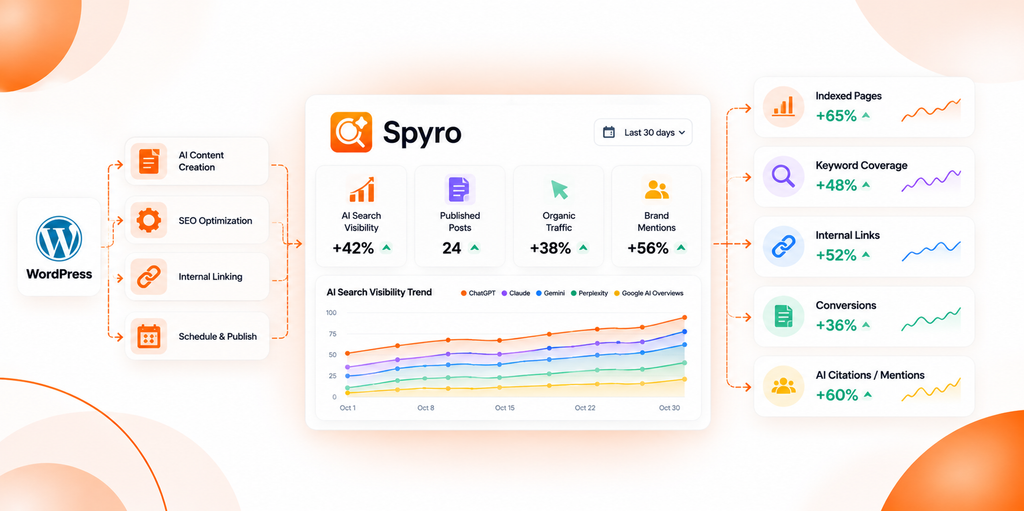
Split your WordPress AI SEO automation metrics into two piles. Process metrics tell you whether the workflow works. Outcome metrics tell you whether the content performs.
Process metrics
- Time from brief to approved post
- Editorial revision rate (how much editors change)
- Share of posts with complete metadata, valid schema and checked links
Outcome metrics
- Organic impressions and clicks
- Search query coverage
- Indexing status
- Internal link quality
- Content freshness and conversions
- Referral traffic from AI assistants, where your analytics can identify it
- Brand mentions or citations in the AI engines you care about, checked on the same prompts over time
Be careful with causation. A traffic rise after you automate doesn’t prove automation caused it, because seasonality, new links and Google updates move numbers too. Record a baseline and wait weeks before judging.
For Google’s side, Search Console’s generative AI report counts impressions in AI Overviews and AI Mode, and the guide on ranking in Google AI Overviews explains how to read it. For a quick read on whether ChatGPT and Google AI Overviews mention your brand today, try the free AI Visibility Checker.
Key Takeaways
- WordPress AI SEO automation works best on repeatable tasks like briefs, drafts, metadata drafts, scheduling and monitoring. Facts, approvals and strategy stay with people.
- Automated publishing and automated optimization are different things. Draft or scheduled status by default beats instant publishing.
- GEO ready means answer first, sourced, crawlable and consistent. It improves your chances of being quoted and guarantees nothing.
- No single plugin does WordPress AI SEO automation well on its own. Choose by compatibility, approval controls, permissions, cost and exportability.
- Use a dedicated low privilege account, HTTPS, backups and rollback, then measure process and outcome metrics separately.
Frequently Asked Questions
What is WordPress AI SEO automation?
WordPress AI SEO automation is using AI and scheduled workflows to handle repeatable SEO and publishing tasks on a WordPress site, such as briefs, drafts, metadata, link suggestions, scheduling and monitoring. People still review facts, approve posts and set strategy.
Can AI automatically publish blog posts in WordPress?
Yes, technically. WordPress AI SEO automation tools such as a plugin, a workflow service, the REST API or a connected platform can create posts as drafts, schedule them or publish them live. I’d start with drafts or scheduled posts and a human review.
What is the best AI SEO plugin for WordPress?
There isn’t one. WordPress AI SEO automation rarely depends on a single plugin, so the best AI SEO plugin for WordPress is the one that matches your setup, the SEO tasks you need, your approval process, your budget and your privacy needs. Test it on a staging site first.
Is AI generated content allowed by Google?
Yes, with conditions, including for WordPress AI SEO automation. Google’s guidance says AI can help with research and structure, and that you should manually fact check and review the output, including metadata. Producing many pages without adding value can violate its scaled content abuse policy.
Does a WordPress SEO plugin automatically optimize content for AI search?
Not by itself. A WordPress SEO AI feature can handle metadata, schema and readability checks, but GEO readiness also depends on direct answers, sourced claims, original information and crawlable pages. Google says there are no extra requirements for AI Overviews beyond being indexed and snippet eligible.
Can WordPress AI SEO automation improve organic traffic?
It can help indirectly, by letting a team publish and update useful content more consistently. It can’t guarantee traffic, rankings or AI citations, and low quality automation can hurt. Measure against a baseline.
Can Spyro AI publish WordPress posts automatically?
Yes, for self hosted WordPress. You connect your site with an application password, then publish a finished article with one click, schedule it, or turn on auto publish. The documentation doesn’t say whether posts arrive as drafts or go live, so test on a staging site first.
Automate the Repetitive Work, Keep the Judgment
The goal isn’t a blog that runs without people. It’s a blog where people spend their time on facts, examples and decisions, and tools handle the copying, formatting and scheduling. That’s what WordPress AI SEO automation should give you.
Want to test it on one article? Start a free trial of Spyro AI, connect your self hosted WordPress site, and publish a single reviewed article before you turn anything on automatically.