Shopify SEO and GEO App: How Online Stores Get Recommended by AI



Quick Answer: What Is Shopify AI Search Optimization?
Shopify AI search optimization is the work of making your products, collections and brand easy for AI answer engines such as ChatGPT, Google AI Mode, Gemini, Perplexity and Claude to find, understand and recommend, on top of the SEO that already gets your pages ranked in Google.
- No single app does all of it. In the Shopify App Store, a “geo” app usually means geolocation. AI visibility needs data, content, crawl access and tracking.
- Shopify already sends product data to AI channels. Agentic Storefronts and Shopify Catalog share eligible products with ChatGPT, Copilot, Google AI Mode and Gemini by default.
- Your job is everything around the feed: complete product data, crawlable pages, honest structured data, useful buying guides and mentions on other sites.
- Measure with repeated prompt checks, not one screenshot. Nothing guarantees a recommendation.
Searching for a Shopify GEO app? Here’s the short version. Shopify AI search optimization is less about installing one more plugin and more about giving AI engines accurate, complete reasons to name your products. This guide is for merchants, ecommerce managers, marketing teams and agencies. If you want the writing principles first, the AI content optimization guide explains how engines choose passages to cite.
Is There a Shopify GEO App, or Do You Need a Workflow?
I checked what Google returns for “shopify geo app.” Nearly every result was a geolocation tool that routes visitors to the right country store. That’s GEO as in geography. Not this topic.
In search marketing, GEO means generative engine optimization: improving the chance that AI answers mention, cite or recommend you. Shopify generative engine optimization lives in several places at once.
| Layer | What handles it | Examples |
|---|---|---|
| Product data | Shopify admin and Shopify Catalog | Titles, descriptions, variants, prices, availability |
| Store SEO | Your theme plus a Shopify SEO app | Meta tags, alt text, structured data, redirects |
| Content | Your blog and pages | Buying guides, comparisons, sizing help |
| Technical access | Shopify defaults and robots.txt.liquid |
Crawler access, sitemaps, canonical tags |
| Measurement | Search Console, GA4 and an AI visibility tracker | Mentions, citations, AI referral traffic |
So the “app” for Shopify AI search optimization is really a stack. Don’t expect one tool to cover all five layers.
Why Do Shopify Stores Need SEO and GEO in 2026?
Because product research now starts in two kinds of places.
In classic search, someone sees a product listing or collection page and clicks. Your page has to rank. In AI search, a shopper asks ChatGPT for a waterproof hiking boot under $150 for wide feet and gets a short list. Your product has to be named.
That channel is growing fast from a small base. Adobe’s 2026 analysis of U.S. retail sites found AI referral traffic up 71% year over year in its latest monthly data, with those visits converting 90% better than non AI traffic. Adobe doesn’t say what share of all retail traffic that is, so treat AI as a growing channel beside search.
Shopify has changed the plumbing too. Its Help Center page on agentic storefronts says they’re active by default for eligible stores and lists ChatGPT, Google AI Mode and Gemini, Microsoft Copilot and Meta as channels. For ChatGPT, the shopper finds the product in the chat and pays on your store.
Why keep doing SEO, then? Google says there are no additional requirements to appear in AI Overviews or AI Mode beyond being indexed and eligible for a snippet. Weak SEO quietly limits Shopify AI search optimization. GEO adds what SEO never tracked, like whether an assistant names you at all.
Shopify SEO vs GEO: What’s the Difference?
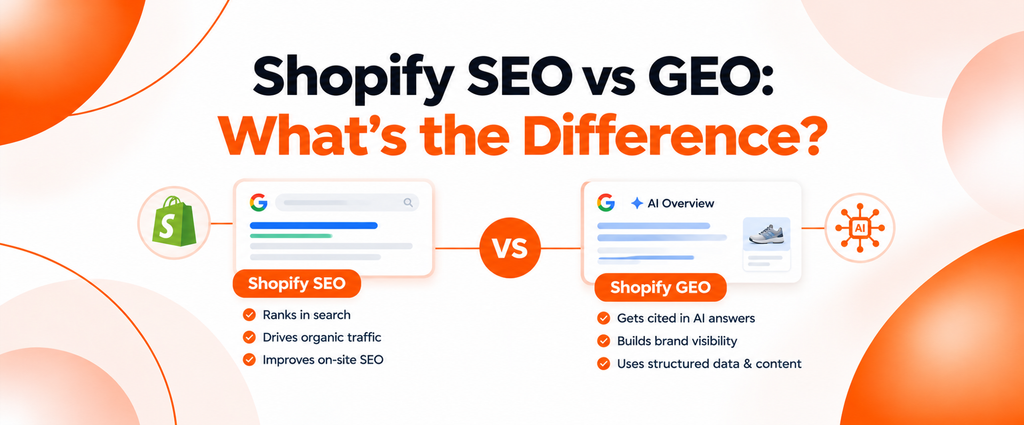
Shopify SEO gets pages ranked and clicked. GEO tries to get your products included, described accurately and cited inside AI answers. They overlap a lot. Here’s where they split.
| Factor | Shopify SEO | Shopify AI search optimization (GEO) |
|---|---|---|
| Main objective | Rank product, collection and blog pages | Get named, cited and described accurately in AI answers |
| Discovery channel | Google and Bing results, Shopping listings | ChatGPT, Gemini, AI Overviews and AI Mode, Perplexity, Claude, Copilot |
| Content requirements | Pages that match search intent | Specific facts an engine can lift and repeat |
| Product page optimization | Titles, meta descriptions, images, internal links | Complete attributes, plain descriptions, answers to buyer questions |
| Technical requirements | Crawlable, indexable, fast pages | The same, plus access for AI search crawlers |
| Structured data | Eligibility for rich results | Helps machines read price, availability and variants. No citation promise |
| Measurement | Rankings, clicks, impressions, revenue | Mentions, citations, share of voice, AI referral traffic |
| Expected outcomes | Organic traffic | Inclusion in recommendations, plus visits that are harder to attribute |
SEO gets you indexed, ranking pages that any engine searching the web can find. GEO adds attention to how products get summarized and who gets named beside you. That’s why ecommerce GEO works best layered on SEO.
How Do AI Engines Discover and Recommend Shopify Products?
Shopify AI search optimization starts with knowing how products get found. No engine publishes a full formula, so be wary of fixed “AI ranking factor” lists. The documentation points to three routes.
- Product feeds. Shopify’s Catalog documentation lists titles, descriptions, options, images, price and availability as default fields. OpenAI’s shopping help page says Shopify merchants are already included through Shopify Catalog.
- Crawling and search indexes. Shopify notes products can still be found through web crawling. OpenAI’s crawler documentation says sites that opt out of
OAI-SearchBotwon’t be shown in ChatGPT search answers. - What other sites say. OpenAI says ChatGPT may summarize reviews from public websites and uses metadata from first and third party providers.
Here’s how I’d separate the documented from the observed.
| Signal | Status | Notes |
|---|---|---|
| Complete product data in Shopify Catalog | Documented by Shopify | Gaps limit what channels show |
| Crawl access for search crawlers | Documented by OpenAI and Google | Blocking OAI-SearchBot hides you from ChatGPT search |
| Availability and price | Documented by OpenAI | Merchant ranking weighs availability, price, quality and primary seller status |
| Reviews on public sites | Documented as an input to ChatGPT review summaries | OpenAI says it doesn’t verify those reviews |
| Structured data that matches the page | Google requirement for its features | No AI specific schema is needed |
| Buying guides and comparisons | Industry observation | Often cited for “best for” questions. Not guaranteed |
| Brand mentions on other sites | Industry observation | No engine publishes a weight |
| llms.txt | Not documented as a factor by these engines | Read the llms.txt explainer before spending time on it |
How Do You Do Shopify AI Search Optimization? 12 Steps
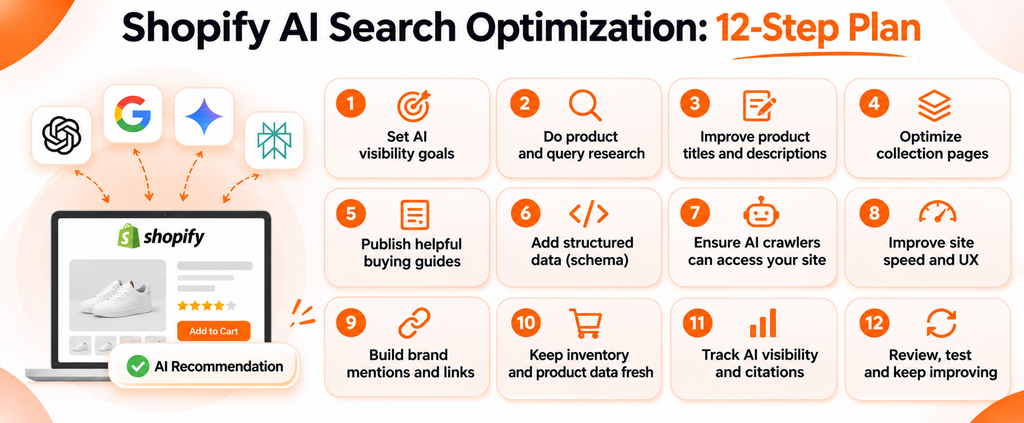
Work through these in order. Shopify AI search optimization mostly rewards stores that are clear, complete and consistent.
1. Rewrite product titles and descriptions. Use brand, product type and the attribute people filter by. Catalog sends titles and descriptions to AI channels, so vague names travel badly. Open each description with who it’s for, then details. Avoid stuffed titles and copied manufacturer text.
2. Add original product information. Engines need specific facts to repeat. Add fit notes, care steps, what’s in the box and honest limitations. Never invent claims. Missing a real customer example? Leave [ADD REAL EXAMPLE] for your team.
3. Fill in attributes and specifications. Set the Shopify product category, use real variant options (size, color, material) and keep extra specs in metafields. Channel mapping lets you send metafield data to Catalog. Don’t hide specs in images. Machines can’t read a size chart that only exists as a JPEG.
4. Optimize collection pages. Collections often answer broad questions best. Add a short intro that helps someone choose, a unique title and a clear meta description. Don’t paste one paragraph across every collection.
5. Publish buying guides and comparisons. Write “best X for Y,” “X vs Y,” sizing and care guides, and link each to the right products. Be fair, or it reads like an ad. The guide to AI blog writers for SEO and GEO covers drafting tools, but a person should check every fact.
6. Implement and validate structured data. Check what your theme outputs before adding anything. The classic mistake is two product blocks on one page, from theme and app, with different prices.
7. Keep brand and product information consistent. Use the same names, prices and specs on your store, Google Merchant Center, marketplaces and social profiles. $79 here and $89 there gives engines two answers.
8. Improve internal linking and architecture. Link guides to collections and collections to products, using each product’s /products/ URL. Orphan products get missed.
9. Make sure crawlers can reach important content. Check yourstore.com/robots.txt and keep key text in the page HTML. The free AI crawler and robots.txt checker shows which AI bots your file allows.
10. Earn credible third party mentions. Engines draw on what other sites say, so get products into honest reviews, niche publications and gift guides. Never buy fake reviews.
11. Monitor AI visibility. Shopify AI search optimization needs a feedback loop, so check a fixed set of buyer questions across engines on a schedule. The tracking section covers how.
12. Refresh outdated content. Stale guides recommend things you no longer sell. Update prices and redirect discontinued products to the closest replacement.
What Belongs on a Shopify Technical SEO Checklist?
Shopify handles a lot of technical SEO for you. For Shopify AI search optimization, the goal is to check it, not rebuild it.
| Area | What Shopify does by default | What you should check |
|---|---|---|
| URL structure | Fixed paths such as /products/, /collections/ and /blogs/ |
Short handles. Add a redirect when you change one |
| Canonical tags | Themes typically point collection product paths to the /products/ URL |
View source on a product inside a collection and confirm it |
| Duplicate content | Default robots.txt blocks filtered and sorted collection pages |
Don’t publish near copies or reuse one description everywhere |
| XML sitemap | Generated at /sitemap.xml with child sitemaps |
Submit it in Search Console, once per international domain |
robots.txt |
A default file Shopify says works for most stores | Edit robots.txt.liquid only with expert help |
| Speed and Core Web Vitals | Web Performance dashboard using real user data | Remove heavy app scripts |
| Mobile usability | Depends on your theme | Test variant pickers and size charts on a phone |
| Structured data | Many themes output product data through a Liquid filter | Validate it and keep one product block per page |
| Price and availability | Catalog keeps prices and inventory current for AI channels | Match prices across feeds, marketplaces and guides |
Shopify’s sitemap guide explains the generated file, and its robots.txt guide calls editing an unsupported customization and warns that incorrect use can lose all traffic. Google’s canonical documentation treats canonical tags as signals, with Google making the final call. Shopify’s web performance overview says at least 75% of page loads need Good scores across Core Web Vitals.
My rule? Don’t fight Shopify’s generated infrastructure.
How Should You Handle Product Schema and Structured Data on Shopify?
For Shopify AI search optimization, structured data labels the facts (price, availability, variants) so machines don’t guess. Shopify’s structured_data Liquid filter works on product and article objects, and a Shopify changelog says it has output products as a ProductGroup since 2024. To check your theme, view a product page’s source and search for application/ld+json.
| Schema type | Use it for | Shopify note |
|---|---|---|
| Product and ProductGroup | The item and its variants | Google’s variant guidance groups variants under a ProductGroup |
| Offer | Price, currency, availability | Must match the visible price and stock |
| AggregateRating and Review | Real customer ratings | Only when ratings are visible on the page |
| Organization | Brand name, logo, profiles | Google says return policy markup belongs under Organization |
| BreadcrumbList | Page hierarchy | Some themes add it. Check before adding another |
| Article | Blog posts and guides | The same filter covers article objects |
Google’s product structured data guide separates merchant listings (pages where people can buy) from product snippets (review pages). It says enhancements appear at Google’s discretion. So product schema for AI search helps machines read your page, without guaranteeing rich results or citations.
The hard rules: never mark up fake reviews, ratings, prices or availability, and never add properties the page doesn’t show. Google’s review snippet guidelines require marked up reviews to be readily available on the page. Run changes through the free Schema Markup Validator before publishing.
How Do You Track AI Visibility for a Shopify Store?
Track the same questions on the same engines, on a schedule. That’s how you measure Shopify AI search optimization and Shopify AI visibility. Record:
- Brand mentions: does the answer name your store?
- Product mentions: which products appear, and how are they described?
- Citations: does the answer link to your site, or to a review site about you?
- Competitor mentions: which brands appear instead of you?
- Share of voice: your mentions as a share of all tracked brands.
- Prompt level visibility: which questions you win or lose, per engine.
- AI referral traffic: visits from AI sources, where analytics can identify them.
Why isn’t one ChatGPT check enough? Answers vary by run, location and account, and OpenAI says selection weighs context such as Memory. One screenshot is an anecdote. Thirty prompts checked weekly start to look like data.
Build a set of 20 to 50 questions that mirror how buyers ask. An illustrative mix for an outdoor footwear store (made up, not a client):
| Prompt type | Example |
|---|---|
| Category | “best waterproof hiking boots for wide feet” |
| Problem | “hiking boots that don’t cause heel blisters” |
| Comparison | “Brand A vs Brand B trail runners” |
| Budget | “good hiking boots under $150” |
| Brand | “is [your brand] good for long hikes?” |
Then add the data you already have. Shopify’s changelog for the Agentic Storefronts admin page says it shows performance across AI channels, the queries your products rank for, and product data recommendations. Search Console includes AI Overviews and AI Mode traffic in its Performance report. For analytics, the guide on tracking AI traffic in GA4 walks through referral segments.
Which Shopify SEO Apps and AI Visibility Tools Do What?
Different tools cover different layers of Shopify AI search optimization. I haven’t ranked apps, since features and prices change often.
| Tool or app type | Main purpose | Shopify relevance | AI visibility capabilities | Best suited for |
|---|---|---|---|---|
| Shopify SEO apps (App Store) | Bulk meta tags, alt text, structured data. Some generate llms.txt | Edits store data | Little or no answer tracking | Fixing on page SEO at scale |
| Agentic Storefronts admin page | Manage AI channels | Built in | Query insights for Shopify’s AI channels | Every eligible merchant |
| Google Search Console | Search performance | Verify domain, submit sitemap | Includes AI Overviews and AI Mode traffic | Every store |
| AI visibility tracker, such as Spyro AI | Run buyer prompts across engines | Tracks your domain | Mentions, citations, share of voice | Teams needing trends |
| Schema validators | Check markup | Any public URL | None directly | Theme and app edits |
How should you judge a Shopify AI SEO app or a tracker? Ask which engines it covers, how many prompts and checks you get, what store permissions it needs, and the cost. Distrust any promise of AI recommendations.
How Does Spyro AI Help Shopify Teams Monitor AI Visibility?
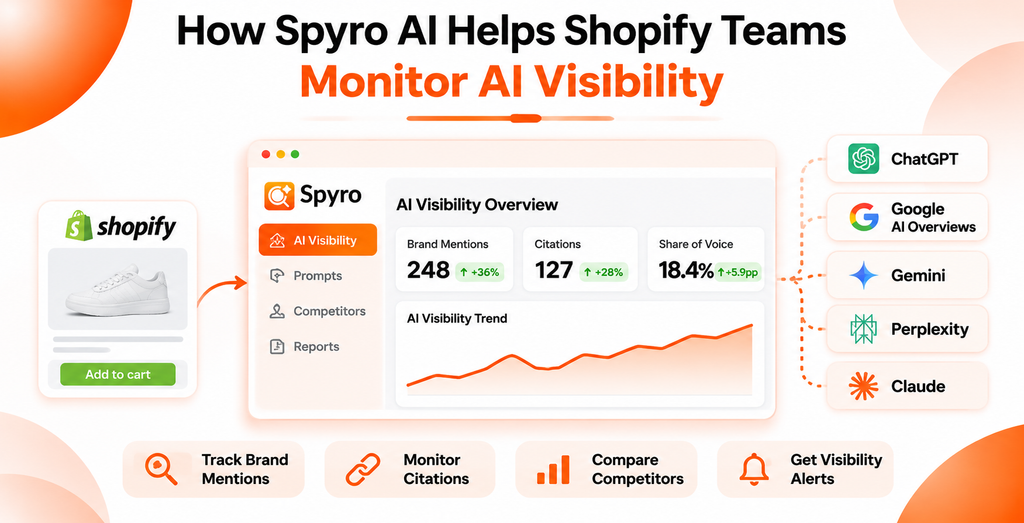
To be clear up front: Spyro AI isn’t a Shopify SEO plugin. It doesn’t edit product descriptions, change your theme’s schema or fix technical issues inside Shopify. Its place in Shopify AI search optimization is measurement, research and blog content. This comes from Spyro AI’s product pages and docs, checked in 2026. Spyro AI sells subscriptions, so weigh it accordingly.
- Engines and schedule. Spyro AI tracks ChatGPT, Gemini, Claude, Perplexity and Google AI Overviews on Pro and Agency plans. Starter covers ChatGPT and Google AI Overviews. Each prompt runs daily or weekly, your choice.
- Metrics. Mention rate, link rate, position in the answer, sentiment and share of voice against tracked competitors. Rates use the last four checks, so one odd answer doesn’t swing them.
- Competitors. Prompt by prompt standings show which rival wins each question.
- Sources and next steps. It lists the pages engines cite and can plan an article for a prompt you’re losing.
- Site checks and traffic. A site audit flags technical issues, a weekly check warns when
robots.txtblocks AI crawlers, and GA4 supplies AI referral traffic. - Shopify integration. Spyro AI publishes articles to your Shopify blog. You connect with your store address and approve the request in Shopify, or create a custom app token with the
read_content,write_contentandwrite_filesscopes. Those cover blog content and files, not products or themes. Publishing stays manual unless you turn on auto publish. The integrations documentation has the setup steps.
Product titles, attributes, collection copy, theme structured data and Catalog settings stay in your Shopify admin. Pricing on the site, checked in 2026, starts at $29 a month for Starter, with Pro at $99 and Agency at $399, plus a 3 day trial with 500 credits.
Shopify SEO and GEO Best Practices Checklist
Use this as a quarterly Shopify AI search optimization review.
- Product titles name the brand, product type and main attribute
- Product category, variant options and key metafields are filled in
- Every key collection has a unique intro, title and meta description
- Each main category has at least one buying guide or comparison
- Theme structured data validates, with one product block per page
- Prices and stock match across your store, feeds, marketplaces and guides
- Internal links point to
/products/URLs, and no product is orphaned robots.txtallows the search crawlers you want, and no password is set- The sitemap is submitted in Search Console for every domain
- A fixed prompt set is tracked across engines every week
Which Shopify GEO Mistakes Should You Avoid?
Most Shopify AI search optimization failures are small, boring and fixable.
| Mistake | Why it hurts | Fix |
|---|---|---|
| Buying an app and stopping there | Apps fix metadata, not thin product information | Pair any app with content and data work |
| Vague or stuffed product titles | Engines can’t tell what the product is | Brand, type and main attribute, in plain words |
| Fake or unsupported review markup | Breaks Google’s guidelines and trust | Mark up only real reviews visible on the page |
| Two conflicting product schema blocks | Machines see two prices | Keep one source of structured data |
| Blocking AI search crawlers by accident | ChatGPT can’t show pages OAI-SearchBot can’t crawl |
Review robots.txt after theme or app changes |
Key Takeaways
- Shopify AI search optimization is a workflow across product data, store SEO, content, technical access and measurement. No single Shopify GEO app covers all of it.
- Shopify Catalog already shares eligible products with AI channels, so complete, accurate product data matters more than any trick.
- SEO still carries GEO: Google’s AI features need indexed, snippet eligible pages, and ChatGPT search depends on crawl access.
- Structured data should match the page. It helps machines read your products and guarantees nothing.
- Measure Shopify AI search optimization with a fixed prompt set across engines, and judge trends, not single answers.
Frequently Asked Questions
What is GEO for Shopify?
GEO for Shopify is generative engine optimization for an online store: improving product data, content, crawl access and outside mentions so engines such as ChatGPT, Gemini and Google AI Overviews can find, understand and recommend your products. It’s also called Shopify AI search optimization.
Is there a Shopify GEO app?
Not one that does everything. A “geo” search in the App Store mostly returns geolocation apps. SEO apps fix metadata, trackers measure mentions, and product data still needs human work.
How can I get my Shopify products recommended by ChatGPT?
Stay eligible for Shopify Catalog, write clear titles and descriptions, fill in attributes, keep prices and stock accurate, allow OAI-SearchBot in robots.txt and earn real reviews. That’s the practical core of Shopify AI search optimization. Nobody can guarantee a recommendation.
Does product schema help with AI search visibility?
It’s one input to Shopify AI search optimization. It helps machines read price, availability and variants, and Google uses it for merchant listings. Google says no special AI schema is needed for AI Overviews, and no schema guarantees a citation. Keep it accurate and matched to the visible page.
How can I track whether ChatGPT mentions my Shopify store?
Write 20 to 50 buyer questions, run them on a schedule and record mentions, links and competitors. An AI visibility tracker can automate this across engines.
Do Shopify SEO apps also improve AI visibility?
Partly. Clean metadata, valid structured data and fast pages help every engine read your store. But most SEO apps don’t track AI answers, write buying guides or earn outside mentions, which are big parts of Shopify AI search optimization.
How long does Shopify AI search optimization take to show results?
There’s no fixed timeline. Shopify says Catalog keeps product data current for its AI channels, while crawled pages and outside mentions take longer to be picked up. Track your prompt set for a few months before judging results.
Make Your Store Easy to Recommend
AI engines can only recommend what they can find and understand. Shopify gives you the feed and the technical base. Shopify AI search optimization makes sure your product data, content and reputation tell one clear story, then checks whether engines repeat it.
Want to see where your store stands? Start a free trial of Spyro AI, add 15 buyer questions for your main category, and see which engines name you and which competitors they name instead.