llms.txt Explained: What It Does and Whether Your Site Needs One



Quick Answer: What Is llms.txt and Does Your Site Need One?
llms.txt is a proposed Markdown file, placed at the root of a website, that gives AI agents a short, curated map of the site’s most useful pages. It’s optional. For most websites it’s a small experiment, not a priority.
- What it is: a plain text file with a site name, a one line summary and grouped links to key pages. Jeremy Howard proposed it in 2024.
- Ranking factor? No. Google says Google Search ignores these files, so keeping one won’t help or hurt your rankings.
- Do AI platforms use it? No major AI search provider documents reading it to choose sources, and independent studies haven’t found a citation lift.
- Who should bother: documentation heavy sites, developer tools and SaaS help centers. A ten page local business site can skip it and lose nothing.
Written for website owners, marketing teams, agencies and SEO professionals. For the bigger picture of how AI answers relate to classic rankings, see the SEO vs GEO vs AEO guide.
What Is llms.txt?
It’s a text file, written in Markdown, that tells a language model what your site is and where the best information lives. Think of it as a table of contents written for software rather than people.
Jeremy Howard of Answer.AI published the original proposal in 2024. The current version lives at llmstxt.org and was revised in 2026.
Here’s the whole idea in six lines:
# Example Payroll

> Payroll software for small and mid sized businesses in the United States.

## Docs

- [Run your first payroll](https://example.com/help/first-payroll): Setup steps for new accounts
How would an AI system use that? Per the proposal, an agent helping a user opens the file, finds the relevant section, then follows only the links it needs. So the intended use is on demand, while answering a question. Not training.
That’s the difference from simply having a good website. Your pages already hold the information. The file just hands an agent a clean shortcut to it, without menus, cookie banners and scripts in the way.
Why Was the File Proposed?
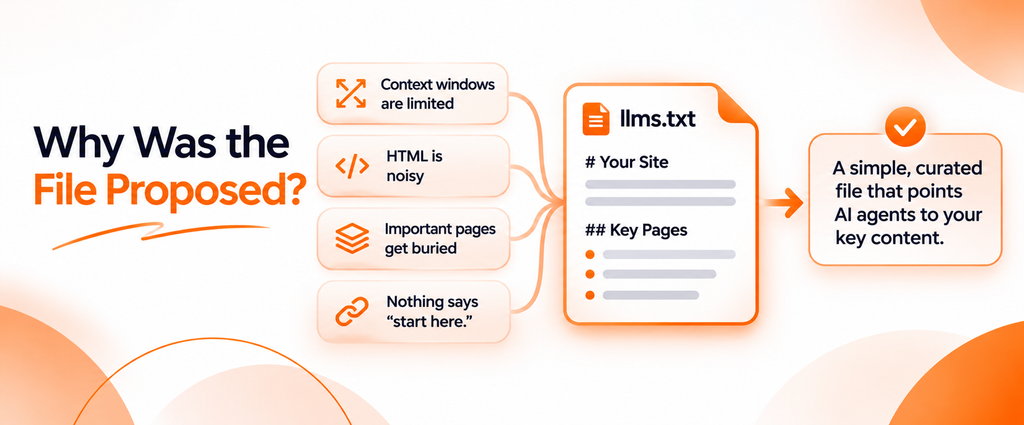
Web pages are built for people. A browser happily renders navigation, ads and JavaScript. A language model has to dig through all of it to find the three paragraphs that matter.
The proposal points to a handful of problems, which boil down to this:
- Context windows are limited. Most websites are too large to load into a model in one go.
- HTML is noisy. Turning a complex page into clean text is hard, and wasted tokens cost time and money.
- Important pages get buried. A model doesn’t know which of your 400 help articles are the canonical ones.
- Nothing says “start here.” A sitemap lists everything, with no priority.
The fix it suggests: one curated file, in one place, in Markdown that humans and models can both read.
Now the honest part. Those are the problems it was designed to solve. Whether AI products actually use it that way is a separate question, and the evidence is thin (more below). Intended benefits aren’t proven outcomes.
What Does an llms.txt File Look Like?
The format is deliberately small. Per the llmstxt.org specification, the parts appear in this order:
| Part | Required? | What it does |
|---|---|---|
# Name (H1) |
Yes, the only required part | The name of the site or project |
> Summary (blockquote) |
No | A short description with the key facts |
| Paragraphs or lists | No | Extra notes, with no headings |
## Section (H2) with links |
No | Groups of links, each written as - [name](url): note |
## Optional |
No | Secondary links an agent can skip |
A few details matter more than they look. Keep one H1 at the very top. Write each link in normal Markdown, followed by a colon and a note that helps a machine decide (“Current plans and what each includes” beats “Click here”). And use full URLs, so links still work if the file is copied into another tool.
The 2026 revision, listed on the llmstxt.org changes page, added a few extras. Pages can offer a Markdown copy at the same URL with .md added. Pages can point to that copy with rel="alternate" type="text/markdown" and to the covering file with rel="describedby", as HTML <link> tags or an HTTP Link header. “Optional” is now just a convention for secondary links.
Where Does the File Go?
At the root of your domain, so it loads at https://yourdomain.com/llms.txt. The proposal also allows files in subpaths, such as /docs/, each covering the pages under that path, and tells agents to use the most specific one. It advises against /.well-known/, because that location can’t describe a subpath.
What Is llms-full.txt?
llms-full.txt isn’t part of the proposal. It’s a companion convention, adopted by documentation platforms, that joins the full text of your key pages into one large Markdown file. The 2024 proposal described something similar under other names (llms-ctx.txt and llms-ctx-full.txt), built by a tool the 2026 revision dropped.
Anthropic’s developer docs show both in practice: their index file ends with a link to an llms-full.txt for readers who want everything. For most business websites, the short index is plenty. The full version mainly suits large technical documentation.
llms.txt Example: A Practical Website Implementation
Here’s a complete llms.txt example for a fictional payroll software company. Copy the structure, not the content.
# Example Payroll

> Example Payroll is cloud payroll software for small and mid sized businesses in the United States. It runs payroll, files payroll taxes and handles employee onboarding.

Key facts:

- Serves businesses with 1 to 500 employees
- Support is available by chat and email on weekdays
- Current prices are always on the pricing page, not in this file

## Product

- [Features](https://example.com/features): What the software does, grouped by payroll, tax and HR tasks
- [Pricing](https://example.com/pricing): Current plans, what each includes and how billing works
- [Integrations](https://example.com/integrations): Accounting and time tracking tools that connect to Example Payroll

## Help center

- [Run your first payroll](https://example.com/help/first-payroll): Setup steps for new accounts
- [Payroll tax filing](https://example.com/help/tax-filing): Which federal and state filings are handled automatically
- [Add a new employee](https://example.com/help/add-employee): Onboarding steps and required documents

## Company

- [About](https://example.com/about): Who runs the company and where it operates
- [Security](https://example.com/security): How customer and employee data is protected

## Optional

- [Blog](https://example.com/blog): Guides on payroll rules and small business HR
- [Changelog](https://example.com/changelog): Recent product updates
What belongs: core product or service pages, pricing, the help pages people ask about most, policies and an About page.
What doesn’t: login pages, carts, internal search results, thin tag pages, staging URLs, anything private. Don’t paste prices or claims that change often into the summary. Link to the page that stays current.
How to prioritize: start with the 10 to 30 pages you’d send a new customer to. Put the most important group first. Push nice to have content into ## Optional.
How to keep links accurate: every URL should return a 200 status, with no redirects and no noindex pages. If you publish Markdown copies, link those. If not, normal page URLs are fine.
How to update it: review the file whenever you launch, rename or retire a page, and on a fixed schedule. Quarterly works for most sites.
Real Examples From AI Companies
Some AI companies publish one for their own developer docs. OpenAI’s crawler documentation and Perplexity’s bot documentation both point readers to a docs index in this format. Notice what that shows. They use the file to help developers and coding tools navigate documentation, while their crawler pages still manage access through robots.txt.
How to Create an llms.txt File
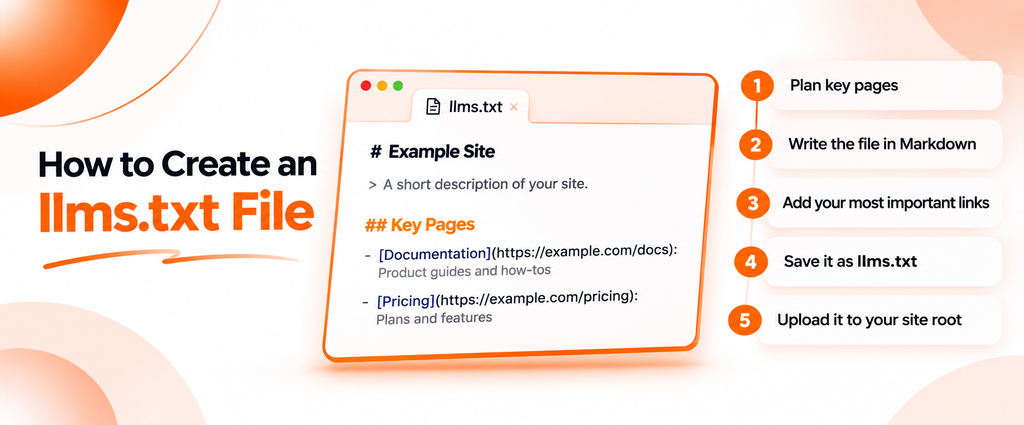
You don’t need to be a developer. A text editor and access to your site’s files (or CMS settings) is enough.
- Audit your important pages. List the pages that answer the questions customers ask most. Analytics and your support inbox are the best sources.
- Pick your resources. Help articles, guides, policies, pricing. Skip anything thin or out of date.
- Group them. Three to six groups usually works: Product, Help, Company.
- Write the file. Start with
# Your Site Name, then a one or two sentence summary in a>blockquote. - Add the links. One per line, as
- [Page name](full URL): what the page covers. - Check the format. One H1 at the top, H2s for groups, valid Markdown links. The validator section below shows how.
- Upload it to the root. Save it as UTF8 plain text where
/llms.txtresolves on your domain. - Test that it’s public. Open the URL in a private browser window. You should see raw text, not a 404, a login page or your theme’s HTML.
- Maintain it. Set a recurring reminder and recheck every link when the site changes.
How to Create llms.txt for WordPress
You have two sensible options.
Upload it manually. Upload the file to your site’s root folder (the one holding wp-config.php) with your host’s file manager or SFTP. Static files there are served directly. This is the most predictable route, and you control every line.
Use an SEO plugin you already run. The llmstxt.org project lists Yoast SEO and AIOSEO among the tools that can generate the file. Yoast’s version is free and automatic by default, with a manual mode for choosing pages. AIOSEO generates it on free plans, while its llms-full.txt and Markdown options need a paid plan. Check each plugin’s current settings, since features change.
Two cautions. Don’t add a new plugin just for one small text file; that’s more maintenance than it’s worth. And don’t run two sources at once. If you upload a physical file and enable a plugin version, one will override the other, so pick one and load the URL to confirm which is live.
How to Create llms.txt for Shopify
Shopify used to be awkward, because merchants can’t upload arbitrary files to the domain root. That changed. According to Shopify’s developer documentation, Shopify now manages /llms.txt by default, mirroring /agents.md, its main document for shopping agents. /llms-full.txt mirrors it too.
So your store probably already serves a file. Open it and read what’s there before changing anything.
To customize it, use theme templates:
- Change all three files at once: add an
agents.md.liquidtemplate. The other two fall back to it. - Change only the llms file: in Shopify admin, go to Online Store, then Themes, click the three dots next to your theme and choose Edit code. Add a file named
llms.txt.liquidto the Templates folder.
Know the limits. The template gets a restricted set of Liquid objects, it’s served on your primary domain without market or language prefixes, and once you add it, you maintain it. Shopify recommends keeping the managed default unless you need different content.
llms.txt Generator: Can You Create the File Automatically?
Yes. An llms.txt generator usually reads your sitemap or crawls your site, collects page titles and meta descriptions, groups URLs by folder and writes the Markdown. CMS plugins, Shopify’s managed file and documentation platforms all generate one, and there are plenty of free web based tools.
That’s a fine first draft. It still needs a human edit, because generated files commonly:
- List everything. A sitemap dump isn’t a curated map.
- Reuse weak descriptions. Meta descriptions written for clicks rarely explain what a page covers.
- Include junk URLs. Tag archives, paginated pages, old campaigns, redirects.
- Go stale. A one time export drifts from the live site within weeks.
- Group badly. A folder name like
/blog/2023/isn’t a meaningful section.
Cut the list to what matters, rewrite the notes in plain language and check every link.
llms.txt Validator: How to Check Your File
There’s no official llms.txt validator. The proposal publishes a format, not a test suite, and free online checkers interpret it differently (some flag a missing blockquote even though it’s optional).
The closest official check comes from Google’s Chrome team. Lighthouse includes an audit for the file in its Agentic browsing category. It flags a page when fetching the file returns a server error, and marks a missing file (404) as not applicable, since providing one is optional “at the moment.” It doesn’t grade your content.
Here’s a free manual method:
URL=https://example.com/llms.txt

# 1. Status code and content type (expect 200 and text/plain or text/markdown)
curl -s -o /dev/null -w "%{http_code} %{content_type}\n" "$URL"

# 2. First line (should be your H1)
curl -s "$URL" | head -n 1

# 3. Every link, with a count to catch duplicates
curl -s "$URL" | grep -oE 'https?://[^) ]+' | sort | uniq -c
Then check by hand:
- Availability: a 200 response, no login, no CDN challenge page.
- Location: your main domain, not a forgotten subdomain.
- Format: one H1 first, H2s for groups, links written as
[name](url). - Broken or duplicate links: every URL returns 200, and none appears twice.
- Descriptions: each link has a short note after the colon.
- Freshness: no retired products, old prices or dead campaigns.
- robots.txt: you aren’t disallowing the file for bots you want to read it.
For a quick outside check, the free AI Crawler & robots.txt Checker from Spyro AI fetches your robots.txt, sitemap and llms.txt in one pass and shows which AI crawlers your rules allow or block. The free SEO and GEO Audit checks whether the file is present. Neither claims to grade its content, so the manual checks still apply.
llms.txt vs robots.txt vs XML Sitemap: What’s the Difference?
All three sit at the root, so people lump them together. They do different jobs.
| Feature | robots.txt | XML sitemap | llms.txt |
|---|---|---|---|
| Primary purpose | Tell crawlers which URLs they may fetch | List URLs you want discovered | Give AI agents a curated overview of key content |
| File format | Plain text directives | XML | Markdown |
| What it communicates | Access rules per user agent | Indexable URLs, sometimes with dates | What the site is, plus prioritized links with notes |
| How crawlers use it | Compliant crawlers read it before fetching | Search engines use it as a discovery hint | Some agents and tools may read it on demand; major AI search products don’t document using it |
| Controls access? | Requests it, but isn’t a lock | No | No |
| Helps discovery? | Indirectly, via the Sitemap line | Yes | Possibly, for tools that read it |
| Status | Established standard (RFC 9309) | Long established and widely supported | Proposed convention |
Google’s robots.txt introduction says that file mainly manages crawler traffic and isn’t a way to keep a page out of Google. Its sitemap overview says a sitemap doesn’t guarantee crawling or indexing. The proposal itself says its file can complement robots.txt, and that a sitemap serves a different job: listing every indexable page rather than a curated few.
So in the llms.txt vs robots.txt question, you need robots.txt, and the other one is optional. It can’t block a crawler anyway. It has no allow or disallow syntax at all.
Does llms.txt Help SEO?
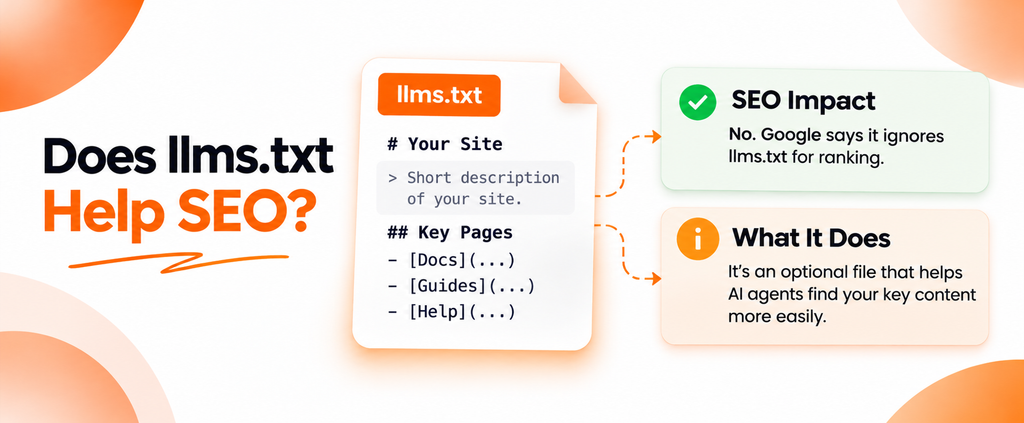
Not for Google. This is one of the few places in AI search with an official answer.
Google’s guide to generative AI features in Search says you don’t need machine readable files, AI text files, markup or Markdown to appear in Google Search, because Search doesn’t use them. It adds that keeping such a file is fine, and will neither help nor harm your visibility or rankings, since Google Search ignores it. That includes AI Overviews and AI Mode.
Google clarified that wording in 2026, as Search Engine Journal reported, to make clear it covers Google Search only and that maintaining the file for other services is acceptable. The position didn’t change.
Google’s John Mueller has been blunter. In a Reddit thread covered by Search Engine Journal, he called its use “purely speculative for now.” On the Search Off the Record podcast, he argued that LLM systems can’t trust a file a site writes about itself to decide which sites to surface, per Search Engine Journal’s summary.
What should you do instead? The things Google says it does use: crawlable pages, indexable content with snippets allowed, useful answers, internal links and solid technical SEO. The guide on how to rank in Google AI Overviews walks through that list.
Does llms.txt Improve AI Search Visibility?
There’s no reliable evidence that it does. Here’s what each platform documents:
| Platform | What the provider documents | What that means |
|---|---|---|
| ChatGPT (OpenAI) | GPTBot, OAI-SearchBot and ChatGPT-User, all managed through robots.txt | No statement that the file affects ChatGPT search or citations |
| Claude (Anthropic) | Its crawler help article covers ClaudeBot, Claude-User and Claude-SearchBot via robots.txt and doesn’t mention the file | Anthropic publishes one for its docs, but doesn’t say Claude uses yours to pick sources |
| Gemini and Google AI Overviews | Google Search ignores the file | No effect on AI Overviews or AI Mode |
| Perplexity | PerplexityBot and Perplexity-User, managed through robots.txt | No statement that the file affects answers |
Independent research points the same way. An SE Ranking analysis of about 300,000 domains, reported by Search Engine Journal, found the file on roughly 10% of sites and no measurable link between having it and how often a domain was cited in LLM answers. A Search Engine Land test followed 10 sites for 90 days before and after adding it. Eight saw no measurable change in AI traffic, and the author tied the two gains to other work.
None of that proves the file will never matter. Agents change fast. But AI visibility today depends on things you can measure: whether crawlers reach your pages, whether your content answers the question, whether trusted sources mention you, and how each system picks sources. A text file can’t stand in for any of that.
Does Your Website Actually Need llms.txt?
Probably not urgently. Here’s how I’d decide:
| Website type | Add one? | Why |
|---|---|---|
| Small business site | Low priority | Few pages, already easy to read |
| SaaS website | Reasonable experiment | Docs, pricing and integrations are what agents look for |
| Documentation heavy site | Yes, if it’s cheap | The use case the proposal was built for |
| Ecommerce store | Check what your platform serves | Clean product pages and feeds matter more |
| WordPress site | Only if your SEO plugin makes it a toggle | Not worth a new plugin or custom code |
| Shopify store | Review the default file | It already exists, so make sure it’s accurate |
| Publisher or blog | Low priority | Thousands of articles don’t curate well into one file |
| Enterprise website | Optional, per section | Subpath files for docs or support can make sense |
My rule of thumb: if it takes under an hour and someone will maintain it, go ahead. If it means new software, a developer ticket or a paid service, spend that time on content and crawler access first.
Common llms.txt Mistakes to Avoid
- Treating it as a Google ranking factor. Google says it isn’t.
- Expecting guaranteed AI citations. Nobody can promise that, with or without the file.
- Listing every URL. A sitemap dump removes the one thing the file is for: curation.
- Publishing broken links. Redirects, 404s and
noindexpages send agents nowhere. - Including outdated information. Old prices in the summary can mislead any tool that reads it.
- Copying another site’s file. Their structure might help. Their content won’t.
- Confusing it with robots.txt. It can’t block or allow any crawler.
- Assuming every AI crawler reads it. The major ones don’t document doing so.
- Never maintaining it. A stale file is worse than none.
How the File Fits Into a Broader GEO Strategy
In generative engine optimization (GEO), this file is a small supporting piece at most. It shouldn’t replace:
- accessible pages that crawlers can fetch without logins or heavy scripts
- clear information architecture and strong internal linking
- useful documentation and help content
- structured data that matches the visible page
- technical SEO basics like status codes, canonicals and sitemaps
- content that answers real questions
- consistent brand information across your site and third party profiles
To check the first item, the AI crawler checker guide explains how to test whether GPTBot, ClaudeBot and PerplexityBot can actually read your pages. That matters far more.
Measurement matters too. Spyro AI is one option here: the Spyro AI platform tracks when ChatGPT, Claude, Gemini, Perplexity and Google AI Overviews mention or cite a brand, so you can compare before and after a change. Whatever you use, repeat the same prompts over time, because AI answers vary from run to run. For how this fits with classic SEO, the SEO vs GEO vs AEO pillar guide has the full picture.
Key Takeaways
- llms.txt is a proposed Markdown file at your site’s root that gives AI agents a curated map of key pages. It’s a convention, not an established standard.
- Google Search ignores it, so it won’t help or hurt rankings, AI Overviews or AI Mode.
- No major AI search provider documents using it to pick sources, and independent studies haven’t found a citation lift.
- It’s most useful for documentation heavy sites and developer tools. Elsewhere it’s an optional, low effort experiment.
- If you publish one, keep it short, accurate and maintained, and fix crawler access and content quality first.
Frequently Asked Questions
What is llms.txt?
llms.txt is a proposed Markdown file at a website’s root that gives AI agents a short summary of the site and links to its most useful pages. Jeremy Howard of Answer.AI proposed it in 2024. It’s a convention some tools support, not an official web standard.
Does Google use llms.txt?
No. Google’s guide to generative AI features says Google Search ignores these files, so having one will neither help nor harm your rankings or your visibility in AI Overviews and AI Mode. Google also says it’s fine to keep one for other services.
Does ChatGPT read llms.txt?
OpenAI hasn’t documented that ChatGPT uses the file to find or cite sources. Its crawler documentation manages GPTBot, OAI-SearchBot and ChatGPT-User through robots.txt. ChatGPT may fetch the file if a user points to it, but that’s not the same as using it to choose sources.
Does llms.txt improve AI visibility?
There’s no reliable evidence that it does. An analysis of about 300,000 domains found no measurable link between having the file and AI citation frequency, and a 10 site test saw no AI traffic change it could attribute to it. Crawler access and content quality matter far more.
What’s the difference between llms.txt and robots.txt?
robots.txt tells crawlers which URLs they may fetch and is an established standard. llms.txt is a proposed Markdown overview that points AI agents to useful content. It can’t allow or block anything, so it doesn’t replace robots.txt.
Where should I put the file?
Put it at the root of your main domain so it loads at /llms.txt, for example https://yourdomain.com/llms.txt. The proposal also allows extra files in subpaths, such as a docs folder. It should return a 200 status as plain text, with no login.
How do I create one?
List your most useful pages, group them into a few sections, and write a Markdown file with an H1 site name, a short blockquote summary and H2 sections of links with brief notes. Upload it to your site root, then check that every link works.
My Recommendation: Should You Create One?
If you run a documentation site, a developer tool or a SaaS help center, yes. Write a tight file, link your best pages and give it an hour a quarter.
If you run a small business site, a store or a blog, it’s optional. Create one if your CMS makes it a toggle, review what Shopify already serves, then move on. Your time is better spent on pages that answer customer questions, and on making sure AI crawlers can reach them.
Before you write a single line of llms.txt, run the free AI Crawler & robots.txt Checker on your domain. It shows whether AI crawlers can reach your site at all. That’s the bigger question, and it takes a minute to answer.