

Why use it
Real buyer questions
Track the questions your customers ask AI before they buy.
You choose the engines
Decide which AI engines answer each question, and how often.
See who's cited
Each prompt shows the competitor sites the engines cite.
Track your progress
Watch how often you’re mentioned for each question over time.
You start with suggestions
You don’t begin with a blank page. During setup, Spyro AI suggests buyer questions based on your website and competitors (10 on Starter, 20 on Pro and Agency), and you keep the ones you want. For more ideas later, choose Suggest prompts on the Prompts page. Spyro AI suggests prompts worth tracking from your own search, competitor and AI data, and leaves out duplicates and prompts that name your brand. You can run suggestions up to 3 times a day.Add a prompt
1
Open Prompts
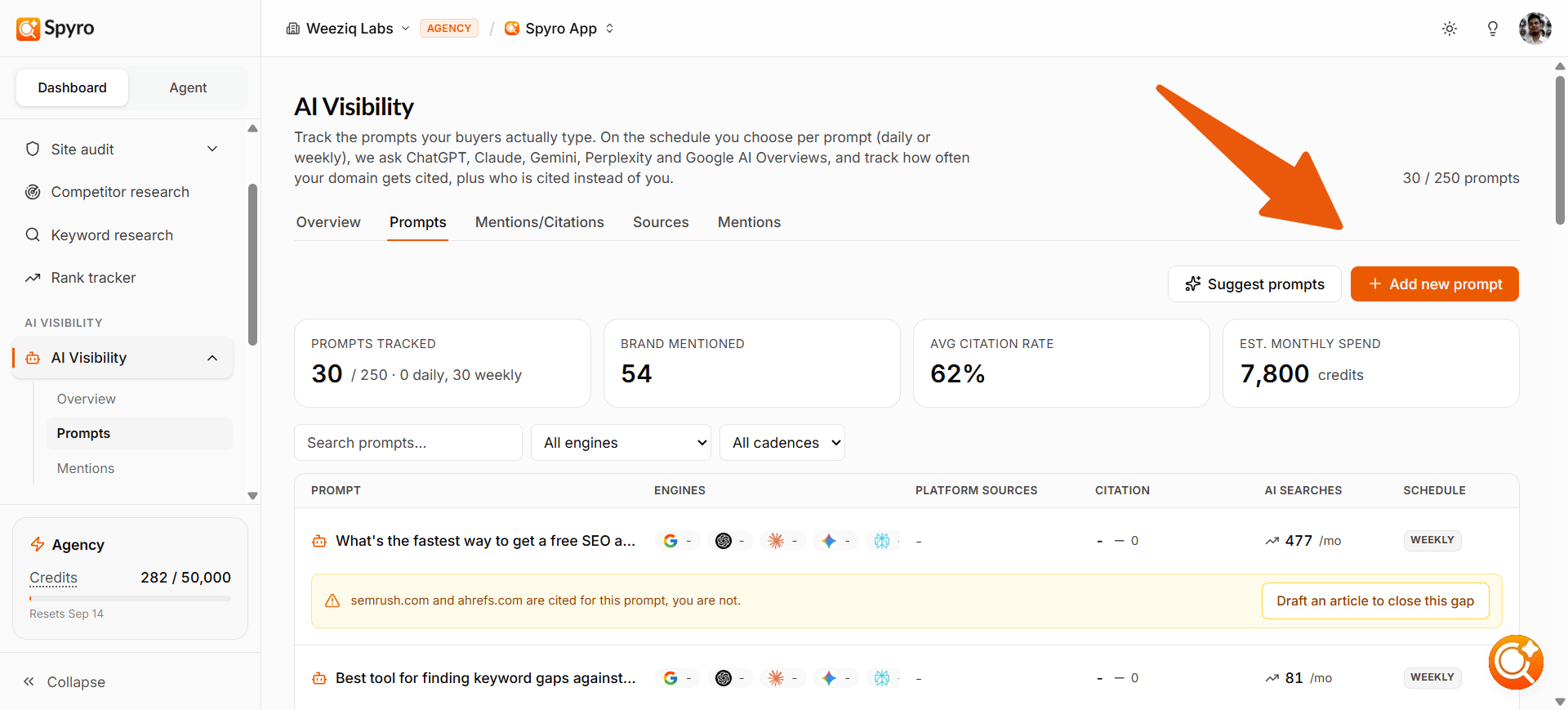
Choose Prompts in the sidebar, under AI visibility, then choose Add new prompt. (If you have no prompts yet, choose Write my own.)
2
Write the question
In Prompt, phrase it the way a real customer would, for example
best budget standing desk for a home office.3
Choose the engines
Tick the AI engines that should answer it. Starter can use ChatGPT and Google AI Overviews; Pro and Agency can use all 5.
4
Choose where and how often
Set the Answer location (the country the engines answer from) and the Check frequency:
- Weekly runs every Monday at midnight, in your workspace’s time zone.
- Daily runs every day at midnight.
5
Check the cost and save
The form shows an estimate of the prompt’s monthly credit cost. Choose Start tracking. The first check runs right away.
What prompts cost
Each check costs 10 credits per engine (20 on Claude). For example, one prompt on all 5 engines costs 60 credits per check: about 260 credits a month if it’s checked weekly, or 1,800 a month daily. See Plans & billing. You can track up to 15 prompts per workspace on Starter, 50 on Pro and 250 on Agency.Manage your prompts
The Prompts page lists every prompt with its status, engines, last 4 checks, how often people ask AI assistants that question each month (AI searches), and its schedule. At the top you’ll see how many prompts you track, how many mentioned your brand, your average citation rate and the estimated monthly credit spend. Search the list or filter it by engine and by schedule. Open a prompt to manage it:- Pause it with its toggle to stop checking it without losing its history. Turn it back on any time.
- Change its schedule between daily and weekly.
- Delete it with Delete prompt to remove it for good. This also erases its history, so pause it instead if you might want it back.
Read a prompt’s results
Open any prompt to see:- The latest answer from each engine.
- Your average position in the answer (1 means you were named first) and the top competitor for that question.
- What AI is citing for this prompt, and other sites also cited for it.
- Recent mentions of your brand for this prompt.
Google doesn’t show an AI Overview for every search. If it didn’t show one on the latest check, the prompt says so: there was nothing to be cited in.
What to expect
- Results are shown as rates across checks, because AI answers vary each time.
- Trends need a few checks before they mean much.
- When many prompts are due at once, a prompt may show Starts when a slot is free before it runs.
Tips
- Keep prompts in your customer’s words. If it sounds like an SEO keyword, rewrite it as a natural question.
- Use the competitor sites on each prompt to spot rivals worth studying in AI visibility.
- To read the exact wording of an answer, open AI mentions.
Related
AI visibility
See your overall AI visibility and how you compare with competitors.
AI mentions
Read every answer and the exact snippet that names you.
Competitors
See where competitor information lives in Spyro AI.
Plans & billing
Credit costs and prompt limits per plan.