> ## Documentation Index
> Fetch the complete documentation index at: https://spyro.app/docs/llms.txt
> Use this file to discover all available pages before exploring further.
# Competitors
> See who you're up against - the keywords they target, the topics they cover that you don't, and how often AI assistants recommend them instead of you.
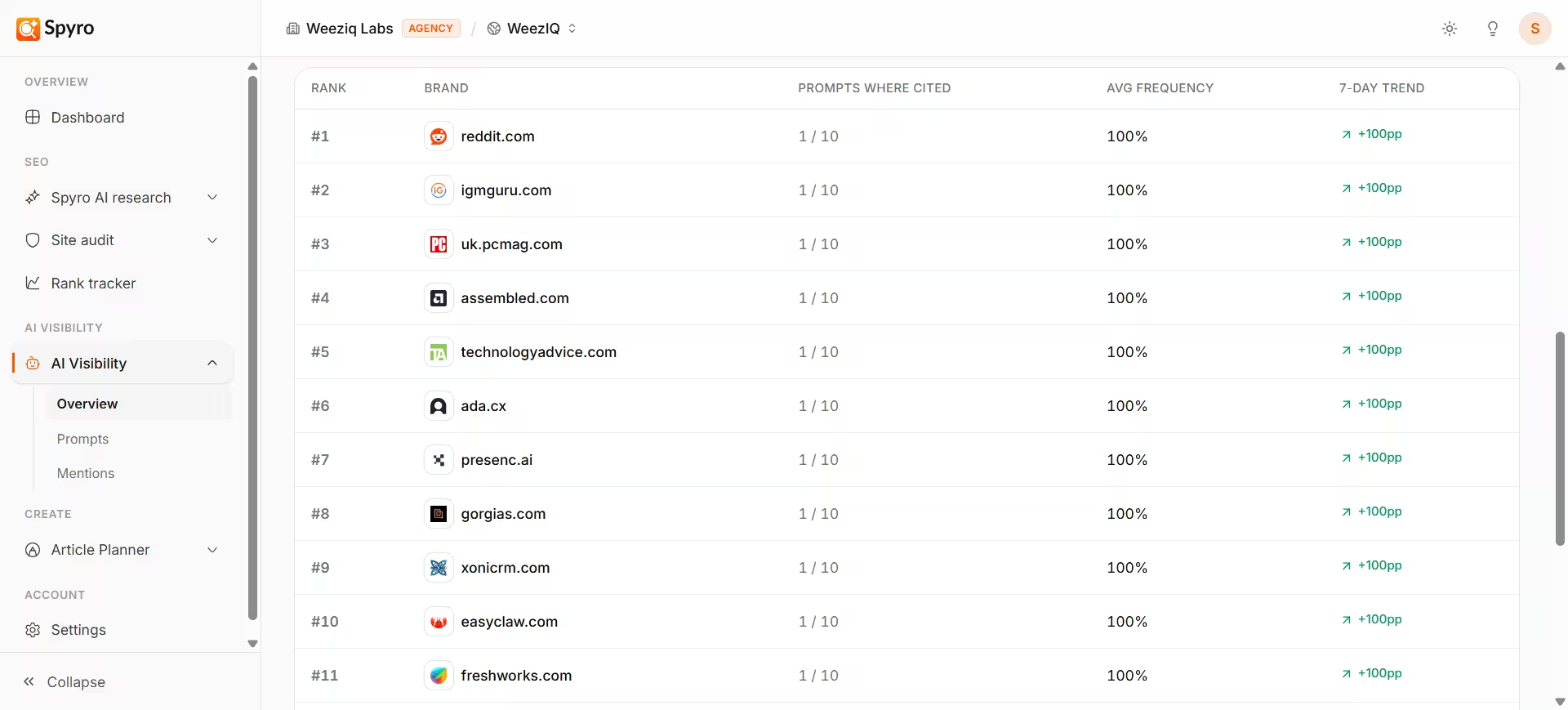 Spyro keeps an eye on your competitors so you always know who you're up against and where you can win. It tracks three kinds of competitor information: the **keywords** they go after, the **topics** they cover that you don't, and how often **AI assistants** mention them instead of you.
## Why use it
See who really competes with you for searches and AI recommendations.
Discover the keywords competitors target so you can target them too.
Find topics your competitors cover that you're missing.
See which rivals AI assistants recommend, and close the gap.
## Where to find competitor information
Competitor data shows up in a few places, depending on what you want to know.
### Your competitor list
Open **Settings** and go to **Competitors**. Here you'll see the competitors Spyro has found for you - it discovers them automatically as it runs keyword and search analysis - plus any you add yourself. Next to each one, you'll see how many **keywords you share**, which is a quick sign of how directly you compete. You can add or remove competitors at any time.
The list shows a shared-keyword **count** (for example, "12 shared keywords"). To see the actual keywords and a deeper breakdown, ask the AI agent (below).
### Competitor keywords - ask the AI agent
For a closer look, just ask the [AI agent](/docs/product/spyro-ai-agent) in plain English:
* **"Who are my competitors for \[topic]?"** - Spyro runs a live Google search and lists the top sites ranking for that topic, with an estimate of how strong each one is.
* **"What keywords does \[a competitor's website] target?"** - Spyro looks at that competitor's pages and pulls out the keywords they appear to be going after.
This shows what a competitor is *aiming* for, based on their own pages - a great way to find ideas you might be missing.
### Content gaps become article ideas
When Spyro plans your content in the [content calendar](/docs/product/calendar), it looks at what your competitors cover that you don't and turns those gaps into blog topic suggestions. So your competitor research quietly feeds your content plan.
### How often AI recommends them
On the [AI visibility](/docs/product/ai-visibility) page, the **Competitors** ranking shows which rival brands AI assistants mention for your buyer questions, how your **share of voice** compares, and whether you're gaining or losing ground. The [tracking prompts](/docs/product/prompts) view even shows which competitor websites get cited for each question.
## How to use it
Open **Settings → Competitors**. Add the rivals you care about, or let Spyro keep finding them for you.
Ask the [AI agent](/docs/product/spyro-ai-agent) who ranks for a topic, or what keywords a specific competitor targets.
Open [AI visibility](/docs/product/ai-visibility) to see the competitor ranking and your share of voice.
Let the [content calendar](/docs/product/calendar) suggest topics from competitor gaps, then write and publish them with the [AI writer](/docs/product/writer).
## What to expect
* The competitor list shows a shared-keyword **count**, not the full list - ask the agent when you want the details.
* Keyword research runs **on demand**, so you always get fresh results.
* Competitor AI citations need [tracking prompts](/docs/product/prompts) first; they fill in after the next check (Spyro checks every week).
* Your competitor list grows over time as Spyro learns your market.
## Tips
* Start with 3-5 close competitors so the comparisons stay meaningful.
* When a rival outranks you inside AI, open AI visibility and study the questions they win.
* Treat competitor content gaps as your next article ideas.
## Related
Spyro keeps an eye on your competitors so you always know who you're up against and where you can win. It tracks three kinds of competitor information: the **keywords** they go after, the **topics** they cover that you don't, and how often **AI assistants** mention them instead of you.
## Why use it
See who really competes with you for searches and AI recommendations.
Discover the keywords competitors target so you can target them too.
Find topics your competitors cover that you're missing.
See which rivals AI assistants recommend, and close the gap.
## Where to find competitor information
Competitor data shows up in a few places, depending on what you want to know.
### Your competitor list
Open **Settings** and go to **Competitors**. Here you'll see the competitors Spyro has found for you - it discovers them automatically as it runs keyword and search analysis - plus any you add yourself. Next to each one, you'll see how many **keywords you share**, which is a quick sign of how directly you compete. You can add or remove competitors at any time.
The list shows a shared-keyword **count** (for example, "12 shared keywords"). To see the actual keywords and a deeper breakdown, ask the AI agent (below).
### Competitor keywords - ask the AI agent
For a closer look, just ask the [AI agent](/docs/product/spyro-ai-agent) in plain English:
* **"Who are my competitors for \[topic]?"** - Spyro runs a live Google search and lists the top sites ranking for that topic, with an estimate of how strong each one is.
* **"What keywords does \[a competitor's website] target?"** - Spyro looks at that competitor's pages and pulls out the keywords they appear to be going after.
This shows what a competitor is *aiming* for, based on their own pages - a great way to find ideas you might be missing.
### Content gaps become article ideas
When Spyro plans your content in the [content calendar](/docs/product/calendar), it looks at what your competitors cover that you don't and turns those gaps into blog topic suggestions. So your competitor research quietly feeds your content plan.
### How often AI recommends them
On the [AI visibility](/docs/product/ai-visibility) page, the **Competitors** ranking shows which rival brands AI assistants mention for your buyer questions, how your **share of voice** compares, and whether you're gaining or losing ground. The [tracking prompts](/docs/product/prompts) view even shows which competitor websites get cited for each question.
## How to use it
Open **Settings → Competitors**. Add the rivals you care about, or let Spyro keep finding them for you.
Ask the [AI agent](/docs/product/spyro-ai-agent) who ranks for a topic, or what keywords a specific competitor targets.
Open [AI visibility](/docs/product/ai-visibility) to see the competitor ranking and your share of voice.
Let the [content calendar](/docs/product/calendar) suggest topics from competitor gaps, then write and publish them with the [AI writer](/docs/product/writer).
## What to expect
* The competitor list shows a shared-keyword **count**, not the full list - ask the agent when you want the details.
* Keyword research runs **on demand**, so you always get fresh results.
* Competitor AI citations need [tracking prompts](/docs/product/prompts) first; they fill in after the next check (Spyro checks every week).
* Your competitor list grows over time as Spyro learns your market.
## Tips
* Start with 3-5 close competitors so the comparisons stay meaningful.
* When a rival outranks you inside AI, open AI visibility and study the questions they win.
* Treat competitor content gaps as your next article ideas.
## Related