> ## Documentation Index
> Fetch the complete documentation index at: https://spyro.app/docs/llms.txt
> Use this file to discover all available pages before exploring further.
# Plans & billing
> Spyro's free trial and paid plans, what you get, how to upgrade or change plans, and where to see your usage for the month - explained simply.
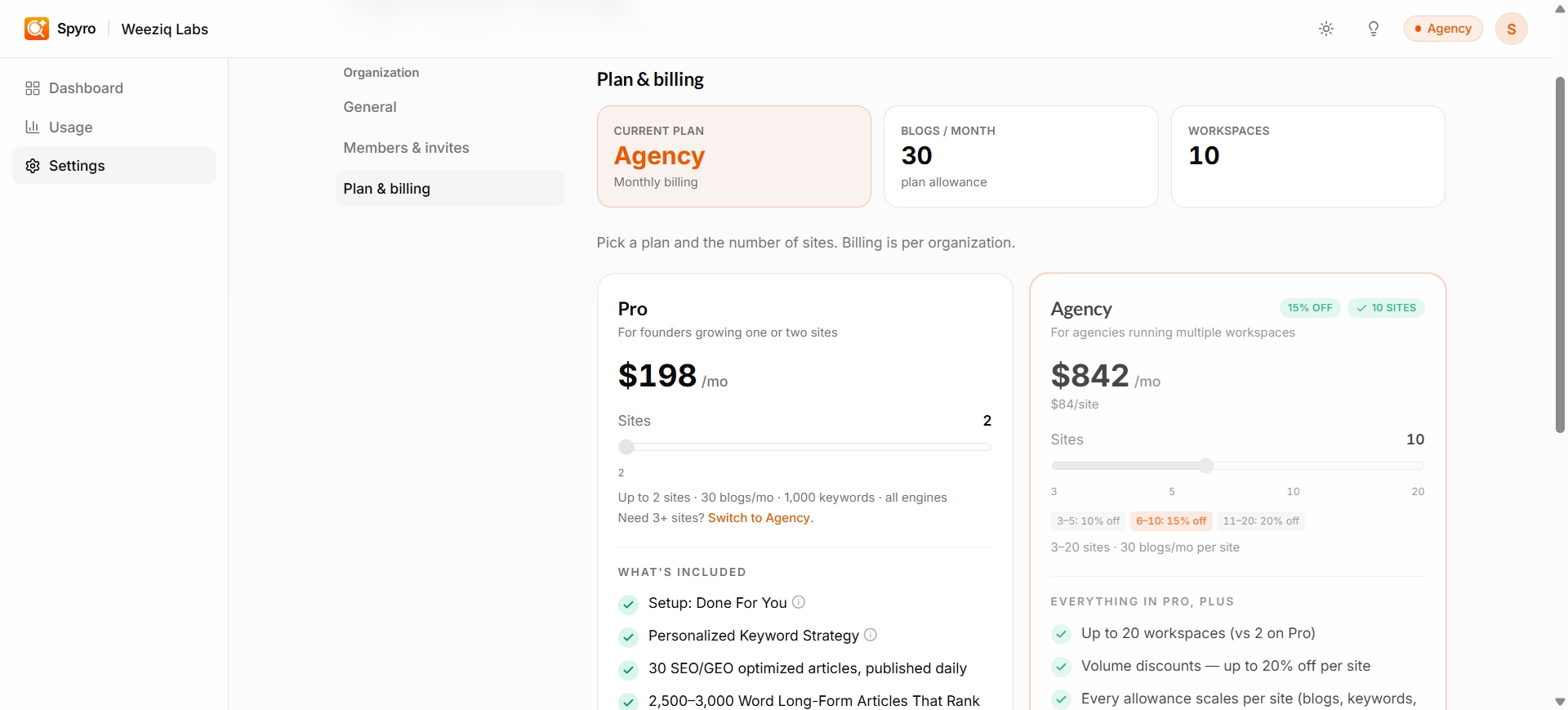 Spyro keeps pricing simple: try it free, then pick a plan based on how many websites you run. This page explains the plans, what's included, and how to manage it all.
## Start with a free trial
New accounts begin with a **3-day free trial** that lets you create **3 articles** total - enough to take the writer for a spin. When the trial ends, you'll choose a plan to keep going.
## The plans
For founders growing **1-2 websites**. A second site adds another \$99/month. A third site moves you to Agency.
For agencies running **3-20 websites**, with discounts that grow as you add more sites.
### Agency discounts
The price per website drops the more sites you run:
| Websites | You save | Roughly per site |
| -------- | -------------- | ------------------------------------ |
| 3-5 | 10% off | \~\$89/site/month |
| 6-10 | 15% off | \~\$84/site/month |
| 11-20 | 20% off | \~\$79/site/month |
| 21+ | Custom pricing | [Talk to us](mailto:hello@spyro.app) |
Running 21 or more websites? Reach out at `hello@spyro.app` for a custom plan.
Pay **yearly** and you get two months free - you pay for 10 months instead of 12.
## What you get
Every website on either plan comes with the same generous monthly allowances:
| What you get | How much |
| ------------------------------------ | -------------------------------------------------------------------------- |
| Articles written | **30 / month** |
| AI credits (chat + keyword research) | **200 / month** |
| Keywords you can track | up to **500** |
| AI assistants tracked | **All of them** - Google AI Overviews, ChatGPT, Gemini, Claude, Perplexity |
| Connected tools | **5** per website |
| Images per article | 3 |
| Competitor comparison | Included |
| Team members | **Unlimited** |
The one extra in **Agency** is white-labeling - putting your own brand on the reports.
## Where to see your usage
Open the **Usage** page from your account settings to see how much you've used this month. You'll find a progress bar for each thing you can use up - articles, AI credits, and more - so you always know where you stand. Everything resets at the start of each month.
During your trial, the articles bar shows your 3-article trial allowance instead of the monthly plan figure.
## Upgrade or change your plan
Go to your account settings and open **Plan & billing**.
Choose Pro or Agency, monthly or yearly, and - for Agency - how many websites. Spyro opens a secure checkout for you to pay.
Already subscribed? Adjust your plan, billing cycle, or number of websites and Spyro updates it on the spot. To go smaller, remove any extra websites first.
Use **Manage billing** to update your card, download invoices, and review your subscription.
Billing covers your whole account, not a single website. Only the account owner can change the plan or payment details.
## Related
Spyro keeps pricing simple: try it free, then pick a plan based on how many websites you run. This page explains the plans, what's included, and how to manage it all.
## Start with a free trial
New accounts begin with a **3-day free trial** that lets you create **3 articles** total - enough to take the writer for a spin. When the trial ends, you'll choose a plan to keep going.
## The plans
For founders growing **1-2 websites**. A second site adds another \$99/month. A third site moves you to Agency.
For agencies running **3-20 websites**, with discounts that grow as you add more sites.
### Agency discounts
The price per website drops the more sites you run:
| Websites | You save | Roughly per site |
| -------- | -------------- | ------------------------------------ |
| 3-5 | 10% off | \~\$89/site/month |
| 6-10 | 15% off | \~\$84/site/month |
| 11-20 | 20% off | \~\$79/site/month |
| 21+ | Custom pricing | [Talk to us](mailto:hello@spyro.app) |
Running 21 or more websites? Reach out at `hello@spyro.app` for a custom plan.
Pay **yearly** and you get two months free - you pay for 10 months instead of 12.
## What you get
Every website on either plan comes with the same generous monthly allowances:
| What you get | How much |
| ------------------------------------ | -------------------------------------------------------------------------- |
| Articles written | **30 / month** |
| AI credits (chat + keyword research) | **200 / month** |
| Keywords you can track | up to **500** |
| AI assistants tracked | **All of them** - Google AI Overviews, ChatGPT, Gemini, Claude, Perplexity |
| Connected tools | **5** per website |
| Images per article | 3 |
| Competitor comparison | Included |
| Team members | **Unlimited** |
The one extra in **Agency** is white-labeling - putting your own brand on the reports.
## Where to see your usage
Open the **Usage** page from your account settings to see how much you've used this month. You'll find a progress bar for each thing you can use up - articles, AI credits, and more - so you always know where you stand. Everything resets at the start of each month.
During your trial, the articles bar shows your 3-article trial allowance instead of the monthly plan figure.
## Upgrade or change your plan
Go to your account settings and open **Plan & billing**.
Choose Pro or Agency, monthly or yearly, and - for Agency - how many websites. Spyro opens a secure checkout for you to pay.
Already subscribed? Adjust your plan, billing cycle, or number of websites and Spyro updates it on the spot. To go smaller, remove any extra websites first.
Use **Manage billing** to update your card, download invoices, and review your subscription.
Billing covers your whole account, not a single website. Only the account owner can change the plan or payment details.
## Related