> ## Documentation Index
> Fetch the complete documentation index at: https://spyro.app/docs/llms.txt
> Use this file to discover all available pages before exploring further.
# AI visibility & competitors
> See how often ChatGPT, Gemini, Claude, Perplexity and Google AI Overviews recommend you - and exactly where you rank against your competitors.
 These days, people don't just search Google - they ask AI assistants like **ChatGPT, Gemini, Claude, Perplexity, and Google AI Overviews** for recommendations. **AI visibility** shows you whether those assistants mention *you* when buyers ask, and how you stack up against your competitors.
Here's how it works: Spyro asks the AI assistants the same kinds of questions your buyers ask, then tracks how often each assistant mentions your brand versus everyone else's. It's the easiest way to find out if AI is recommending you - or sending customers to a rival.
## Why use it
See whether AI assistants name you when buyers ask for recommendations.
Find out who AI mentions most often, and where you rank against them.
See your slice of all the AI mentions - and whether it's growing.
Notice when you start gaining (or losing) ground over time.
## How to use it
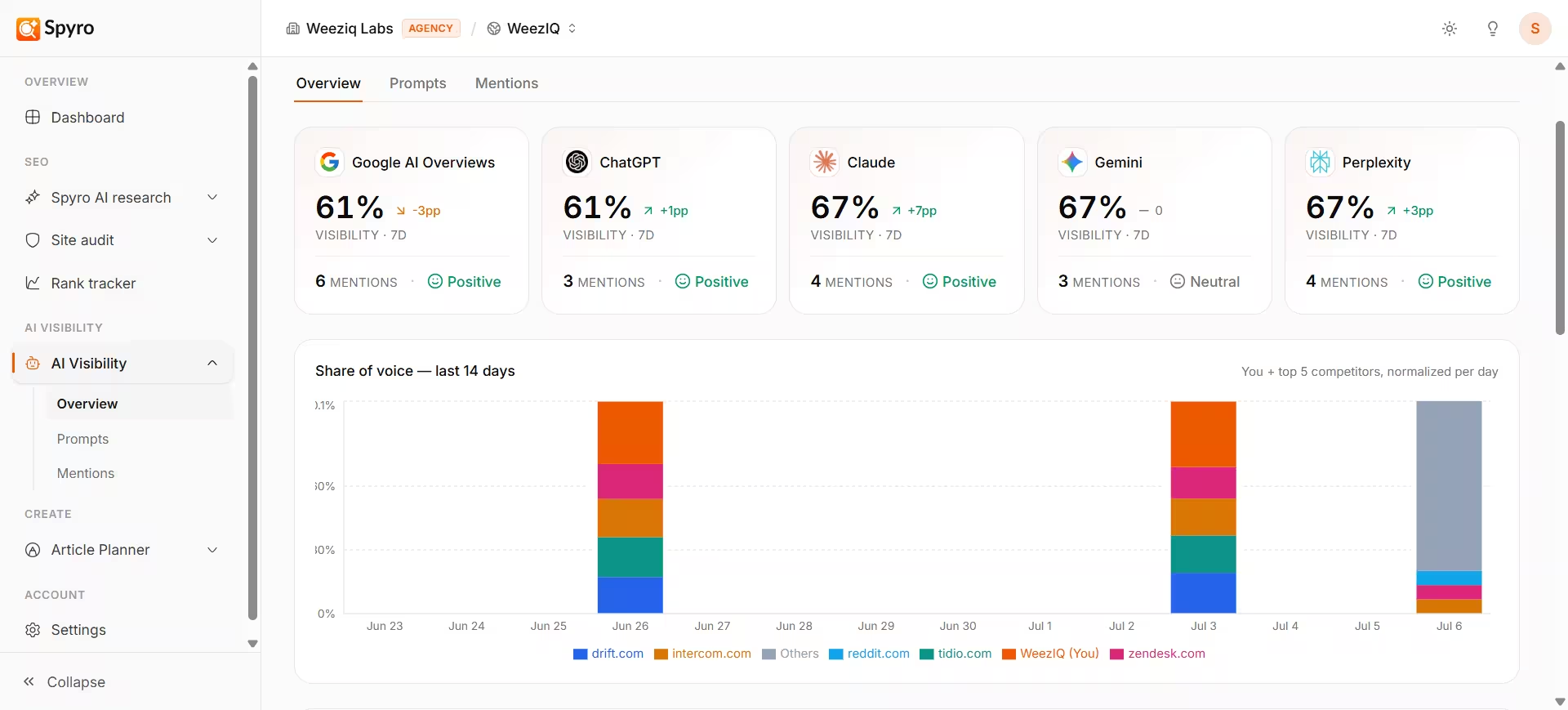
In the sidebar, open **AI visibility**. The main view shows how often each AI assistant mentions you, your share of voice, and your competitor ranking.
At the top you'll see a card for each assistant - **ChatGPT, Gemini, Claude, Perplexity, and Google AI Overviews**. Each card shows how visible you are there, how many times it mentioned you, and whether that's going up or down.
The chart below shows your share of all the AI mentions over time, next to your top rivals. A growing slice means you're winning more of the conversation.
The **Competitors** table lists every brand the AI assistants mention for your questions, ranked from most-mentioned to least - with a highlighted **You** row so you can see exactly where you sit.
## What "share of voice" means
Think of every mention the AI assistants make as one vote. **Share of voice** is simply your slice of all those votes. If the assistants mention five brands and yours is named in a third of the answers, you have about a third of the share of voice.
It's a *relative* number, so it can change in two ways:
* **You climb** when the assistants start naming you more often.
* **You slip** when a competitor surges ahead - even if your own mentions stayed the same.
Watching your share of voice tells you whether you're gaining or losing ground in the AI conversation overall.
## The competitor ranking
The **Competitors** view is where you go head-to-head with your rivals. It lists every brand the AI assistants mention for your questions and ranks them from most mentioned to least. Your own row is highlighted with a **You** badge, so you can spot your rank at a glance.
For each brand you can see:
* **Its rank** - who AI mentions most for your kind of questions.
* **How many of your questions it shows up in.**
* **How often it gets mentioned**, and whether that's rising or falling.
If a competitor is sitting above you, that's your cue to dig into *which* questions they win - and that's exactly what the companion views are for.
## What to expect
* Because AI answers vary each time, Spyro never gives a simple yes or no. Instead you'll see results like **"mentioned in 3 of 5 checks"** - a frequency that's fairer and more reliable than a single answer.
* Your first results appear right after you add your buyer questions, and Spyro re-checks every week so your numbers stay fresh.
* If you haven't added any questions yet, this view will be empty - start by adding a few [tracking prompts](/docs/product/prompts).
## Tips
* Pair this view with its two companions: [Tracking prompts](/docs/product/prompts) to manage the questions Spyro asks, and [AI mentions](/docs/product/ai-mentions) to read the actual answers word for word.
* When a rival outranks you, note which questions they win, then study those answers to see what they're doing differently.
## Related
These days, people don't just search Google - they ask AI assistants like **ChatGPT, Gemini, Claude, Perplexity, and Google AI Overviews** for recommendations. **AI visibility** shows you whether those assistants mention *you* when buyers ask, and how you stack up against your competitors.
Here's how it works: Spyro asks the AI assistants the same kinds of questions your buyers ask, then tracks how often each assistant mentions your brand versus everyone else's. It's the easiest way to find out if AI is recommending you - or sending customers to a rival.
## Why use it
See whether AI assistants name you when buyers ask for recommendations.
Find out who AI mentions most often, and where you rank against them.
See your slice of all the AI mentions - and whether it's growing.
Notice when you start gaining (or losing) ground over time.
## How to use it
In the sidebar, open **AI visibility**. The main view shows how often each AI assistant mentions you, your share of voice, and your competitor ranking.
At the top you'll see a card for each assistant - **ChatGPT, Gemini, Claude, Perplexity, and Google AI Overviews**. Each card shows how visible you are there, how many times it mentioned you, and whether that's going up or down.
The chart below shows your share of all the AI mentions over time, next to your top rivals. A growing slice means you're winning more of the conversation.
The **Competitors** table lists every brand the AI assistants mention for your questions, ranked from most-mentioned to least - with a highlighted **You** row so you can see exactly where you sit.
## What "share of voice" means
Think of every mention the AI assistants make as one vote. **Share of voice** is simply your slice of all those votes. If the assistants mention five brands and yours is named in a third of the answers, you have about a third of the share of voice.
It's a *relative* number, so it can change in two ways:
* **You climb** when the assistants start naming you more often.
* **You slip** when a competitor surges ahead - even if your own mentions stayed the same.
Watching your share of voice tells you whether you're gaining or losing ground in the AI conversation overall.
## The competitor ranking
The **Competitors** view is where you go head-to-head with your rivals. It lists every brand the AI assistants mention for your questions and ranks them from most mentioned to least. Your own row is highlighted with a **You** badge, so you can spot your rank at a glance.
For each brand you can see:
* **Its rank** - who AI mentions most for your kind of questions.
* **How many of your questions it shows up in.**
* **How often it gets mentioned**, and whether that's rising or falling.
If a competitor is sitting above you, that's your cue to dig into *which* questions they win - and that's exactly what the companion views are for.
## What to expect
* Because AI answers vary each time, Spyro never gives a simple yes or no. Instead you'll see results like **"mentioned in 3 of 5 checks"** - a frequency that's fairer and more reliable than a single answer.
* Your first results appear right after you add your buyer questions, and Spyro re-checks every week so your numbers stay fresh.
* If you haven't added any questions yet, this view will be empty - start by adding a few [tracking prompts](/docs/product/prompts).
## Tips
* Pair this view with its two companions: [Tracking prompts](/docs/product/prompts) to manage the questions Spyro asks, and [AI mentions](/docs/product/ai-mentions) to read the actual answers word for word.
* When a rival outranks you, note which questions they win, then study those answers to see what they're doing differently.
## Related